Still using a cash register? A POS system replaces outdated checkout methods with automated processes that cut costs, prevent errors, and give you visibility into your entire business.
Learn how faster checkouts, accurate inventory tracking, better reporting, and payment flexibility can transform how you operate. We’ll walk through what a POS system does, how to choose the right one for your business, and why retailers are making the switch.
Key Takeaways
- Speed and accuracy eliminate errors. A POS system processes transactions instantly, while barcode scanning and automatic pricing cut down on mistakes that cost you money.
- Inventory visibility prevents stockouts and overstocking. You stop losing sales from empty shelves and quit buying stock you can’t sell.
- Data drives smarter business decisions. You make ordering decisions based on actual numbers rather than guesses.
- Payment flexibility meets customer expectations. A POS system that integrates multiple payment processors lets you accept whatever your customers prefer.
- Multi-location management
What Is a POS System?
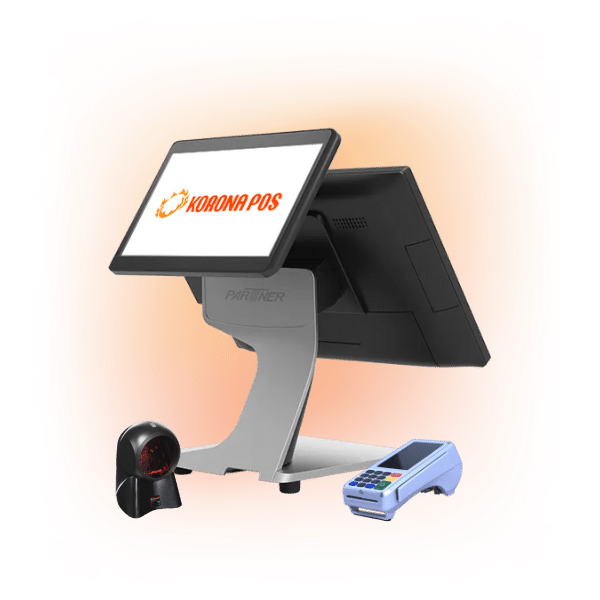
A POS system is software and hardware that processes customer payments and manages your store operations.
Modern POS systems do far more than just ring up sales. It tracks inventory, monitors staff transactions, and records customer purchase history. You’ll see what’s selling, what’s sitting on shelves, and where your money went.
For retail business owners, a POS system becomes the operational backbone. You get sales reports instantly, catch discrepancies faster, and make smarter ordering decisions. It centralizes the data you need to run efficiently.
HAPPY READING
Want to dig deeper? Learn how POS systems work, explore different POS types for your business, or compare POS versus traditional cash registers. If you’re considering mobile options, check out the difference between POS and mPOS.
Types of POS Systems (On-Premise, Cloud-Based)
There are two common POS setups, and the right choice depends on how you run your business.
- On-Premise Systems: These platforms typically run locally on a back-office computer or a private network. You own the software outright after a larger initial investment, which removes recurring monthly fees. Because the data lives on your own hardware, understanding what a desktop POS is helps you manage a system that works perfectly even if the internet goes down. However, legacy systems don’t have updates and quickly become outdated. Plus, remote access and customer support is often limited.
- Cloud-Based Systems: These systems sync through the internet, allowing you to manage your store from any device. Cloud POS systems handle updates automatically in the background, so you always have the latest features without downtime. While they require a subscription, they offer seamless multi-location management. If you are looking for the best cloud-based POS, focus on providers with strong offline modes to protect against outages.
When comparing cloud vs. server POS, consider long-term ownership costs and IT requirements. Larger retailers might even look into a white-label POS for a fully branded experience or develop their own proprietary software, particularly if they need a large suite of integrations.
Benefits of a POS System
If you’re considering switching from your old cash register, here’s why a POS system pays for itself.
Faster Checkout Times
Your checkout speed directly affects customer satisfaction and loyalty. A POS system eliminates manual entry and barcode scanning errors, lines move more quickly, and customers wait less. Handle more transactions per hour and improve the flow of your checkout counter.
Accurate Inventory Tracking
Cash registers give you no visibility into stock levels. A POS system automatically updates inventory when items sell, so you know exactly what you have. No more guessing if you’re out of stock or over-ordering. Track this by comparing your counted inventory to system records – the gap shrinks dramatically. Fewer manual counts mean less time on inventory work.
Inventory management a headache?
KORONA POS makes stock control easy. Automate tasks, generate custom reports, and learn how you can start improving your business.
Reduced Errors and Shrinkage
Manual entry creates mistakes. Wrong prices ring up, items go unscanned, and discrepancies pile up. A POS catches human error through barcode scanning and automatic pricing. Merchants can measure success by comparing month-to-month cash drawer overages and shortages. Most retailers see shrinkage drop by 2-5% after switching.
Better Sales Reporting
Your cash register shows totals. A POS system shows you what sold, when it sold, and which staff member rang it up. You spot trends, identify top performers, and make smarter ordering decisions. Review reports by product category, time of day, or employee. You’ll know which items are your best sellers within hours of closing.
Multi-Location Management
Managing multiple stores with cash registers means physical visits to each location. A POS system syncs all locations into a single dashboard. Check sales, inventory, and performance across stores from anywhere. You measure progress through faster reporting cycles and reduced time spent gathering data from each location.
Payment Flexibility
Customers expect more than cash and card payments today. A POS system accepts multiple payment methods simultaneously, letting you process contactless payments, take Apple Pay, and enable PayPal, Venmo, and Cash App without additional equipment. Track acceptance rates by payment type and see which methods drive your sales.
Customer Insights
Cash registers don’t tell you who bought what. A POS system captures customer purchase history and contact information. You build a database to identify repeat customers, track preferences, and run targeted promotions.
PRO TIP
Measure engagement through repeat purchase rates and customer frequency. You’ll know exactly who your best customers are.
Staff Accountability
Without a POS, you can’t track which employee handled each transaction. A POS logs every sale by staff member, showing who rang it up and when. Identify top performers, spot training gaps, and prevent theft through accountability. Review reports showing sales and transactions per employee to measure performance.
Faster Setup and Checkout Process
Easily make changes to your system’s flow, button layout, pricing, and promotions from any internet-connected device. It’s easier than ever to make changes on the go.
Hardware and Software Bundled
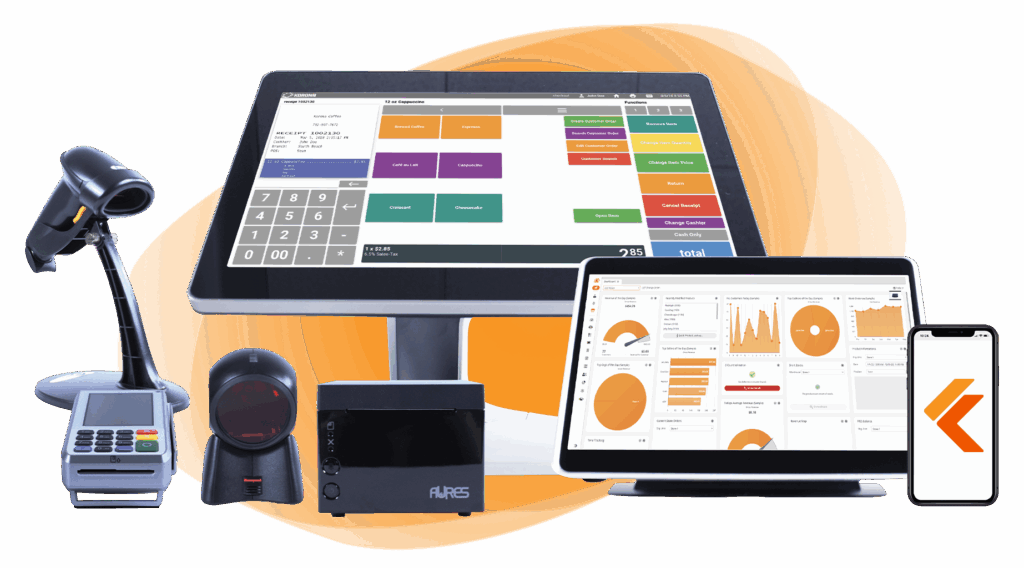
Old cash registers require separate payment processors, printers, and systems. A POS bundles everything (hardware, software, payments, and support) in one complete retail POS kit. Setup is simpler, troubleshooting is easier, and you have one vendor to contact.
Build Your Own POS
Whether you run a retail store, café, or admissions booth, we have the point of sale hardware designed for your specific needs. Start building your ideal POS system now.
Self-Checkout Options
Some customers prefer handling checkout themselves. A POS system can power self-checkout stations, reducing your labor costs and improving speed. Customers scan items, pay, and leave without needing a cashier’s help. Measure success through labor hours saved and customer satisfaction with faster checkout.
Scalability as You Grow
Your cash register can’t expand with your business. A POS system grows with you, adding terminals, locations, or features without replacing everything. You scale smoothly instead of overhauling your entire system. Track growth through new terminals added and locations managed on a single platform.
PRO TIP
Explore complete POS payment options to see all available payment methods.
How Does a POS System Work?
A POS system automates the entire transaction process from calculating totals to tracking inventory. Here’s exactly what happens behind the scenes when you ring up a sale.
The Sale is Created
When an employee scans a barcode, the POS pulls the item details and price from the system database. Multiple items can be added quickly, and the system calculates subtotals as you go. Discounts apply instantly if configured. The employee never has to manually type prices or hunt for information. Everything is stored and accessible. For a cash register, this step requires manual entry and calculation, creating room for errors.
Totals Are Calculated
Once all items are scanned, the POS automatically calculates the final total, including taxes based on your location. It handles multi-currency transactions, applies loyalty discounts, and shows the exact amount due.
No math errors, no recalculating. A traditional cash register either shows no breakdown or requires staff to calculate by hand. A POS displays itemized receipts so customers see what they paid for.
Payment Processing
Once the total is set, the system sends the amount to the terminal. Many owners choose integrated payments to save time. Integrated setups send data directly between the POS and the card reader. Understanding how credit card processing works is helpful for negotiating and saving money on your payment services.

Learn more about how credit card processing works and save your business money with this free eGuide.
A Receipt is Generated
After payment clears, the POS automatically prints a receipt. You choose what appears: itemized lists, store info, promotions via QR code, loyalty offers, to name a few option. Customers get proof of purchase. Some systems email receipts or send them via SMS. A cash register simply shows the amount exchanged. A POS receipt serves marketing purposes and creates a paper trail for disputes.
Everything is Recorded for Later
After the sale closes, the real work of a POS begins. Every transaction is logged—what was sold, who sold it, when, and how it was paid. Your POS data feeds your reports instantly, keeping inventory levels up to date automatically when items are scanned. Staff performance is tracked by transaction count and total sales. Sales by time of day, product category, and payment method are all recorded. A cash register shows you a total. A POS shows you the story behind it.
Employee Activity is Tracked
Each employee has a login, and the POS records every transaction they handle. Managers can see who rang up what, when, and for how much. You spot top performers and identify training gaps quickly. Accountability prevents theft and dishonesty. Without a POS, you have no way to connect specific sales to specific staff members.
Inventory Moves Instantly
When an item is scanned, the POS deducts it from your inventory count. You always know what’s in stock without physical counts. Low-stock alerts trigger reorders automatically. Inventory reports show what’s selling and what’s gathering dust. A cash register has zero inventory visibility. You’d have to count manually or use a separate system to track stock.
Data Flows to Reports
At the end of each day, week, or month, your POS compiles reports. You see total revenue, top-selling items, sales by employee, payment methods used, and discrepancies. Compare today’s numbers to last month’s in seconds. Cash registers can’t generate these insights; you’d need a separate system to track everything manually.
Discover Advanced Analytics and Custom Reports
Speak with a product specialist and learn how KORONA POS can work for your business.
How to Choose a POS That Delivers These Benefits?
Not all POS systems are equal. Your choice should match your business type and priorities.
Match Your Business Type First
A liquor store needs age verification and strict compliance tracking. A clothing boutique needs size and color variants. A coffee shop needs quick ordering and upsells.
A grocery store needs bulk scanning and loyalty integration. Your POS must handle your specific operations, or you’ll constantly fight it. Start by identifying what your business actually does, then find systems built for that industry. For example, a POS system for smoke shop retailers should support compliance checks, detailed product categories, and strong inventory controls.
Look for Staff Permission Controls
Staff mistakes happen. Cashiers discount items without approval. Employees void transactions to hide shortages. Permission controls prevent unauthorized actions by limiting who can perform what actions.
You want role-based access, managers approve discounts, certain staff can only process refunds, and new employees have restricted abilities. Review core POS system features to see how permissions are handled and compare systems based on control options.
Require Offline Mode Capability
At some point, your Internet will go down. If your POS depends entirely on a cloud connection, you lose sales during outages. Offline mode lets transactions continue and syncs back when the connection returns.
You avoid downtime losses and customer frustration. Check whether offline mode is available and how long the system can operate without a connection.
Confirm Real Inventory Updates
Many basic POS systems don’t update inventory instantly. You scan items, but the count doesn’t adjust until the end of the day. You oversell products and disappoint customers.
A proper system deducts inventory immediately, so you always know what’s available. Test this during demos, scan an item, and check if the stock level changes right away.
Evaluate Reporting Capabilities
You need reports that show what matters to your business. Top-selling items, sales by time of day, employee performance, payment methods, and discrepancies.
Some systems offer basic totals only. Others give detailed breakdowns. Weak reporting means you’re blind to what’s happening. Ask vendors to show you the actual reports you’d receive daily and monthly.
Check Multi-Location Features
If you plan to expand or already manage multiple stores, ensure the POS syncs data across locations. You should see combined reports, manage inventory across stores, and access everything from one dashboard. A single-location system won’t scale. Make this decision now if growth is in your plans.
Verify Payment Processing Options
Customers want flexibility – a wide acceptance of different cards, digital wallets, contactless, PayPal/Venmo, cash, cryptocurrency, and even personal or traveler’s checks!
PRO TIP
Your POS should accept the methods your customers prefer. Check which payment types are supported and whether they require separate equipment or integrate seamlessly.
Assess Training and Support
A powerful POS is useless if your staff can’t use it. Good vendors provide onboarding training, ongoing support, and clear documentation. Poor support means your team struggles and you waste time troubleshooting. Ask about training options (in-person, online, videos) and response times for support issues. Understand point of sale training requirements before committing.
Have trouble getting your POS customer service on the phone?
KORONA POS offers 24/7 phone, chat, and email support. Call us at 833.200.0213 to see how reliable we are.
Understand Setup and Implementation
Setup shouldn’t take months. Learn how to set up a POS system and ask vendors for realistic timelines. You want to be operational within days or weeks, not months. Complex integrations with old systems can slow things down. Ask what the actual implementation looks like and how much support you’ll get through the process.
Review Long-Term Costs
Don’t compare only the upfront price. Calculate monthly fees, payment processing rates, support costs, hardware replacement, and software updates over three years. A cheap POS system with high monthly fees costs more than an expensive system with low fees. Get a full cost breakdown before deciding. It’s also important to look out for hidden fees, add-ons, and inflated processing costs.
Find out how much you’re spending.
Use a Buyer’s Guide
Don’t evaluate systems alone. Use a POS buyer’s guide to compare features, costs, and vendor reputations side by side. A good guide walks through key questions and helps you avoid common mistakes.
Prioritize What Matters Most to Your Business
Every business needs different things. A high-volume quick-service operation prioritizes speed and offline capability. A boutique prioritizes detailed inventory with variants.
A multi-location chain prioritizes centralized reporting. Look at your pain points with your current cash register: what frustrates you most? Find a POS that solves those specific problems first, then evaluate secondary features.
PRO TIP
Don’t buy based on buzzwords or what competitors use. Buy based on what your business actually needs to operate better and grow.
Turn POS Benefits Into Daily Results with KORONA POS
KORONA POS serves liquor stores, smoke shops, convenience stores, cannabis retailers, QSRs like bakeries and coffee shops, specialty retailers, and admissions operations. Each vertical needs different things: age verification, compliance tracking, and quick ordering. KORONA POS handles all of these with industry-specific configurations and integrations.
Multi-location operations and franchises benefit from centralized management. Run dozens of locations from one dashboard, sync inventory, and compare performance without new systems.
KORONA integrates with multiple payment providers, so you can choose the processor that best suits your needs. You’re not locked in or forced to accept unfavorable rates. Ready to see KORONA in action? Schedule a demo or call 833-200-0213.