


Every day you run your smoke shop on the wrong POS system, you risk compliance violations, inventory errors, and lost revenue. Choosing the best POS smoke shop system is one of the most important decisions you’ll make as a tobacco retailer. Below, we cover the top options built specifically for smoke, vape, and tobacco shops so you can make a confident, informed choice fast.
Key Takeaways:
- Smoke shops have unique needs — age verification, carton/pack inventory tracking, and compliance reporting are must-have features in any POS system you choose.
- KORONA POS is the top overall pick because it works with any payment processor, supports multi-location management, and includes built-in ID scanning for age compliance.
- Budget-friendly options like Square lack tobacco-specific tools. Cigars POS or RetailzPOS are better suited for stores that need scan data reporting and manufacturer loyalty program integration.
Top 7 POS Systems for Smoke Shops: At a Glance
Note: The pricing shown reflects the lowest publicly listed starting point for each provider. Some systems use quote-based pricing, and actual costs may vary depending on hardware bundles, add-ons, and contract terms.
| Name | Best For | Stand Out Feature | Price Starting Point |
|---|---|---|---|
| KORONA POS | Overall best smoke shop POS software |
|
$59/moPer terminal |
| POS Nation | Bundling custom vape kits for customers |
|
$69/moTobacco Starter plan |
| Cigars POS | Creating and printing barcodes and labels |
|
$69/moStarter plan |
| RetailzPOS | Integrating with tobacco manufacturer loyalty programs |
|
$40/moSoftware + $999 hardware bundle |
| Lightspeed | Multi-location and omnichannel smoke shops |
|
$109/mo$89/mo billed yearly |
| Quickvee | Online ordering integration |
|
Quote-basedContact for pricing |
| Square POS | Budget-friendly starter option |
|
$0/moFree plan available |
1. KORONA POS: Best Overall Smoke Shop POS Software
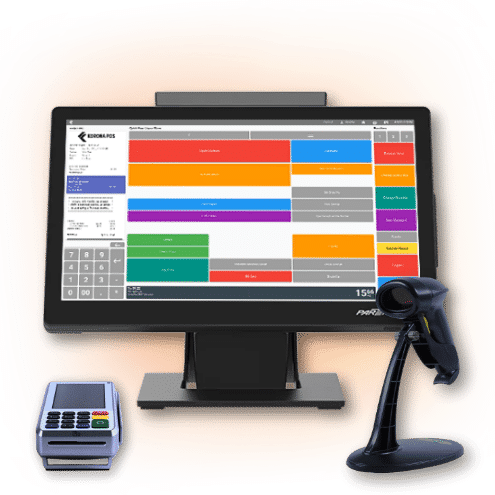
KORONA POS overview
The system has built-in age verification via ID scanning for purchasing compliance. KORONA POS allows users to easily configure customized mix-and-match pricing, thresholds, bundles, and holiday promotions. It integrates with any payment processor, allowing shops to reduce credit card fees.

Pros
- Excellent customer support
- ID customer verification
- Multi-store capacities
Cons
- Learning curve
Korona POS Pricing
KORONA POS Core
$59/mo
- Work with any processor
- Unlimited users and sales
- Customizable dashboard
KORONA POS Retail
$79/mo
- All Core features
- Inventory counts
- Stock management
KORONA POS Plus
$99
- ABC analysis
- Performance reports
- Accounting export
KORONA POS is the flagship product of COMBASE USA. COMBASE USA, founded in 2011, is the North American branch of Combase AG, a German company. They specialize in adaptable, effective POS solutions for a range of retail and business needs.
They cater to retail stores, restaurants, and even niche businesses like wineries and museums. When it comes to selecting the ideal POS software for smoke shops, the industry’s top recommendation is KORONA POS.
Key Features
- Inventory management: Track cigarettes, cigars, vape products, and accessories using barcodes. Assign unique container quantities and special prices to each product code without duplicating entries.
- Carton/pack inventory counting: Staff can enter carton or pack quantities during shipments, rather than counting individual items. The system saves significant time when processing wholesale orders.
- Mix-match pricing and promotions: Configure custom bundle deals, threshold discounts, holiday specials, and quantity incentives directly in the POS. All promotions run automatically at checkout.
- ID scanning for age verification and security: The built-in scanner verifies customer age before every restricted sale. The feature integrates with various scanner hardware and helps cashiers process ID checks quickly.
- Processing-agnostic solution: KORONA POS works with any payment processor. Smoke shop owners can shop for the best credit card rates without being locked into a single provider.
- Cashier permission levels: Set different access levels for each employee. Loss prevention features include time tracking, sales auditing, and detailed reports on voids and check-ins.
- Multi-location and franchise management: Manage menus, employees, and inventory across multiple stores from one centralized dashboard.
Speak with a product specialist and learn how KORONA POS can power your business.
Pros
- Excellent customer support: KORONA POS is consistently recognized for its great customer support. Help is available by phone, email, and remote access.
- Inventory management for tobacco products: KORONA POS goes beyond basic inventory. It can handle the complexities of tracking tobacco products, including features like carton/pack tracking, low-stock alerts, and promotion management.
- Flexible pricing and promotions: Smoke shops often utilize mix-and-match pricing and bundle deals. KORONA POS allows easy configuration of these, along with customized thresholds and holiday promotions. This empowers you to optimize sales strategies and attract customers.
Cons
- Learning curve: Advanced features take time to master. Staff may need extra training during the first few weeks.
- Mobile POS limitations: The mobile version is not as robust as the desktop POS. Stores that rely heavily on mobile checkout may notice reduced functionality.
Pricing
Here’s a full breakdown of KORONA POS pricing:
No contracts · No hidden fees · 24/7 support included · Works with any payment processor
| Plan | Monthly Price | Billing Unit | Best For |
|---|---|---|---|
| KORONA POS CoreCore | $59/mo | Per terminal | Standard checkout & daily operationsDashboard · KPI reports · eCommerce · Gift cards · API |
| KORONA POS RetailCore | $79/mo | Per terminal | Inventory-driven retail storesStock management · Barcode automation · Order automation |
| KORONA POS PlusCore | $99/mo | Per terminal | Multi-store analytics & advanced reportingABC analysis · Performance reports · Accounting export |
| KORONA FoodAdd-on | +$10/mo | Per terminal | Cafes, bakeries & quick-service restaurantsTable management · Modifiers · Check-splitting |
| KORONA InvoicingAdd-on | +$10/mo | Per terminal | Businesses that invoice customers & suppliersQuotes · Rentals · Delivery notes |
| KORONA TicketingAdd-on | +$50/mo | Per gate | Amusement parks, museums & water parksTicket printing · Entry gates · Online ticketing |
| KORONA FranchiseAdd-on | +$30/mo | Per franchise | Franchise & multi-location businessesRoyalty systems · Product syncing · Centralized inventory |
| KORONA IntegrationAdd-on | +$45/mo | Per token | Custom niche integrations via open APIIntegration jobs · Workflows · Dashboard |
Customer Reviews
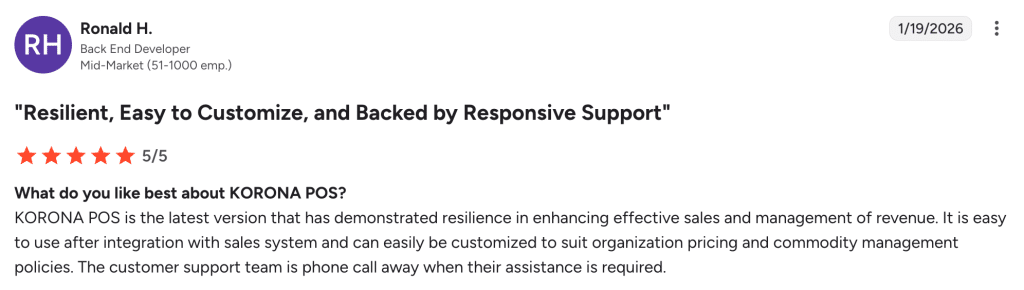
Many users praise KORONA POS for its attentive customer support and ease of daily use, as this Capterra review reflects.
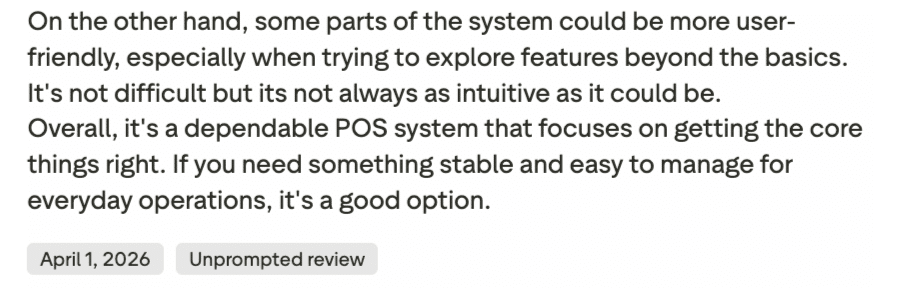
However, some users note that advanced features come with a learning curve, particularly around label printing and initial setup.
Who KORONA POS is best for
- Multi-location smoke shop owners: The centralized dashboard and franchise tools simplify store management.
- Shops that want payment flexibility: Owners who want to pick or switch processors freely will benefit from KORONA’s agnostic approach.
- High-volume tobacco retailers: Carton/pack counting and automated promotions save time for stores with large product catalogs.
- Scan Data Reporting: Automates manufacturer scan data reporting to tobacco companies (e.g., RJ Reynolds, Altria), ensuring retailers receive incentive rebates without manual work.
- Compliance-focused businesses: Built-in ID scanning and age verification reduce regulatory risk.
2. POS Nation: Best For Bundling Custom Vape Kits For Customers
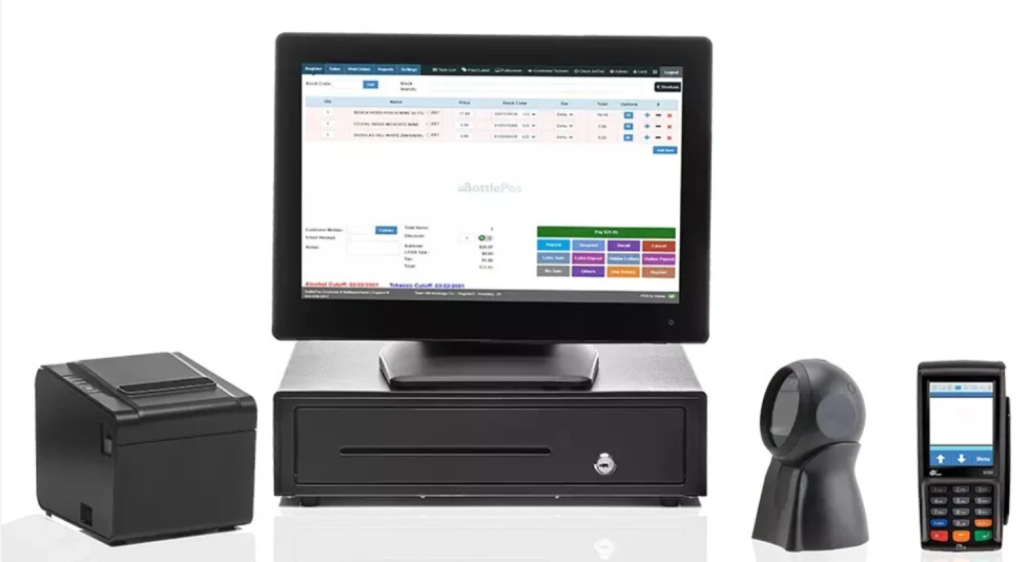
POS nation overview
POS Nation is recognized as a top supplier of POS software tailored for cigar stores. While the solution lacks some flexibility with payments and higher up-front costs, it comes with various appealing features, establishing it as a strong option for smoke shop owners.

Pros
- Good customer support
- Age verification
- Great reporting features
Cons
- Not RACS-compliant
- Not too many software integrations
POS Nation Pricing
Starter Plan
From 39$ to 69$ /mo
- Liquor
- Convenience Store
- Tobacco
Growth
Request a free quote
- Year hardware warranty
- Requires POS nation processing agreement – includes free pin pad
- No long-term contracts
Premium tier
Request a free quote
- Multiple payment options in the custom-built POS
- New customers get a one-time discount code
- Requires processing agreement
POSNation’s core strength lies in serving convenience stores, liquor stores, tobacco shops, and hardware stores, but its solutions also extend to lawn and garden centers, grocery stores, and even clothing stores.
Key Features
- Carton-pack inventory tracking: Link cases, packs, and single items. The POS automatically adjusts all related quantities when a single item sells.
- Shrinkage reduction tools: Granular employee permissions, blind drawer counts, and inventory loss tracking help minimize theft and errors.
- 50+ built-in reports: Daily sales summaries, departmental breakdowns, top-selling item lists, and employee performance reviews.
- Auto Ranking: An AI tool that grades each product A through D based on sales performance. Best-sellers get an A, slow movers get a D.
Pros
- Scalability and customization: Plans and hardware bundles can be tailored to fit single-store operators or growing chains.
- Strong reporting tools: Over 55 prebuilt reports with Excel export options for deeper analysis.
Cons
- Customer support concerns: Some users on Software Advice report slow response times and difficulty resolving specialized issues.
- Hardware-first approach: POS Nation often bundles software with hardware purchases. Shops with existing equipment may pay for hardware they do not need.
Pricing
POS Nation’s Starter plan pricing varies by retail vertical, with tobacco shops sitting at the higher end of the range at $69/month.
| Industry | Starter Plan |
|---|---|
| Liquor | $59/mo |
| Convenience Store | $39/mo |
| Grocery | $49/mo |
| Tobacco | $69/mo |
| Cell Phone Repair | $79/mo |
| Retail | $49/mo |
Note: The Growth and Premium tier prices are not publicly displayed — you must request a free quote to get those figures.
Customer Reviews
On the positive side, several users commend POS Nation for its smooth onboarding experience and helpful initial setup process.
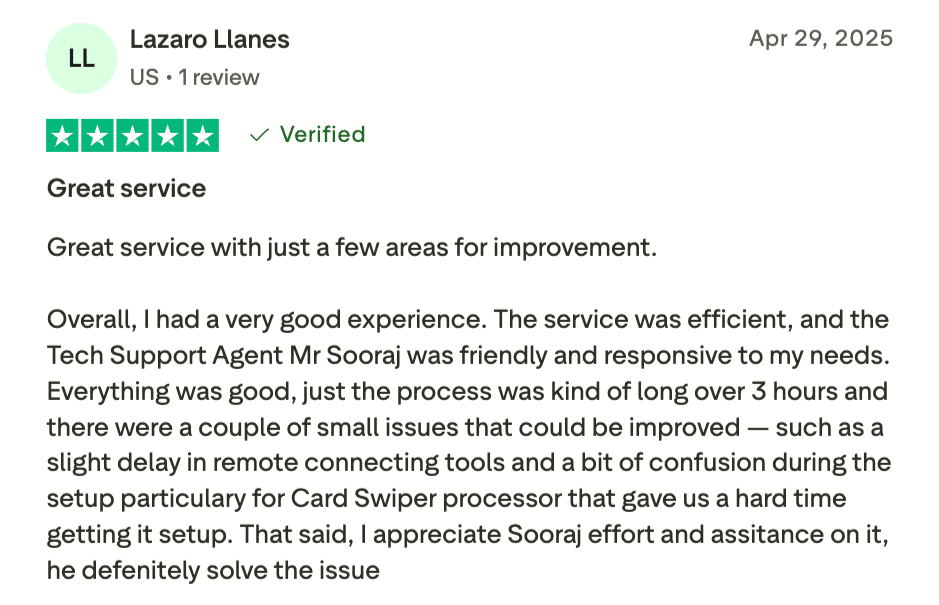
On the other hand, some customers report frustration with reaching knowledgeable support agents when issues arise after setup.
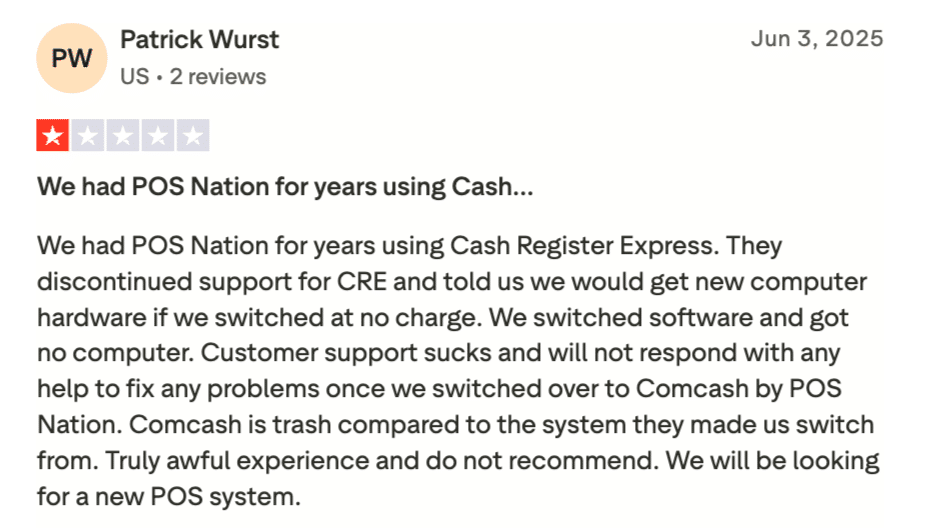
Source: Trustpilot
Who POS Nation is best for
- Custom Cigar Labeling: Allows for printing labels for individual cigars, which is essential for inventory tracking in humidors.
- Customer Loyalty Programs: Supports loyalty systems that record customer purchase history, allowing owners to reward repeat customers and personalize service.
- Shops that sell custom vape kits: The bundling and carton-pack features make it easy to sell multi-component products.
3. Cigars POS: Best For Creating And Printing Barcodes And Labels
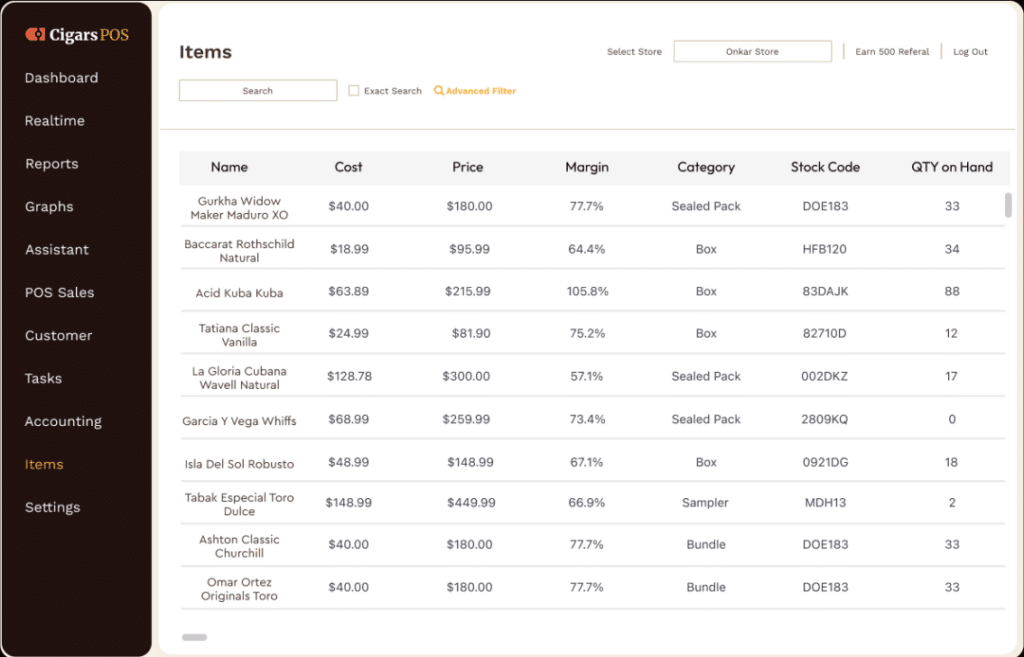
Cigars POS overview
Cigars POS focuses on providing POS solutions specifically tailored for tobacco shops, including cigar, smoke, and pipe shops. Cigars POS facilitates barcode creation and printing, and improves inventory management with unique barcodes for each product.

Pros
- Smoke-shop specifics features
- Scan data reporting
- Great analytics features
Cons
- Can be more expensive for smaller shops
- Learning curve
- Limited integrations
Cigars POS Pricing
Starter
$69/mo
- 24/7 support & unlimited training
- Requires Cigars POS Processing Agreement
- Lifetime hardware warranty
Growth
Quote-based
- 2-year hardware warranty
- Supports multiple locations
- No long-term contracts
Premium
Quote-based
- Full premium feature set for complex stores
- No hidden fees
- 2-year hardware warranty
Cigars POS is a US-based company specializing in POS systems for tobacco shops, particularly cigar stores. Their features are clearly tailored to the cigar industry.
Since their focus is specific, Cigars POS might not be the best choice for businesses outside the tobacco retail sector. Similar to POS Nation, Cigars POS does not offer payment processing flexibility.
Key Features
- Barcode and label creation: Generate unique barcodes for each product and print custom labels directly from the POS.
- Inventory management: Track individual cigars, packs, and cartons. The case-breaking feature lets you split bulk products into single items and automatically update inventory counts.
- Performance analytics: Includes reports from major tobacco manufacturers like R.J. Reynolds and Philip Morris. Track sales trends and product performance on any device.
- Scan data reporting: Participate in tobacco Scan Data programs to earn rebates and manufacturer rewards based on verified sales volume.
- Customer loyalty: Set up a points-based rewards program. Customers earn points per dollar spent and redeem them for discounts on future visits.
Pros
- Tobacco-first design: Every feature is built for cigar stores and smoke shops, from individual cigar tracking to case-breaking tools.
- Compliance support: Age-verification and tax-calculation tools reduce the risk of regulatory violations.
- User-friendly interface: The system is designed with smoke shop workflows in mind, so staff training time is minimal.
- Industry-specific reporting: Track sales by brand, analyze cigar humidor performance, and identify popular blends.
Cons
- No free trial: Owners cannot test the software before committing to a purchase.
- Limited third-party integrations: Fewer connections with external accounting or marketing platforms compared to more general POS systems.
- Scalability limits: Multi-store reporting is less robust than systems designed for franchise operations.
Pricing
Cigars POS uses a custom quote-based model. Only the Starter plan has a publicly listed price ($69/mo). Growth and Premium pricing require a free quote request. All plans require a Cigars POS Processing Agreement. Hardware add-ons (pinpads, scanners, cameras, etc.) are priced separately and configured at checkout.
| Plan | Subscription | Hardware Included |
Key Terms & Features |
|---|---|---|---|
| Starter Small smoke shops | $69/mo Pay monthly Listed publicly | POS software Touch PC Receipt printer Barcode scanner Cash drawer Chip card reader |
|
| Growth Expanding / multi-location stores | Quote-based Pay monthly Free quote required | Widescreen Touch PC Thermal receipt printer Barcode laser scanner Mini keyboard 16 in. cash drawer Free pinpad (via agreement) |
|
| Premium Large / complex operations | Quote-based Pay monthly Free quote required | Widescreen Touch PC Thermal receipt printer Barcode laser scanner Mini keyboard 16 in. cash drawer Free pinpad (via agreement) |
|
| Add-Ons All plans — optional extras | Varies Per item / per month | PAX A920 wireless pinpad (cellular: +$20/mo) Age verification scanners Label printers (Dymo / Zebra) Surveillance cameras Customer displays (7″–9.7″) |
|
Customer reviews
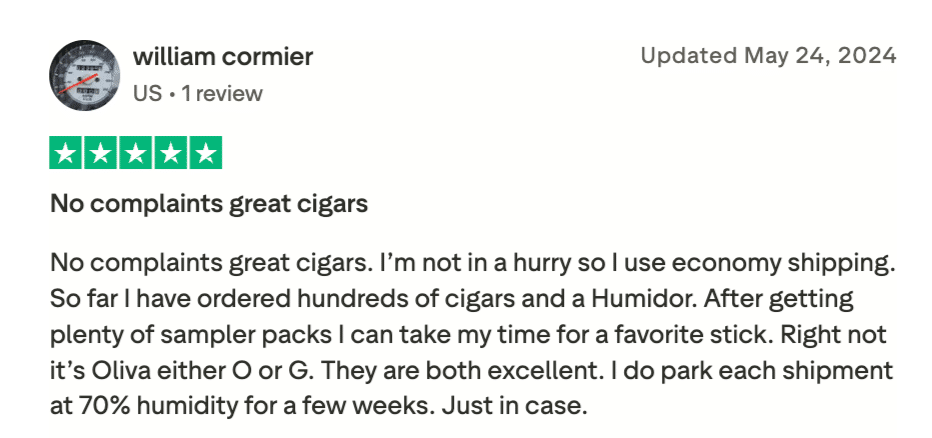
Cigars POS has mixed customer reviews from Trustpilot. William Cormier praised the product quality on Trustpilot, highlighting great cigars and a smooth ordering experience.
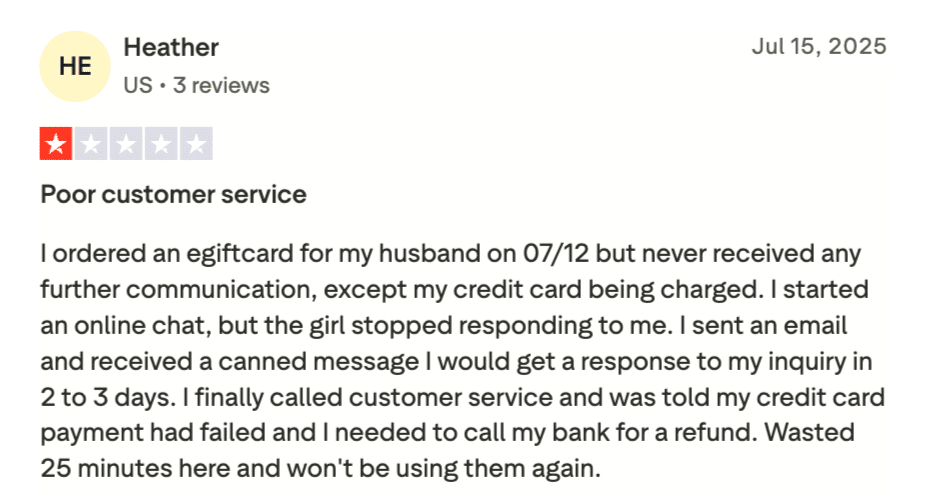
However, Heather flagged poor customer service, citing unresolved communication and a failed payment issue. Overall, product satisfaction is high, but customer support remains an area needing improvement.
Who Cigars POS is best for
Cigars POS is best for the following types of retailers:
- Independent tobacco and cigar shop owners benefit from a platform designed by industry experts to address unique retail challenges, such as case-break tracking.
- Cigar lounge and bar operators can use the system to manage complex inventory, automatically verify customer ages, and run specialized loyalty programs.
- Multilocation tobacco retailers find value in the cloud-based dashboard that allows for centralized management of inventory and sales data across several storefronts.
4. RetailzPOS: Best For Integrating With Tobacco Manufacturer Loyalty Programs
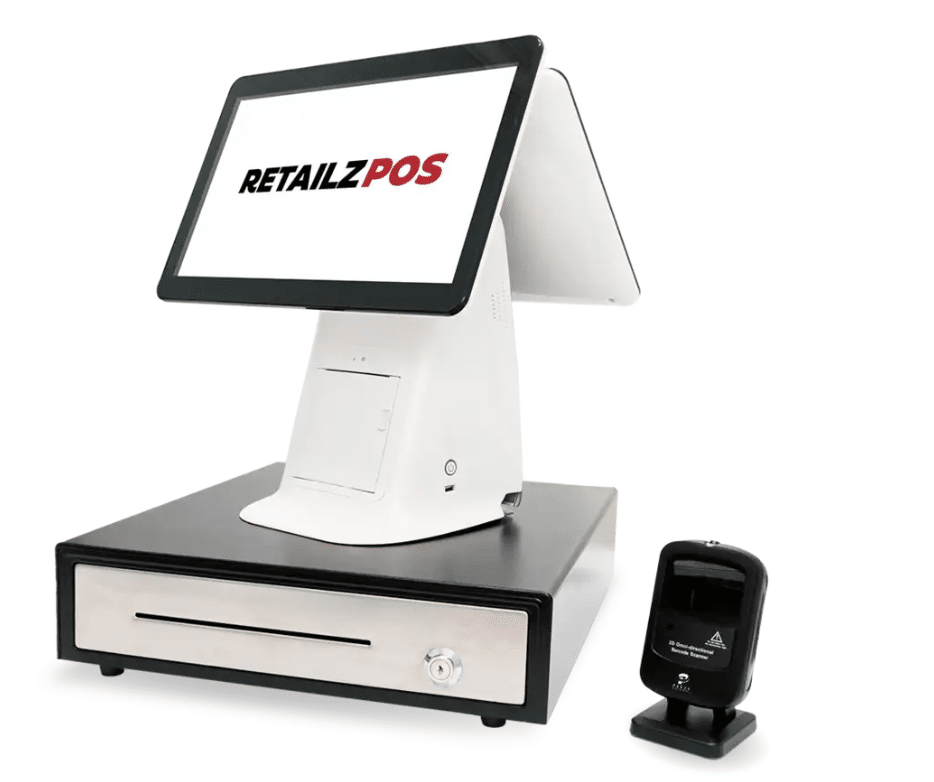
overview
RetailzPOS is another great choice for the best smoke shop POS system. It supports dual pricing to account for credit card processing fees, allowing shops to maintain profit margins.
The system also integrates with tobacco manufacturer loyalty programs through robust scanning capabilities to earn rewards.

Pros
- Auto UPC generation
- Master database
- Employee management features
Cons
- Poor customer support
- Pricing isn’t clear
- No free trial
RetailzPOS Pricing
Basic Package
custom/quote-based
- Sales & Inventory Reports
- Print Labels
- Sales & Promotions
Loyalty Package
custom/quote-based
- Automated Email Reports
- Remote Management
- Loyalty Campaigns
Based in Griffin, Georgia, RetailzPOS seems like a good option if you run a tobacco, liquor, or convenience store and are looking for a user-friendly POS system with dedicated support.
They also have a mobile app available for iOS and Android devices. The software helps you assign unique product codes for all your tobacco products.
Key Features
- Dual pricing: Set separate cash and credit card prices for each product. The POS automatically applies the correct price at checkout based on the payment method.
- Scan data capacity: Track and submit sales data to manufacturers like Altria and R.J. Reynolds to earn cash-back rewards based on sales volume.
- eCommerce integration: Customers can browse products online and complete purchases for in-store pickup or delivery. Inventory and orders sync between the website and POS.
- Master database: Manage all product descriptions, pricing, and tax rates in one centralized system. Changes update across checkout and reporting instantly.
Pros
- Cash-back feature: Customers can withdraw cash during transactions, which attracts foot traffic and encourages larger purchases.
- Security integration: NVR (Network Video Recorder) compatibility overlays transaction data on security footage for loss prevention and dispute resolution.
- Simple pricing: $999 hardware bundle plus $40/month for software. No cancellation charges or contracts.
Cons
- Limited independent reviews: Fewer verified reviews on third-party platforms compared to larger POS providers.
- Pricing transparency: Some features may carry additional costs that are not clearly listed on the website. Always request a detailed quote before purchasing.
- No free trial: There is no trial period available to test the software before buying.
Pricing
RetailzPOS splits its features across two custom-quoted packages: Basic and Loyalty, with the Loyalty tier adding marketing, remote management, and rewards tools on top of the core POS.
| Feature | Basic Package | Loyalty Package |
|---|---|---|
| Core POS Features | ||
| Pricebook (Master Database)Add all item info from our master product database. | ✓ | ✓ |
| Inventory ManagementMonitor stock levels, manage departments, and adjust for theft or breakage. | ✓ | ✓ |
| Vendor ManagementTrack supplier performance and automate vendor communications. | ✓ | ✓ |
| Scan DataTrack product performance and earn cash-back rebates from suppliers. | ✓ | ✓ |
| EDI InvoicingSimplify and automate invoice processing for efficiency. | ✓ | ✓ |
| Dual PricingSet separate prices for cash and card payments to manage costs. | ✓ | ✓ |
| Bulk ChangeUpdate thousands of products in seconds — pricing, inventory & attributes. | ✓ | ✓ |
| Split PackConvert bulk inventory into smaller packs while maintaining accurate stock records. | ✓ | ✓ |
| Operations & Compliance | ||
| Employee ManagementManage employee schedules, roles, and performance effortlessly. | ✓ | ✓ |
| License ID ScanInstantly verify customer IDs for restricted products at checkout. | ✓ | ✓ |
| Surcharge / Cash DiscountManage card surcharges and incentivize cash payments. | ✓ | ✓ |
| Drawer ReconciliationMatch cash in the drawer with recorded sales to detect discrepancies. | ✓ | ✓ |
| Sales & Inventory ReportsSales summary, item sales summary, and inventory insights. | ✓ | ✓ |
| Print LabelsCreate professional price, discount, or barcode labels on demand. | ✓ | ✓ |
| Sales & PromotionsMix-and-match deals, BOGO offers, and multi-item discounts by department or group. | ✓ | ✓ |
| Advanced & Loyalty Features | ||
| Automated Email ReportsSales, inventory & performance insights delivered directly to your inbox. | ✕ | ✓ |
| Remote ManagementManage your store operations from anywhere in real time. | ✕ | ✓ |
| Loyalty CampaignsLaunch rewards programs to turn one-time buyers into lifelong customers. | ✕ | ✓ |
| SMS & Email MarketingSend personalized offers and updates to customers instantly. | ✕ | ✓ |
| Campaign ReportsIn-depth analytics to measure campaign success and optimize marketing efforts. | ✕ | ✓ |
| Moolah Points Loyalty AppMobile-friendly loyalty experience for effortless reward tracking and redemption. | ✕ | ✓ |
| Loyalty Management PortalRobust portal for full control of all loyalty programs and initiatives. | ✕ | ✓ |
Customer reviews
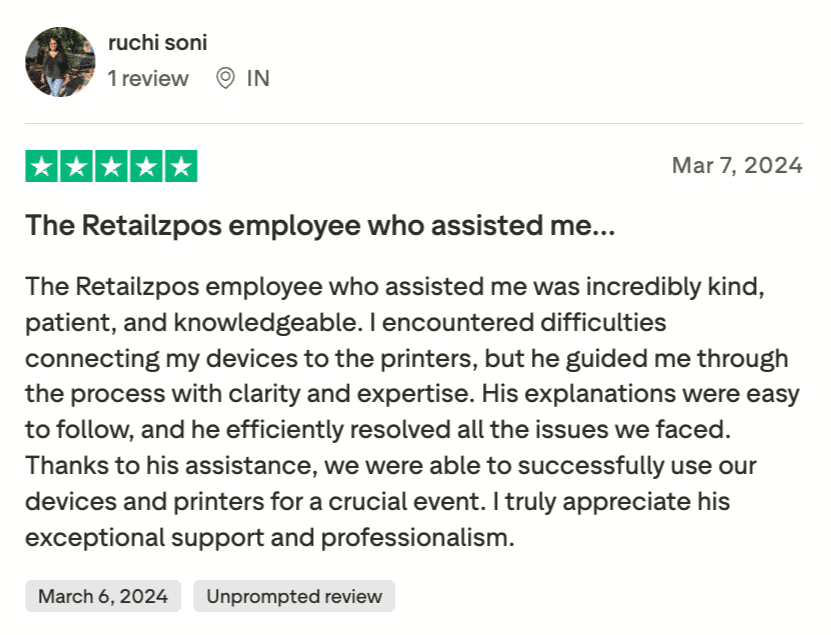
RetailzPOS has limited third-party reviews. The feedback available on Trustpilot reflects a mix of opinions. Here’s a snapshot of what users are saying.
Source: Trustpilot
Who RetailzPOS is best for
- Shops enrolled in manufacturer loyalty programs: The scan data and dual pricing tools are designed for tobacco rebate programs.
- Vape & smoke shop owners who need fast checkout, age verification (ID scanning), and easy tracking of a large variety of products.
5. Lightspeed: Best For Multi-Location and Omnichannel Smoke Shops
Lightspeed Retail overview
Lightspeed is a cloud-based POS platform headquartered in Montreal, Canada. It serves retailers across multiple industries, and its smoke shop features have grown significantly in recent years.

Pros
- Centralized employee management
- Built-in marketing tools
- Cloud-based accessibility
Cons
- Customer service issues
- Dependence on the internet connection
Lightspeed Retail Pricing
Basic
$109/mo
- Registers
- Free training and onboarding resources
- Dedicated account manager
Core
$179/mo
- Lightspeed B2B
- Accounting
- eCommerce
Plus
$289/mo
- Omnichannel loyalty
- Advanced reporting
Lightspeed offers a mature POS platform with deep inventory management, eCommerce integration, and built-in RACS (Responsible Age Check System) compliance for vape and tobacco retailers. The system runs on iPads and integrates with accounting tools, marketing platforms, and loyalty programs.
Key Features
- RACS compliance: Built-in age verification workflows prompt cashiers to check IDs at checkout. Available on Plus and Enterprise plans through Lightspeed Workflows.
- Advanced inventory management: Preloaded catalogs with over 8 million products. Matrix inventory handles variants like flavor, nicotine level, and size.
- Omnichannel selling: Sync in-store and online inventory. Build an eCommerce storefront with built-in SEO tools. Sell through Facebook and other social channels.
- Multi-location tools: Manage stock, staff, and sales across multiple stores from one dashboard. Transfer inventory between locations.
Pros
- Robust reporting: Customizable reports on sales, staff performance, and inventory turnover.
- Large integration ecosystem: Hundreds of third-party integrations with accounting software, marketing tools, and more.
- Professional eCommerce tools: Ready-made website templates and SEO tools help stores sell online quickly.
Cons
- Higher pricing: Plans start at $89/month (annual billing) and advanced features like loyalty programs require the Plus plan at $239/month.
- Payment processor restrictions: Using a third-party processor instead of Lightspeed Payments adds up to $400/month in extra fees.
- Not smoke shop specific: Lightspeed is a general retail POS. It lacks niche features like carton-pack tracking and tobacco scan data reporting.
Pricing
Lightspeed offers three retail tiers priced per location, with discounts for annual billing and progressively deeper features as you move from Basic to Plus.
| Plan | Price | Billing Unit | Best For & Key Features |
|---|---|---|---|
| Basic |
$109/mo
$89/mo annual
|
Per location | Independent retailers with day-to-day needs POS · Payments · Inventory · Basic eCommerce · Loyalty · Chat Support |
| Core |
$179/mo
$149/mo annual
|
Per location | Growing retailers needing advanced management tools + Landed Costs · API Access · Workflows · Phone Support · NuORDER PO Sync |
| Plus |
$339/mo
$289/mo annual
|
Per location | Established retailers requiring full customization & scale + Insights & Forecasting · Custom User Roles · SSO · Priority Support |
Customer reviews
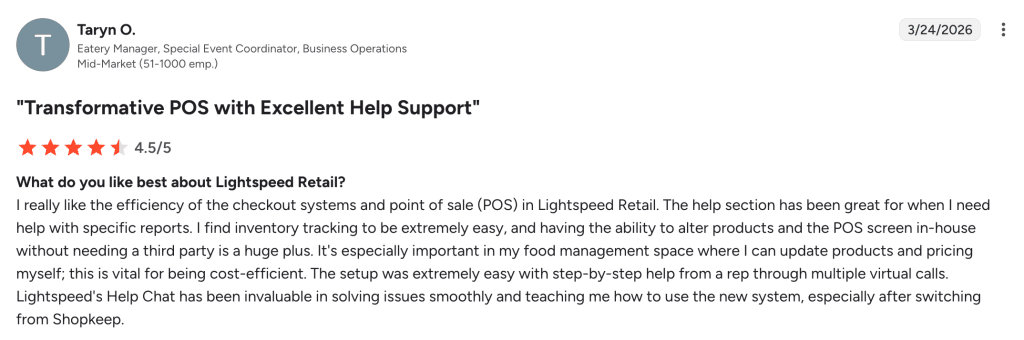
Lightspeed earns praise from users who value its polished interface and comprehensive feature set, as highlighted in this review.
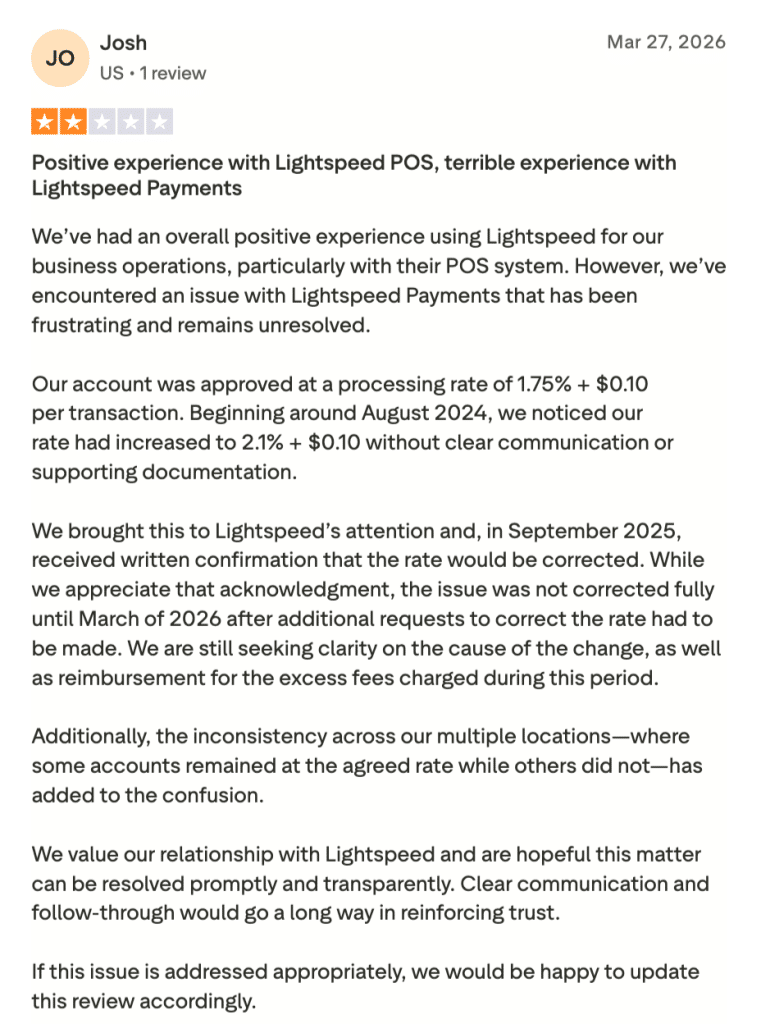
However, some smoke shop owners express concerns about Lightspeed’s pricing structure and customer service responsiveness.
Who Lightspeed Is Best For
- Multi-location smoke shops: Best for owners who need strong stock transfer and store comparison tools.
- Stores expanding into eCommerce: Built-in website creation and omnichannel sync help stores sell online.
6. Quickvee: Best For Online Ordering Integration
Quickvee overview
Quickvee is a POS system designed from the ground up for smoke shops, head shops, vape stores, and tobacco retailers. The platform focuses on combining in-store sales with online ordering.

Pros
- online store for pickup
- custom user roles
- API access
Cons
- Smaller user base
- Limited advanced reporting
Pricing
$0 per month when using Quickvee Integrated Payments
Quickvee provides a cloud-based POS with built-in online ordering, loyalty programs, and age verification. The system is built specifically for tobacco and vape retail, with features like bulk pricing, Mix N’ Match deals, and employee permission controls.
Key Features
- Built-in online ordering: Customers place pickup or delivery orders through a custom website. No separate eCommerce subscription needed.
- Age verification: ID scanning at checkout for in-store sales. Online customers upload their ID, which the owner reviews upon pickup.
- Bulk pricing and promotions: Create BOGO deals, Mix N’ Match pricing, and volume discounts in a few clicks.
- Loyalty program: Set points per dollar, define redemption rules, and choose which product categories earn or accept points.
- Employee management: Time tracking, permission levels, and shift management built into the POS.
Pros
- Smoke shop specific: Every feature is designed for tobacco and vape retail, not generic stores.
- No extra fees for online ordering: Unlike competitors that charge for eCommerce add-ons, Quickvee includes online ordering in the base system.
- User-friendly: Reviewers praise the intuitive interface and quick setup process.
Cons
- Pricing not publicly listed: Owners must contact Quickvee for a quote, which makes comparison shopping harder.
- Smaller user base: Fewer third-party reviews available compared to established platforms like KORONA POS or Lightspeed.
- Limited advanced reporting: Reports cover sales, inventory, and employee performance, but may lack the depth found in larger POS platforms.
Pricing
Quickvee offers one straightforward plan at $0 per month when using Quickvee Integrated Payments, with no feature caps or hidden tiers. The plan includes inventory management with smart reordering, a built-in customer loyalty program, an online store for pickup and delivery, advanced sales and staff reports, unlimited licenses per location, custom user roles, API access, a mobile owner’s app, and 24/7 chat and phone support — everything included from day one, with no monthly software fee.
Customer reviews
Who Quickvee Is Best For
- Smoke shops that want online ordering: The built-in eCommerce tools require no additional subscription or integration.
- Operators who value simplicity: The interface is designed for quick onboarding with minimal training.
7. Square POS: Best Budget-Friendly Starter Option
SQUARE POS overview
Square is one of the most widely used POS platforms in the world, with millions of businesses across all industries. While not built specifically for smoke shops, its free plan and low barrier to entry make it a popular starter option.

Pros
- Free to use (Basically)
- Flexible payment methods
- Great integration features
Cons
- Not ideal for complex and retail businesses
- Poor customer support
- Not ideal for businesses with high sales volume
- Insufficient reporting metrics
Pricing
Square Free
$0
- POS app and payments
- Website builder with SEO tools
- Courses
- Item library
Square Plus
$49/mo
- Staff management
- Expanded site customization
- Loyalty rewards program
Square Premium
$149/mo
- Advanced reporting
- No gift card load fees
- 24/7 phone support
Square provides a free base POS plan with basic inventory tracking, sales management, and payment processing. The platform runs on iOS and Android devices, supports offline transactions, and offers optional add-ons for loyalty programs and team management.
Key Features
- Free POS plan: No monthly software fee for the base plan. Includes sales tracking, basic inventory management, and digital receipts.
- Mobile POS: Process sales from a smartphone or tablet. The app syncs data when reconnected to the internet.
- Optional add-ons: Loyalty programs, advanced team management, and marketing tools available as paid upgrades.
Pros
- No upfront software cost: The free plan lets new smoke shop owners get started without a monthly POS expense.
- Easy setup: Minimal training needed. The interface is clean and intuitive.
- Strong mobile experience: The mobile app is one of the best in the industry for on-the-go sales.
Cons
- No tobacco-specific features: Square lacks carton-pack tracking, scan data reporting, and built-in age verification for tobacco products.
- High-risk merchant issues: Square has a history of freezing or terminating accounts for businesses that sell age-restricted products like tobacco, vape, and CBD.
- Limited inventory depth: The free plan offers only basic inventory. Advanced stock management requires a paid upgrade.
Pricing
Square’s plans range from a free starter tier to a custom Pro plan for high-volume merchants, with in-person processing rates that decrease as you upgrade.
| Plan | Price | Billing Unit | Best For & Key Features |
|---|---|---|---|
| Free | $0/mo No subscription | Per location | New & small businesses getting started POS app · Payments · Website builder · Item library · 2.6% + 15¢ in-person |
| Plus | $49/mo Per location | Per location | Growing businesses needing staff & loyalty tools + Staff management · Loyalty rewards · Expanded site customization · 2.5% + 15¢ in-person |
| Premium | $149/mo Per location | Per location | Established businesses needing advanced tools + Advanced reporting · No gift card load fees · 24/7 phone support · 2.4% + 15¢ in-person |
| Pro | Custom $250K+ / year | Per account | High-volume businesses processing over $250K/year Custom processing rates · Hardware discounts · Onboarding support · Account management |
Customer reviews
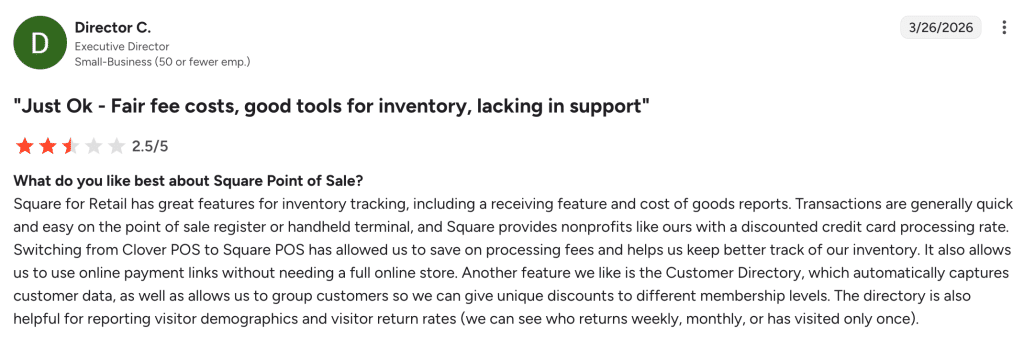
Square’s massive user base means no shortage of feedback. Many small business owners appreciate its simplicity and zero-cost entry point.
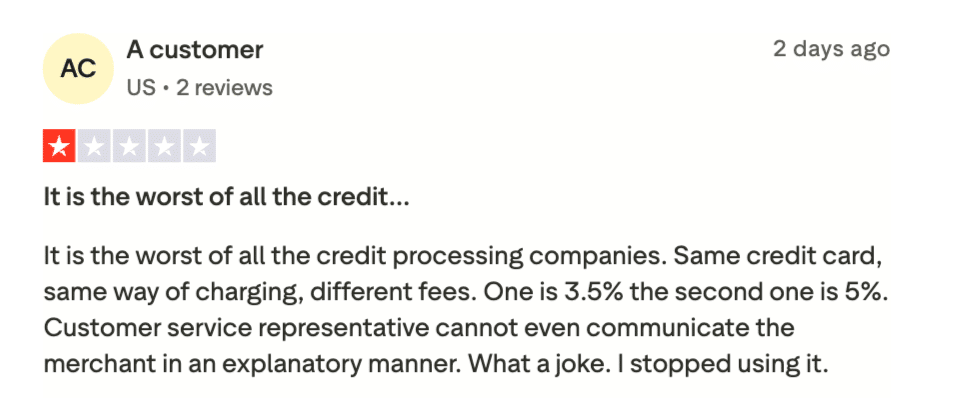
That said, smoke shop owners in particular report issues with account holds and a lack of tobacco-specific tools
Who Square Is Best For
- New smoke shop owners on a tight budget: The free plan removes the financial barrier to getting a POS running.
- Shops testing the market: Start with Square and upgrade to a tobacco-specific system as your business grows.
Pro Tip
Square is a good starting point, but it does not offer the tobacco-specific tools that dedicated smoke shop POS systems provide. If your store grows or you need age verification, carton-pack tracking, or scan data reporting, consider upgrading to KORONA POS or another industry-specific option.
Choosing the Right Smoke Shop POS System for Your Retail Business
Not all POS systems are built for the unique demands of a smoke shop. Here are the key features to look for before you commit to one.
Age Verification and ID Scanning
Smoke shops are legally required to verify customer age at every sale. A solid POS should prompt staff to scan IDs and flag underage customers automatically. Learn more about smoke shop inventory management.
Inventory management a headache?
KORONA POS makes stock control easy. Automate tasks, generate custom reports, and learn how you can start improving your business.
Tobacco and Vape-Specific Inventory Tracking
Generic inventory tools fall short when you’re managing dozens of vape flavors, nicotine levels, and SKU variations. Look for a system that tracks products by attribute, so you always know which variants are selling and which are collecting dust.
Compliance Reporting for Tobacco Regulations
State and local tobacco regulations require detailed sales records. Your POS should generate reports that break down tobacco sales by category, volume, and date. KORONA POS makes it easy to pull these POS reports during audits without having to dig through spreadsheets.
Tiered and Wholesale Pricing
Many smoke shops sell to both walk-in customers and small wholesale buyers. A capable POS lets you assign different price tiers to different customer groups, so staff never have to override prices manually or guess what a wholesale buyer should pay.
Payment Processing Flexibility
Smoke shops operate on thin margins, so payment processing costs matter. Some POS providers lock you into their own payment processor. KORONA POS is processor-agnostic, meaning owners can choose any payment processor that offers the best deal for their business.
Payment processors giving you trouble?
We won’t. KORONA POS is not a payment processor. That means we’ll always find the best payment provider for your business’s needs.
Barcode Label Printing for Untagged Products
A large portion of smoke shop inventory arrives without standard barcodes, especially loose cigars, hookahs, and accessories. The POS should support in-house label printing so every product gets a scannable tag, cutting down checkout errors significantly.
Customer Loyalty Program Integration
Repeat customers drive revenue in smoke shops. A built-in loyalty program that tracks points by product category encourages regulars to keep coming back.
Loss Prevention and Cash Management Tools
Smoke shops deal heavily in cash. Your POS should track drawer counts, flag discrepancies between expected and actual cash, and log every void or refund with a staff ID attached.
Customer Loyalty Programs
Most smoke shop customers are regulars who visit multiple times per week. A built-in loyalty program turns repeat visits into tracked relationships and rewards. KORONA POS loyalty programs are included with every subscription and allow point-based rewards, customer profiles, and targeted promotions.
Manage Your Smoke Shop Operations With KORONA POS
KORONA POS was built to handle the exact challenges smoke shop owners face every day. Built-in ID scanning keeps you compliant with age verification laws at every sale.
Carton and pack inventory tracking gives you full visibility over your tobacco and vape products without the manual counting headache.
Scan data reporting automates your rebate submissions to manufacturers like RJ Reynolds and Altria, so you never leave money on the table. And unlike most POS systems, KORONA POS is payment processor agnostic, meaning you choose your own processor and keep more of your margins.
Ready to see it in action? Schedule a free demo, start an unlimited free trial with no credit card required, or call KORONA POS directly at (833) 200-0213.


