Finding the point of sale system with the lowest fees is more complex than just checking the advertised swipe rate. The true cost involves a mix of processing fees, monthly software and hardware costs, as well as hidden incidentals.
This guide cuts through the confusion. We’ll break down the different types of POS fees, show you how to calculate your total cost of ownership, and rank the top five systems with the lowest overall costs for your business.
Key Takeaways:
- Consider total cost: The lowest overall cost (total cost of ownership) must factor in all expenses: processing fees, monthly software, hardware, and incidentals, not just the advertised transaction rate.
- Agnostic POS systems save more: Processing-agnostic systems, like KORONA POS, allow merchants to choose a processor for lower, negotiated interchange-plus rates,
- Choose by volume: Businesses with low sales volumes are best suited for systems that start with a free plan (like Square).
- Watch for hidden fees: Beyond the swipe rate, high costs include inflated monthly software and hardware device fees, setup fees, payment gateway fees, PCI compliance fees, and fees for advanced features.
- Avoid long contracts: Look for month-to-month subscriptions to maintain flexibility and prevent high early termination fees associated with multi-year contracts.
What Are POS Fees and Why They Matter?
POS (point of sale) fees are the costs merchants pay to accept card and digital payments.
Payment fees usually include transaction fees (a percentage plus a flat amount per sale), interchange fees (paid to card-issuing banks), assessment fees (charged by card networks like Visa or Mastercard), and sometimes chargeback fees and other processor fees (cancellation, compliance, etc.)
POS fees include monthly service / software fees and hardware or terminal costs. Knowing these fees is important because they directly impact profit margins, pricing decisions, and cash flow. Take steps to more accurately compare providers, avoid hidden costs, negotiate more favorable rates, and select payment solutions that align with their business size and sales volume.
POS Systems With the Lowest Fees: At a Glance
Here are the top 5 systems in 2026, ranked by lowest overall costs (monthly + effective processing), ideal for small to mid-sized businesses.
Product
Monthly Fee
Processing Fees
Best For
Key Advantage

Best for:
$59 – $99
Price:
Agnostic (you choose your processor)
Processing Fees:
Retail, QSR, ticketing
Key Feature:
Unique flexibility to integrate any major processor (e.g., pair with Stax for lower rates), no forced bundling or long-term contracts.

Best for:
$109 – $339
Price:
As low as 2.6% + $0.10
Processing Fees:
B2B & Growing Retail
Key Feature:
Transparent, volume-based discounts that lower your rates as you grow.

Best for:
$0 – $149
Price:
As low as 2.6% + $0.10
Processing Fees:
Small Startups
Key Feature:
No monthly commitment; perfect for low-volume or seasonal businesses.

Best for:
$0 – custom pricing
Price:
As low as 2.99% + $0.30
Processing Fees:
Restaurants
Key Feature:
Industry-specific automation that reduces labor costs, though subscription and processing rates are higher.
Best for:
$39 – $399
Price:
As low as 2.4% + $0.10
Processing Fees:
eCommerce businesses
Key Feature:
The subscription model eliminates high % markups for superior long-term savings
Different Types of POS Fees
POS systems include multiple cost layers beyond swipe rates. Here’s a clear breakdown of the most common ones:
1: Payment Processing Fees
These are the fees charged every time a customer pays by card or digital wallet. They typically include a percentage of the transaction plus a fixed per-transaction fee.
Rates vary by card type (debit, credit, rewards), transaction method (in-person vs. online), and pricing model (flat-rate, interchange-plus, or tiered).
2: Monthly Software Fees
Monthly POS fees cover access to the POS software itself. This may include core features like sales tracking, inventory management, reporting, and basic integrations.
Costs range from free for the most basic entry-level systems (with a contract to use their processing) to several hundred dollars per month for advanced retail or restaurant POS platforms with more robust functionality.
3: Hardware Costs
Hardware fees include one-time or financed costs for physical equipment such as terminals, tablets, cash drawers, receipt printers, barcode scanners, and card readers. Some providers sell proprietary hardware, while others allow third-party devices.
Hardware costs can range from free for simple card readers (again with processing agreements in place) to several thousand dollars per terminal setup.
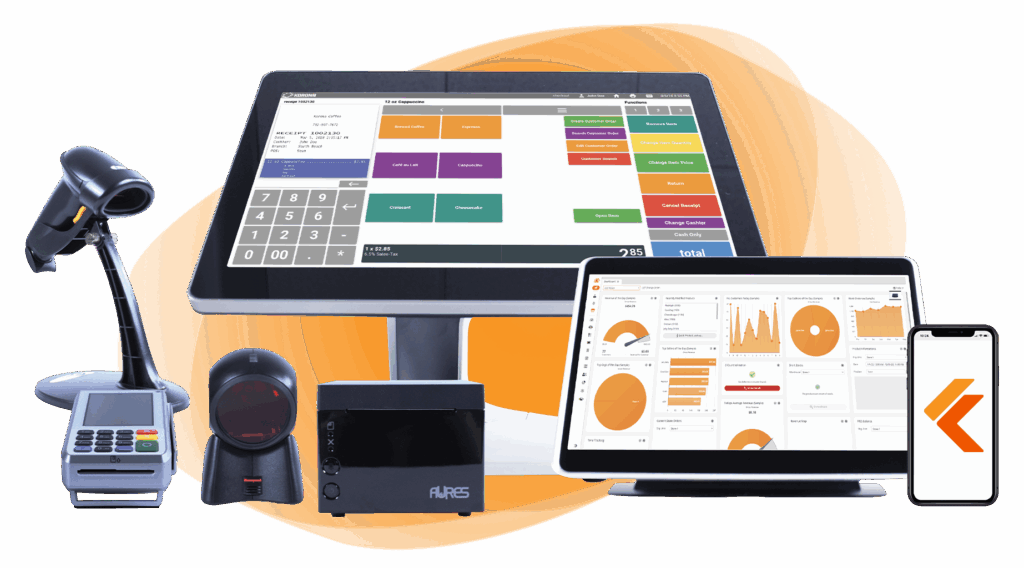
Build Your Own POS
Whether you run a retail store, café, or admissions booth, we have the point of sale hardware designed for your specific needs. Start building your ideal POS system now.
4: Setup & Installation Fees
Some POS providers charge upfront fees for system setup, onboarding, data migration, or in-person installation. These fees are more common with enterprise or highly customized systems.
While many cloud POS solutions waive setup fees, larger businesses may still incur costs of several hundred to several thousand dollars for hands-on configuration.
5: Contract & Early Termination Fees
Certain POS systems require long-term contracts (often 1–3 years). If you cancel early, you may incur early termination fees, which can be a flat fee or the remaining balance of the contract. Month-to-month, no-contract POS providers eliminate this risk and offer greater flexibility for growing businesses. That is a great tip on how to lower your credit card processing fees.
6: Payment Gateway Fees
Gateway fees apply when processing online, mobile, or omnichannel payments are another common type of fee. These fees cover secure data transmission between the POS, payment processor, and issuing bank. They may be charged monthly, per transaction, or both (particularly for eCommerce, delivery, or curbside payment setups).
7: PCI Compliance & Security Fees
PCI compliance fees cover the cost of maintaining secure payment standards to protect cardholder data. These may be billed monthly or annually.
Non-compliance can result in additional penalties or higher processing costs, making PCI compliance an essential but sometimes overlooked POS expense. Always make sure your processor has this covered.
8: Add-On & Feature Fees
Advanced features such as loyalty programs, gift cards, advanced reporting, employee management, multi-location POS support, or integrations with accounting and eCommerce platforms often cost extra. While base POS pricing may look low, add-ons can significantly increase the total monthly cost if not evaluated upfront.
9: Support & Service Fees
Some providers charge for premium support, dedicated account managers, or 24/7 assistance. Others bundle support into the monthly subscription fee.
For high-volume or mission-critical businesses, paying for reliable support can be worthwhile, but the terms and expectations should be very clear.
Have trouble getting your POS customer service on the phone?
KORONA POS offers 24/7 phone, chat, and email support. Call us at 833.200.0213 to see how reliable we are.
10: Chargeback & Refund Fees
When customers dispute transactions, businesses may incur chargeback fees. Refunds may also trigger processing fees that are not returned. These costs can add up in high-volume environments or industries with frequent disputes.
Bottom line
The cheapest POS is rarely the one with the lowest advertised rate. Understanding all POS fee types enables you to accurately compare systems and select the most cost-effective solution for your business model.
Top 5 POS Systems with the Lowest Fees
Finding a POS system with the lowest fees is a balance between monthly software costs and per-transaction rates, especially when comparing POS systems for small businesses that need affordable payment processing. This guide breaks down the top five providers to help you maximize profit margins. You can also use our retail margin calculator to determine your margin.
KORONA POS
KORONA POS is a great fit for high-volume retailers not just because it has advanced reporting and inventory features to manage such environments; it also doesn’t charge any credit card processing fees itself. It’s one of the best credit card processing companies. Instead, it allows you to choose your own merchant service provider, which often results in the lowest possible rates for established businesses.
- Monthly cost: Starts at $59 per terminal
- Yearly cost: Varies depending on number of terminals
- Processing fees: $0 – use your own processor to find the best market rate
- Hardware options: Compatible with Windows tablets and desktop POS terminals; hardware ranges from $100 to $2,500.
- Simple pros and cons:
- Pros: No contracts; unlimited free trial; highly scalable
- Cons: Backend interface can have a steep learning curve
- Who it’s best for: High-volume retail stores like liquor stores and smoke shops. KORONA POS is one of the top choices among smoke shop POS systems, offering flexible payment processing and scalable features.
Square POS System
Square is the industry standard for small businesses looking for zero upfront software costs. While there is no monthly fee for the basic plan, the processing rates are slightly higher to compensate for the free software.
- Monthly cost: $0 (Basic plan); Plus plans start at $29–$60 per month
- Yearly cost: $0 for basic software
- Processing fees: 2.6% + $0.10 for in-person transactions
- Hardware options: Square Reader ($59); Square Stand ($149); Square Terminal ($299)
- Simple pros and cons:
- Pros: Extremely easy to set up; no monthly fees for starters
- Cons: Account stability issues; high keyed-in entry fees (3.5% + $0.15)
- Who it’s best for: New small businesses, pop-ups, and mobile vendors
HAPPY READING
Explore this guide to gain a deeper understanding of Square POS pricing, including its subscription plans, processing fees, hardware fees, and more.
Lightspeed POS System
Lightspeed is a robust, feature-rich platform that offers lower processing rates for businesses that use its built-in payment system. It is best suited for clothing retail or hospitality environments that need more features while maintaining a simple hardware tablet setup.
- Monthly cost: Starts at $89 (billed annually) or $109 (billed monthly)
- Yearly cost: Starts at $1,068 per year
- Processing fees: Starts at 2.6% + $0.10 for in-person payments
- Hardware options: iPad-based setups, proprietary card readers ($299), and custom register kits.
- Simple pros and cons:
- Pros: Best-in-class inventory management; 24/7 support
- Cons: Expensive monthly software cost; requires a long-term contract for best rates; users report unreliable support
- Who it’s best for: Mid-sized retailers and restaurants with complex inventory
HAPPY READING
- Check out this guide to learn more in-depth about Lightspeed POS pricing, including its subscription plans, processing fees, hardware fees, and more.
Toast POS System
Toast is a restaurant-specific system that offers a Starter Kit with $0 upfront costs, though most restaurants will require their paid options. Toast also locks users into their processing, which is nearly always higher than others.
- Monthly cost: $0 (Starter Kit); $69 (Point of Sale plan)
- Yearly cost: $0 to $828+ for software
- Processing fees: Varies by plan, typically 2.99% to 3.09% + $0.15
- Hardware options: Handheld “Toast Go 2” ($494); Flex Terminal ($719)
- Simple pros and cons:
- Pros: Built specifically for food service; excellent handheld hardware
- Cons: Android-only (no iPads); processing fees are higher on free plans
- Who it’s best for: Restaurants, cafes, and bars of all sizes
Shopify POS System
For businesses that sell both online and in-person, Shopify is the most efficient choice. The “Lite” version of the POS is included with all Shopify web plans, keeping additional brick-and-mortar costs low.
- Monthly cost: Starts at $39 (Basic Shopify) + $0 for POS Lite
- Yearly cost: Approximately $468 for the base plan
- Processing fees: 2.4% to 2.9% (depending on plan)
- Hardware options: Mobile card readers ($49); Retail iPad stands ($219)
- Simple pros and cons:
- Pros: Perfect sync between web and store; competitive processing rates
- Cons: Advanced retail features require a $89/mo “Pro” upgrade
- Who it’s best for: Omnichannel retailers who already have a Shopify store
How to Calculate Your POS System’s Total Cost?
To calculate your POS system’s total cost (TCO), project it annually based on your sales volume:
- Estimate monthly card volume and transaction count
- Calculate processing fees
Find out how much you’re spending.
- Add monthly/subscription fees × 12
- Include hardware (purchase or rental), one-time setup, PCI compliance, and average chargeback/incidental costs
| Total = processing + recurring + hardware + incidentals |
PRO TIP 1
Always request itemized quotes from 3–5 providers using your actual (or projected) volume. Many will customize rates and waive setup fees for competitive wins.
Pro tip 2
Pro tip: Always calculate your “Effective Rate” by dividing your total monthly processing fees by your total sales volume. If a “free” software provider charges high transaction rates, you may actually pay more annually than you would with a paid software like KORONA POS that allows for lower, negotiated processing rates.
Payment processors giving you trouble?
We won’t. KORONA POS is not a payment processor. That means we’ll always find the best payment provider for your business’s needs.
How to Choose the Lowest-Cost POS for Your Business?
Choosing the lowest-cost POS for a small retail business requires looking beyond the monthly sticker price. To find the actual value, you must balance upfront expenses against long-term transaction fees and operational efficiency.
Consideration #1: Prioritize Payment Agnosticism
Most “low-cost” POS systems require you to use their proprietary payment processing, which comes with high flat rates. To truly lower costs, choose a processing agnostic system like KORONA POS. It allows you to shop around for the best interchange-plus rates, potentially saving you thousands as your sales volume grows.
Consideration #2: Total Cost of Hardware Ownership
“Free” hardware often comes with higher processing rates that can be more costly in the long run. Invest in durable, industry-standard hardware that can survive a busy retail environment.
Consideration #3: Project Your True Total Cost
Estimate annual costs using your projected card volume and average ticket size. Factor in processing rates, monthly fees, hardware, PCI compliance, and incidentals. Low-volume shops (<$5K/month) often save most with $0-monthly systems; higher volumes favor interchange-plus models that scale down effectively.
Consideration #4: Choose Transparent, Low-Markup Pricing
Avoid tiered or qualified rates that hide markups. Flat-rate pricing is simplest for startups, while interchange-plus (wholesale rates + small fixed markup) delivers the lowest effective cost as volume grows, often beating bundled systems by 0.5–1%.
Consideration #4: Minimize or Eliminate Recurring Fees
Seek $0 or low flat monthly fees with no contracts. Many “free” POS options offset this with higher transaction rates; actual savings come from reasonable subscriptions paired with competitive processing and no early termination penalties.
Consideration #3: Avoid Long-Term Contracts
Hardware leases and multi-year software contracts can trap you in an expensive, outdated system. Look for providers that offer month-to-month subscriptions. KORONA POS offers a no-contract model, providing you with the flexibility to scale or switch without incurring hefty early termination fees.

Learn more about how credit card processing works and save your business money with this free eGuide.
Consideration #7: Ensure Offline Functionality and Reliability
Downtime costs sales. Choose systems with a robust offline mode that syncs transactions once reconnected, along with 24/7 support, to prevent lost revenue during internet outages.
Consideration #8: Compare Multiple Customized Quotes
Request itemized quotes from 3–5 providers using your actual (or projected) volume and card mix. Reputable companies often waive setup fees, offer rate discounts, or match competitors’ rates to win your business.
Speak with a product specialist and learn how KORONA POS can power your business.
Start Using the All-In-One KORONA POS and Save on Fees
KORONA POS helps businesses reduce costs by giving them full control over payment processing. Unlike proprietary POS systems, KORONA is processing-agnostic. Merchants can choose or switch payment processors to secure the lowest possible rates, without hidden markups or forced contracts.
To further boost savings, KORONA POS supports dual pricing. Businesses can offset card processing costs by offering cash discounts or adjusting card prices in a compliant and transparent manner. KORONA‘s dual pricing feature can significantly lower or even eliminate processing expenses, especially for high-volume retailers.
KORONA POS is ideal for multi-location retail, QSR, and ticketing environments, excelling in complex retail verticals such as liquor, smoke, vape, tobacco, CBD POS, wine, and convenience stores, and museum POS systems that rely on specialized POS systems for convenience stores to manage age-restricted sales, fast checkout, and high SKU inventory. It offers advanced inventory management, reporting, and analytics, with centralized control that makes scaling both affordable and efficient.
Plus, KORONA POS offers all users 24/7 product support by phone, chat, or email, so merchants don’t lose money with downtime or other costly errors. Ready to save on POS fees? Call 833-200-0213 or sign up for a demo with one of our product specialists today.
FAQs
1. Is Square POS really free?
Square is “free” in the sense that it does not require a monthly subscription for its basic plan. However, you pay a processing fee (typically 2.6% + $0.10) for every transaction you process.
2. Do all POS systems charge a fee?
Yes. While many offer “free” software, all providers charge transaction fees to process credit cards. Others may also require monthly subscriptions, hardware costs, or fees for advanced features.
3. Which POS system doesn’t charge a fee?
No system is 100% free of processing fees. Some POS options have no monthly software fee, like Square, PayPal, Zettle, Helcim, and Loyverse, but if you accept card payments, you’ll still usually pay per-transaction processing fees.