


Credit card processing for small businesses covers everything that happens when a customer pays you with a card. It includes the hardware at your counter, the software that talks to your POS, the merchant account that holds your money, and the network of banks that move the funds.
In 2026, most small businesses pay between 1.5% and 3.5% per transaction. The gap between the cheapest and most expensive processors can cost a small business thousands of dollars a year, and most owners never realize they’re overpaying.
The article shows you what your business should expect to pay, which providers fit your setup, how to pick one that doesn’t lock you in, and the red flags that signal you’re being overcharged.
Key Takeaways:
- Your monthly volume decides your pricing model. Under $10K a month, flat-rate (Square, Stripe) is fine. Above $10K, switch to interchange-plus to stop overpaying.
- Anything over 3% effective rate on $20K+ in volume is overpriced. Run the 5-minute statement audit. Add your total fees, divide by volume, multiply by 100.
- The rate sheet hides the fees. Always demand the full fee schedule in writing before you sign anything. PCI non-compliance, statement, batch, and gateway fees add up fast.
- Long contracts and early termination fees are red flags. Modern processors (Square, Stripe, Helcim) offer month-to-month. A 3-year contract with a $295+ ETF is a trap.
- An all-in-one POS locks you in. Square, Clover, and Toast bundle POS and processing, so you can’t shop rates. A processor-agnostic POS lets you switch processors as rates change.
- PCI compliance is required, but Level 4 is simple. Complete the right SAQ once a year. Skip it, and you’ll pay $20 to $30 a month in non-compliance fees.
Which Credit Card Processing Setup Fits Your Small Business?
Most small businesses fit into one of four credit card processing setups. Your setup shapes which processor saves you money and which one quietly drains it.
Setup 1: In-Store Sales, Under $10K a Month
Cafés, boutiques, food trucks, and small salons. Card volume is steady but small, and the average ticket sits under $30. Predictable pricing matters more than chasing every basis point. Flat-rate processors like Square or Stripe Terminal usually win here. The math: at $8,000 a month, a flat 2.6% rate costs $208. Interchange-plus would run about $190, plus a small monthly fee that often comes with it. The complexity isn’t worth the savings at low volume.
Setup 2: In-Store Sales, $10K to $100K a Month
Liquor stores, vape and smoke shops, convenience stores, multi-location retail. Once monthly volume crosses $10,000, interchange-plus pricing beats flat-rate by a meaningful margin. A liquor store at $40,000 a month can save $300 to $500 a month by switching from Square to a true interchange-plus processor. The setup also benefits most from dual pricing and cash discount programs, which we cover later.
Setup 3: Online Sales Only
Shopify, WooCommerce, and BigCommerce sellers. Card-not-present transactions carry higher interchange rates, so the gap between flat-rate and interchange-plus is narrower than in-store. Stripe and PayPal dominate the space because developer tools and gateway integrations matter more than rate savings at low volume. Above $25,000 a month online, interchange-plus options like Helcim start to make sense.
Setup 4: In-Store and Online Combined
Retailers with a physical store, a website, and phone orders. The complexity is real. A single processor that covers all three channels reduces reconciliation headaches but rarely offers the best rate on any one channel. The right answer depends on which channel carries the most volume. Pick a processor optimized for the dominant channel, and accept slightly higher rates on the others.
Quick Reference
Your monthly card volume is the single biggest factor in which processor saves you money. Under $10K a month, flat-rate usually wins. Above $10K, interchange-plus is worth the switch.
Recommended Pricing Models by Setup
| Setup | Monthly Volume | Best Pricing Model | Typical Providers |
|---|---|---|---|
| In-Store, Low Volume | Under $10K | Flat-rate | Square, Stripe Terminal |
| In-Store, Moderate to High | $10K – $100K | Interchange-plus | Helcim, Stax, Elavon |
| Online Only | Any Flat-rate under $25K | Flat-rate or interchange-plus | Stripe, PayPal, Shopify |
| In-Store and Online | Any | Interchange-plus, channel-optimized | Helcim, Worldpay, Adyen, Square |
How Much Does Credit Card Processing Cost a Small Business in 2026?
Most small businesses pay between 1.5% and 3.5% per transaction in 2026. The total breaks into three layers: interchange fees, assessment fees, and the processor’s markup. Only one of the three is negotiable, and that’s where any real savings come from.
Interchange Fees (1.15% to 3.15%)
Interchange fees go to the bank that issued your customer’s card. Visa, Mastercard, Discover, and American Express publish the rates, and every processor pays them. No one can negotiate interchange. Rates depend on the card type, the transaction method, and your industry.
A few patterns worth knowing:
- Debit cards are cheaper than credit cards.
- Tapped or dipped cards are cheaper than keyed-in or online cards.
- Rewards cards and corporate cards cost more.
- American Express runs higher than Visa or Mastercard.
For most small businesses, interchange averages around 1.8% for debit and 2.3% for credit in 2026.
Assessment Fees (0.13% to 0.15%)
Assessment fees go to the card networks themselves: Visa, Mastercard, Discover, and American Express. The fees are small, usually 0.13% to 0.15% of each transaction, and they apply to every merchant regardless of processor or volume. You can’t negotiate them, and you shouldn’t worry about them. Assessment fees are the smallest line in your processing cost.
Processor Markup (The Negotiable Part)
The processor’s markup is the only part of your fees that’s actually negotiable. It’s how processors make money, and it’s where you’ll find real savings.
Markup appears differently in each pricing model:
- Flat-rate processors bake markup into a single percentage. Square’s 2.6% includes interchange (around 1.8% to 2.3%), assessment (0.13% to 0.15%), and Square’s own margin (roughly 0.2% to 0.5%).
- Interchange-plus processors quote markup separately. A typical small business deal in 2026 is interchange plus 0.25% to 0.40%, plus a small per-transaction fee of $0.05 to $0.15.
A 0.30% markup cut on $40,000 a month saves $1,440 a year. The math gets bigger fast at higher volumes.
Hidden Fees and Junk Charges
Beyond the three main layers, processors often add extra fees that show up on your statement and quietly add up. The most common ones to watch for in 2026:
- PCI non-compliance fees: $20 to $30 a month if you don’t complete your compliance questionnaire.
- Monthly statement fees: $5 to $15 a month for receiving your bill.
- Batch fees: $0.10 to $0.30 every time you close out daily transactions.
- Gateway fees: $5 to $20 a month for online payment processing.
- Monthly minimums: a charge if your processing volume falls below a set amount.
- Chargeback fees: $25 to $45 per disputed transaction, on top of the lost sale.
Most of the fees are negotiable or can be avoided with the right processor. If a quote doesn’t list them, ask for them in writing before you sign anything.
What It Actually Costs: A Coffee Shop Example
Run the numbers for a coffee shop with $20,000 in monthly card volume and a $10 average ticket (about 2,000 transactions).
On Square (2.6% + $0.15 per transaction):
- 2.6% × $20,000 = $520
- $0.15 × 2,000 = $300
- Total: $820 a month, or $9,840 a year
On interchange-plus (0.30% markup + $0.10 per transaction):
- Interchange (~2.0%) + assessment (~0.14%) + markup (0.30%) = ~2.44%
- 2.44% × $20,000 = $488
- $0.10 × 2,000 = $200
- Total: $688 a month, or $8,256 a year
Annual savings: $1,584.
The gap widens as transaction count and volume grow. At $40,000 a month with the same ticket size, the same setup saves around $3,200 a year.
Bottom line: interchange and assessment fees are fixed. The only number you can actually negotiate is your processor’s markup, plus the junk fees they layer on top. Cut those two, and your costs drop.
Flat-Rate vs. Interchange-Plus vs. Tiered: Which Pricing Model Fits Your Small Business?
Four pricing models dominate the small business credit card processing market in 2026. Three are worth considering. One you should avoid. Your monthly volume decides which one fits.
Flat-Rate Pricing (Best Under $10K a Month)
You pay a single rate per transaction, regardless of which card the customer uses. Square charges 2.6% + $0.15 in person and 3.3% + $0.30 online on the Free plan. Stripe and PayPal sit in a similar range.
Why merchants pick it:
- Predictable monthly costs
- No monthly fees
- Easy setup, often same-day
- No long contracts
Why it stops working:
- Above $10,000 a month, you’re paying more than you need to. The flat rate bakes in interchange averages, so you lose money on debit cards (which cost the processor much less).
- Per-transaction fees of $0.10 to $0.30 eat into low-ticket sales.
Flat-rate is the right call when your volume is small and you want zero surprises.
Interchange-Plus Pricing (Best Above $10K a Month)
Interchange-plus splits your bill into the actual interchange rate (which the processor pays to the card-issuing bank) plus a fixed markup the processor keeps. A typical small business deal in 2026 looks like interchange + 0.30% + $0.10 per transaction.
Why it’s transparent:
- You see exactly what each card type costs.
- You can verify you’re not being overcharged.
- The rate is cheaper across the board once your volume justifies the small monthly fee.
Where it shines:
- Above $10,000 in monthly card volume
- Businesses with lots of debit transactions (interchange-plus passes the savings to you)
- Anyone fed up with high flat-rate prices on cheap debit cards
Helcim, Stax (subscription plan), and direct merchant accounts through KORONA POS partners use the model.
Tiered Pricing (Avoid)
Tiered pricing groups transactions into “qualified,” “mid-qualified,” and “non-qualified” categories, each with its own rate. The categories aren’t standardized. The processor decides which card falls into which tier, and the rules change without notice.
The result: you can’t predict your bill, you can’t compare quotes accurately, and you almost always overpay. If a processor’s quote uses the words “qualified rate,” walk away.
Subscription/Membership Pricing (Niche)
You pay a flat monthly subscription, usually $99 to $199 a month, and the processor charges zero markup on top of interchange. Stax and Payment Depot use the model.
The math only works at high volume. If you process $30,000+ a month and want maximum transparency, subscription pricing can beat interchange-plus by a small margin. Below $30,000 a month, you’re paying for a subscription you don’t need.
Quick Comparison
| Pricing Model | Typical Rate | Best For | Watch Out For |
|---|---|---|---|
| Flat-Rate | 2.6% – 2.9% + $0.15 – $0.30Per transaction | Under $10K/mo | Hidden cost on debit cards |
| Interchange-Plus | Interchange + 0.25% – 0.40%Plus $0.05 – $0.15 per transaction | $10K – $100K/mo | Slightly more complex statements |
| Tiered | 1.5% – 3.5%Variable by tier | AVOID Not recommended for any setup | Unpredictable bills, hidden tier shifts |
| Subscription | $99 – $199/moPlus interchange only | $30K+/mo | Monthly fee hurts on low volume |
The Break-Even Point: When to Switch From Flat-Rate to Interchange-Plus
The cleanest answer: your monthly card volume crosses $10,000 to $12,000. At that level, interchange-plus pricing (around 0.30% markup plus a small monthly fee) starts to beat flat-rate by enough to matter.
A simple rule:
- Under $10K a month: flat-rate. The convenience is worth it.
- $10K to $15K a month: get quotes from both. Compare actual statements.
- $15K+ a month: interchange-plus saves you money almost every time.
Bottom line: under $10K a month, take flat-rate and don’t think about it. Above $10K, demand interchange-plus pricing. If a processor pushes tiered, walk.
Best Credit Card Processing for Small Businesses in 2026
No single processor is best for every small business. The right pick depends on your monthly volume, sales channel, and industry. Six options cover almost every small business setup in 2026.
Square: Best for Volume Under $25K a Month
Rate
2.6% + $0.15 in person, 3.3% + $0.30 online, 3.5% + $0.15 keyed-in (Free plan).
Square is the default for new small businesses or any business with a monthly volume under $25,000. You get the hardware, the software, and the merchant account in one stack, and you can be live in a day.
What works:
- No monthly fees, no contract, no application denial drama
- Hardware is cheap and good (the Square Reader is $49, the Terminal is $299)
- Built-in tools for invoicing, gift cards, and basic loyalty
The honest tradeoff: Square locks you into Square. You can’t shop your rate, and the flat-rate pricing quietly overcharges you on debit and low-ticket sales once volume climbs.
Pick Square when speed and simplicity matter more than squeezing the best rate.
Stripe: Best for Online-First Businesses
Rate
2.9% + $0.30 online, 2.7% + $0.05 in person.
Stripe became the default for online checkout because the developer tools are unmatched and the gateway works with every shopping cart on the market. If your business is online-first, Stripe is hard to beat.
What works:
- The cleanest API and the deepest integrations (Shopify, WooCommerce, Squarespace, custom builds)
- Built-in tools for subscriptions, invoicing, and international payments in 135+ currencies
- Strong fraud detection (Stripe Radar) included at no extra cost
The honest tradeoff: in-person hardware and POS features are an afterthought. If you run a physical store, Stripe isn’t your best option.
Pick Stripe when more than 70% of your sales happen online.
Helcim: Best for Interchange-Plus Transparency
Rate
Interchange + 0.40% + $0.08 per transaction in person. Interchange + 0.50% + $0.25 online. No monthly fee.
Helcim is the small business pick when you want interchange-plus pricing without the hassle of a traditional merchant account. Pricing is published openly, the markup drops as your volume grows, and there is no monthly fee or contract.
What works:
- True interchange-plus with automatic volume discounts. The more you process, the lower your markup.
- No monthly fee, no PCI fee, no statement fee. Helcim built its brand around killing junk fees.
- Hardware and POS integrations cover most small business setups
The honest tradeoff: support response times can lag during peak hours, and the platform has fewer industry-specific features than POS-first competitors.
Pick Helcim when you process $10,000+ a month and want a fair rate without lifting a finger.
Specialized Processors: Best for High-Risk Verticals
Rate
3.5% to 6% per transaction, often with monthly fees of $20 to $50.
If you sell CBD, vape, tobacco, firearms, age-restricted products, or run a subscription business with high chargeback risk, mainstream processors will reject you or shut you down without warning. Specialized high-risk merchant account providers take you on, but they charge more.
Common names: Easy Pay Direct, PaymentCloud, Soar Payments, Durango Merchant Services.
What works:
- Approval where mainstream processors say no
- Industry-specific knowledge (compliance, chargeback management, age verification)
- Account stability with less risk of sudden shutdown if you grow fast
The honest tradeoff: rates are 1.5x to 2x what a low-risk small business pays. The premium is real, but it beats losing the ability to take cards entirely.
Pick a high-risk processor when you have been denied or shut down elsewhere, or when your industry is on the “restricted” list.
Toast: Best for Restaurants
Rate
2.49% + $0.15 in person on paid plans. Software fees start at $69 a month.
Toast is the restaurant-specific POS and payment processor. The platform handles what general processors miss: table management, tip pooling, kitchen display systems, online ordering, and direct integration with delivery services.
What works:
- Restaurant-built features (tip management, server clock-ins, menu modifiers)
- Strong reporting on food cost, labor cost, and table turn times
- Hardware designed for kitchen and counter use
The honest tradeoff: like Square, Toast is a closed system. You cannot shop the processing rate independently. Software fees climb fast once you add online ordering, loyalty, or marketing modules.
Pick Toast when you run a restaurant or coffee shop and want POS and payments built specifically for food service.
Direct Merchant Account (via ISO): Best for $100K+ Monthly Volume
Rate
Custom. Typical interchange + 0.10% to 0.25% markup at $100,000+ in monthly volume.
If you process $100,000 or more a month, you have negotiating leverage. A direct merchant account through an Independent Sales Organization (ISO) lets you sit at the table and bargain your markup down to fractions of a percent.
What works:
- Lowest possible markup, often half of what flat-rate processors charge
- Custom pricing on chargebacks, batch fees, and gateway fees
- Dedicated account rep when you pick a reputable ISO
The honest tradeoff: contracts are longer (1 to 3 years is typical), the application takes weeks instead of days, and bad ISOs use the complexity to slip junk fees past you. You need to read every line.
Pick a direct merchant account when monthly volume sits consistently above $100,000 and you have the time to vet contracts carefully.
Quick Comparison
| Processor | Best For | Typical Rate | Setup Speed |
|---|---|---|---|
| Square | Under $25K/mo, in-person | 2.6% + $0.15 | Same day |
| Stripe | Online-first businesses | 2.9% + $0.30 Online transactions | Same day |
| Helcim | $10K+/mo, transparency | Interchange + 0.40% Plus $0.08 per transaction | 1 – 3 days |
| High-Risk Processors | CBD, vape, firearms, subscriptions | 3.5% – 6% | 1 – 2 weeks |
| Toast | Restaurants and food service | 2.49% + $0.15 | 1 – 3 days |
| Direct Merchant Account | $100K+/mo | Interchange + 0.10% – 0.25% | 1 – 3 weeks |
Match the processor to your volume and channel, not the other way around. If a salesperson pushes features you don’t need, you are talking to the wrong processor. And if you want the flexibility to change processors later without a full POS overhaul, look at processor-agnostic POS systems like KORONA POS that let you bring your own merchant account.
How to Choose a Credit Card Processor for Your Small Business: 8 Steps
The advertised rate is the easy part. The eight steps below tell you what to verify before you sign a credit card processing contract.
Step 1: Know Your Monthly Card Volume and Average Ticket Size
You cannot shop processors intelligently without two numbers: monthly card volume and average transaction size. Volume determines which pricing model fits. Ticket size tells you whether per-transaction fees matter more than percentage rates.
New business? Estimate from industry benchmarks. A new coffee shop processes $15,000 to $30,000 a month. A new boutique processes $5,000 to $15,000 a month.
Step 2: Match Your Volume to the Right Pricing Model
The rule from the pricing models section:
- Under $10K a month: flat-rate
- $10K to $30K a month: interchange-plus
- $30K+ a month: interchange-plus or subscription
- $100K+ a month: direct merchant account
If a processor pushes a model that doesn’t fit your volume, that’s a red flag.
Step 3: Get Quotes From at Least Three Processors With Identical Inputs
Give every processor the same numbers: monthly volume, average ticket, card mix (debit vs. credit), in-person vs. online split. Different inputs make quotes impossible to compare.
Three quotes minimum. Five is better. Use them against each other.
Step 4: Demand Interchange-Plus Pricing in Writing
If your volume is above $10K and a processor only offers flat-rate or tiered, walk away. Interchange-plus belongs in writing on the quote, with the markup percentage and the per-transaction fee both spelled out.
Step 5: Read the Full Fee Schedule, Not Just the Rate Sheet
The rate sheet shows the headline rate. The full fee schedule shows the junk: monthly statement fees, PCI fees, batch fees, gateway fees, monthly minimums, and equipment leases. Insist on the full schedule before you sign anything.
Step 6: Verify Contract Length and Early Termination Fees
The biggest red flag: a 3-year contract with a $295 to $595 early termination fee. Modern processors offer month-to-month contracts. Square, Stripe, and Helcim are examples. A long contract with a high exit fee signals a bad deal.
Step 7: Confirm POS and Hardware Compatibility
If you already have a POS, the processor must integrate cleanly. Ask for a list of compatible systems. If you do not have a POS yet, ask whether the processor sells or leases terminals. Lease equals scam. Buy outright equals sane.
Step 8: Test Support Before You Sign
Call the processor’s support line twice during business hours and once on a weekend. How long until a human picks up? Is the answer clear? When your terminal fails on a Friday night, you want a real person on the line, not a chatbot.
Bottom line: the right processor is not the cheapest one on paper. It is the one with transparent pricing, fair contract terms, and support you can reach when something breaks.
Are You Overpaying for Credit Card Processing? A 5-Minute Statement Audit
If you already have a processor, your monthly statement tells you whether you’re getting a fair deal or being quietly drained. Five checks. Five minutes. Grab your most recent statement.
Check 1: Calculate Your Effective Rate
Find two numbers on your statement: total fees paid for the month, and total card volume processed. Divide fees by volume, multiply by 100. That is your effective rate.
Benchmarks for 2026:
- Under 2.5%: you are in good shape
- 2.5% to 3%: borderline. Worth fresh quotes if you process over $20K a month.
- Above 3% on $20K+ volume: you are overpaying. Get fresh quotes today.
The math: a 0.5% higher rate on $30,000 a month costs you $1,800 a year. The audit is worth the five minutes.
Check 2: Look for Tiered Pricing on the Statement
Search your statement for the words “qualified,” “mid-qualified,” or “non-qualified.” If you see them, you are on a tiered pricing plan. Tiered pricing is overpriced by design. Switch to interchange-plus.
Check 3: Spot the Junk Fees
Run through your line items. For each one below, mark whether it appears and how much it costs you:
- Monthly statement fee: under $10 is normal, $15+ is junk
- PCI non-compliance fee: should be $0 if you completed your annual questionnaire. $20 to $30 a month means you didn’t, and you should
- Batch fee: $0 with modern processors. $0.10 to $0.30 per batch is legacy junk
- Gateway fee: $5 to $20 a month is normal for online processors, anything higher is excessive
- Monthly minimum: if your volume is consistent, you should not see one. If it shows up, ask to have it removed
- “Miscellaneous” or “regulatory” charges: every one of them is negotiable. Call and ask for a line-by-line justification
Add the junk fees up. If they exceed $50 a month and your processor refuses to remove them, you have your answer.
Check 4: Read Your Contract Terms
Pull your contract. Find three things:
- Contract length: 1 year, 2 years, 3 years
- Early termination fee (ETF): $0, $295, $495, $595, or higher
- Auto-renewal clause: usually buried near the signature line, often a one-year auto-renew
Red flag: a multi-year contract with a $295+ ETF and a silent auto-renewal. The combination is designed to trap you.
Check 5: Get a Counter-Quote and Compare
Run your monthly volume and average ticket through Square’s published rates and one interchange-plus processor like Helcim. Both publish public pricing. Compare what you would pay against what you pay now.
Math example: a retailer at $40,000 a month on a 3.1% effective rate pays $1,240 a month. The same volume on interchange-plus at a 2.5% effective rate costs $1,000. Savings: $240 a month, or $2,880 a year.
If the gap is over $1,000 a year, the cost of switching is almost always covered in the first month.
What to Do If You Find Problems
You have three paths:
- Call your current processor. Ask for a rate review and tell them you have competing quotes. The threat of leaving sometimes gets you a quick reduction. Works about 30% of the time.
- Switch processors. If your contract allows it (or the ETF is small enough that the savings cover it), move. The processor comparison above is your shortlist.
- Switch POS systems if you are locked in. If your current POS only works with one processor (Square, Clover, Toast), you cannot shop for rates without a POS swap. A POS that lets you keep your existing credit card processor, like KORONA POS, lets you switch processors later. The POS stays the same.
Bottom line
If your effective rate is over 3% and your monthly volume is over $20,000, you are almost certainly overpaying. The audit takes five minutes. The savings can run into thousands a year.
How to Accept Credit Card Payments at Your Small Business
Credit card payment setup comes down to three decisions: how you take cards in person, how you take them online, and whether you take phone orders. Each path needs different hardware and software. None takes longer than half a day to set up.
Accepting Cards in Person
To accept cards in person, you need three things: a card reader, a connection to a processor, and a way to record the sale.
The hardware:
- Card reader/terminal: must support EMV chip, NFC contactless tap, and magstripe. The order of importance in 2026 is tap > chip > swipe
- Connection: wired (Ethernet) is more reliable than Wi-Fi. Cellular fallback is worth having
- Power: countertop terminals plug in. Mobile readers run on a battery
The setup decision:
- Standalone terminal (e.g., Square Reader, basic Verifone): cheapest, fastest setup. You enter the sale amount manually each time. Fine for under 20 transactions a day.
- Integrated POS + processor: the terminal connects to your POS, and totals auto-transfer to the reader. Fewer keystrokes, fewer errors, better reporting. Worth it above 20 transactions a day.
Hardware costs for a credit card payment terminal in 2026: Square Reader $49, Square Terminal $299, Verifone V200c around $300, Clover Mini around $750. Avoid leases. Most leases cost 4x the purchase price over the contract.
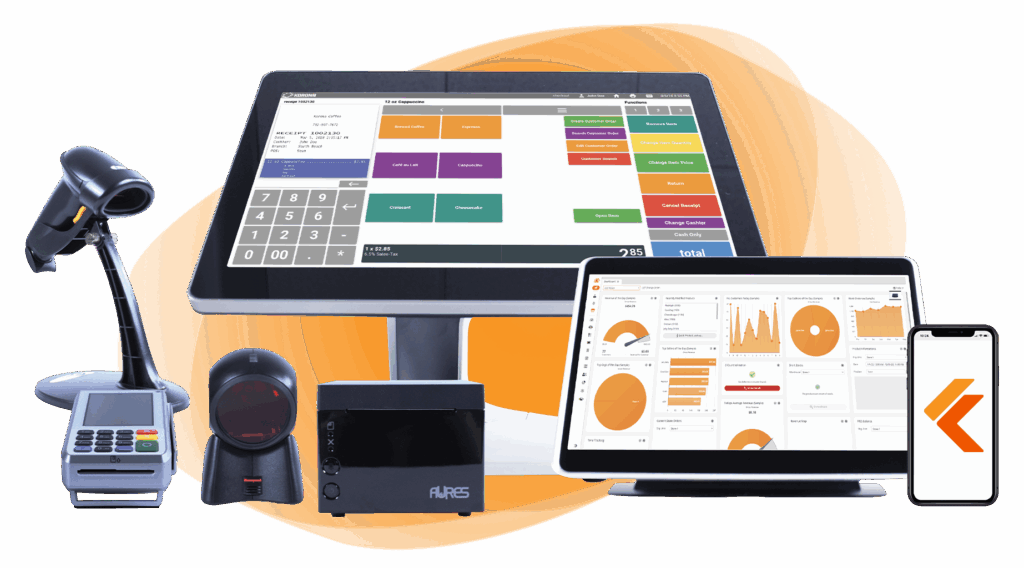
Build Your Own POS
Whether you run a retail store, café, or admissions booth, we have the point of sale hardware designed for your specific needs. Start building your ideal POS system now.
Accepting Cards Online
To accept cards online, you need a payment gateway (the software that securely transmits card data) plus an integration with your website or shopping cart.
Three setup options:
- Hosted payment page: simplest. The customer clicks “Pay” and is redirected to your processor’s secure page. Setup in an hour. PCI compliance for your retail business is mostly handled for you.
- Embedded checkout: the customer never leaves your site. Cleaner experience, slightly more PCI work on your end. Most modern processors offer drop-in widgets (Stripe Elements, Square Web Payments, Helcim.js).
- Shopify, WooCommerce, or BigCommerce integration: if you use a major ecommerce platform, install the processor’s app, and you’re done in 15 minutes.
Setup time for most small businesses: under one hour for Shopify or WooCommerce, two to four hours for a custom site.
Accepting Cards Over the Phone
If you take orders by phone, you need a virtual terminal, which is a web-based dashboard where you key in card details on the customer’s behalf.
What to know:
- Phone/MOTO (mail order/telephone order) transactions count as “card-not-present” and carry higher interchange rates, around 0.5% to 1% higher than in-person
- Most processors include a free virtual terminal with your account
- Record the call if your state allows it, and never store card numbers on paper or in spreadsheets
- For recurring phone customers, tokenize the card on file once, then process future charges against the token rather than the card number
Bottom line
Set up in-person first (highest volume for most small businesses), online second (faster than you think), phone last (only if your business genuinely needs it). Total setup time for a typical small business in 2026: half a day for in-person, one hour for online, 30 minutes for phone if needed.
PCI Compliance and Fraud Prevention for Small Businesses
PCI compliance is the set of security standards Visa, Mastercard, Discover, and American Express require from anyone who accepts card payments. Most small businesses qualify as Level 4 merchants, the lowest-risk tier with the simplest requirements. The whole process takes 30 to 60 minutes once a year, plus a few ongoing security practices.
What PCI Level Are You?
PCI DSS divides merchants into four levels by annual transaction volume:
| Level | Annual Card Transactions | Who It Applies To |
|---|---|---|
| Level 1 | Over 6 million | Large retailers, enterprises |
| Level 2 | 1 million – 6 million | Mid-size merchants |
| Level 3 | 20,000 – 1 million eCommerce only | Mid-volume online sellers |
| Level 4 | Under 20,000 eCommerce Or under 1 million total | MOST COMMON Almost all small businesses |
Most small businesses are Level 4. Compliance at Level 4 means completing a Self-Assessment Questionnaire (SAQ) annually and following basic security practices.
Which SAQ Applies to You?
The right SAQ depends on how you accept cards:
- SAQ A: You only accept cards online, and your processor handles all card data (hosted payment page). The shortest form.
- SAQ A-EP: You accept cards online, and your website touches card data even briefly (embedded checkout). Longer than SAQ A.
- SAQ B: You only use standalone terminals, no integration with anything else.
- SAQ B-IP: Standalone terminals on a network.
- SAQ C-VT: You use a virtual terminal only, no other card acceptance.
- SAQ C: Payment application connected to the internet, plus a segmented network.
- SAQ D: The catch-all. If none of the others fit, you fill out SAQ D.
Your processor should tell you which SAQ to complete. If they refuse to help, that’s a red flag.
The Real Cost of Chargebacks
A chargeback is when a customer disputes a charge with their bank. You lose three things at once:
- The original sale (reversed)
- The product (often already shipped)
- A chargeback fee of $25 to $45 charged by your processor
If your chargeback rate climbs above 1% of transactions, your processor starts adding penalty fees and can terminate your account. Track the ratio monthly.
5 Fraud Prevention Musts
For small businesses in 2026, five practices stop most card fraud before it happens:
- Use EMV-enabled hardware. Chip and contactless tap shift liability for in-person fraud to the card-issuing bank. Magstripe-only is a liability magnet.
- Disable manual card entry where possible. Keyed-in transactions are the most fraud-prone. If you must accept them (phone orders), require AVS and CVV match.
- Require AVS and CVV on online transactions. Address Verification Service and Card Verification Value catch the majority of stolen card attempts.
- Train your staff on red flags. Mismatched signatures, customers rushing through checkout, requests to split a charge across multiple cards.
- Publish a clear refund policy. Customers who can return easily file fewer chargebacks.
Bottom line
PCI compliance for most small businesses is a 30-to-60-minute task once a year. Complete the right SAQ, use EMV hardware, require AVS and CVV online, and train your staff. Skip it, and you risk monthly non-compliance fees, higher liability on fraud, and potential account termination.
POS Choice and Dual Pricing: Two Ways to Manage Your Processing Costs
The advertised rate is only part of the story. Two long-term levers, your POS choice and your pricing strategy, can reduce processing costs by 1% to 3% of card volume. Both work, and both are underused by small businesses in 2026.
Lever 1: Pick a Processor-Agnostic POS
The POS you choose determines how flexible you are with credit card processing. Two models exist.
All-in-one POS systems combine POS software, hardware, and payment processing in one stack. Square, Clover, Toast, and Shopify POS are the main examples. Setup is fast, but you cannot shop your processing rate. If Square raises your effective rate by 0.30%, you cannot move your processor without a POS overhaul.
At $30,000 a month, a 0.30% rate increase costs $1,080 a year. Switching POS systems and retraining staff usually costs more than that, so most merchants accept the increase and quietly overpay.
Processor-agnostic POS systems separate the POS layer from the processing layer. The POS handles sales, inventory, and reporting. A separate merchant account handles card payments. KORONA POS and Lightspeed are examples. When you find a better processing deal, you swap the merchant account in days, not months.
Quick comparison:
| Factor | All-in-One POS | Processor-Agnostic POS |
|---|---|---|
| Setup Speed | Same day | 1 – 5 days |
| Vendors to Manage | 1 | 2 |
| Rate Flexibility | Locked to POS provider | Shop and switch anytime |
| Long-Term Cost Control | Limited | Strong |
| Best For | Under $20K/mo | $20K+/mo |
For high-volume retailers, multi-location operators, or any small business processing more than $20,000 a month, the leverage usually pays for itself in 6 to 12 months.
Lever 2: Use Dual Pricing or Cash Discount Programs
Dual pricing and cash discount programs offset some or all of your processing costs. Customers who pay with cards cover the fee.
How it works in 2026:
- Cash discount: post a “cash discount” sign at checkout. Customers paying with cash get a stated discount off the listed price. Customers paying with cards pay the listed price.
- Dual pricing: display two prices on the menu or shelf: card price and cash price.
- Surcharging: add a percentage fee at checkout if the customer pays with a credit card.
What to know:
- Cash discount and dual pricing are legal in all 50 states
- Surcharging is restricted in Connecticut, Massachusetts, and Maine. New York, Florida, and California have specific disclosure requirements.
- Maximum surcharge in most states: 3% or the actual cost of acceptance, whichever is less
- Debit cards (PIN or signature) cannot be surcharged under any circumstances
Implementation done right can recover 2% to 3% of your card transaction costs. Implementation done badly costs you, customers. The biggest mistake is hiding the surcharge until checkout. Customers walk.
Bottom line: a processor-agnostic POS gives you long-term leverage on rates. Dual pricing, or a cash discount, offsets the cost you do pay. Used together, the two levers can move your effective rate from 3% down to under 1% on card transactions. Most small businesses use neither, even though there are clear ways to lower your merchant fees once you know where to look.
Conclusion
Credit card processing is one of the few small business costs you can directly control. The right pricing model, the right processor, and the right POS setup can save a typical small business $1,000 to $3,000 a year. Most owners never realize how much room there is.
KORONA POS is processor-agnostic. You can switch credit card processors whenever the math works for your business, and the POS stays the same. Flexibility is what protects your margins in the long term. Want to learn more about KORONA POS? Click the button below.
Speak with a product specialist and learn how KORONA POS can power your business.
Credit Card Processing FAQ for Small Businesses
The questions below cover what small business owners ask most about credit card processing in 2026.
How much should a small business pay for credit card processing in 2026?
Most small businesses pay between 1.5% and 3.5% per transaction. The total includes interchange fees (1.15% to 3.15%, paid to the card-issuing bank), assessment fees (0.13% to 0.15%, paid to Visa and Mastercard), and the processor’s markup. Anything consistently above 3% on $20,000+ in monthly volume usually means you’re overpaying.
What’s the cheapest credit card processor for a small business?
There is no single cheapest credit card processor. The right answer depends on your volume. Under $10,000 a month, Square at 2.6% + $0.15 is hard to beat for simplicity. Above $10,000 a month, interchange-plus processors like Helcim cost less. Above $100,000 a month, a direct merchant account through an ISO is cheapest.
Do I need a merchant account, or is a payment processor enough?
For most small businesses, the difference no longer matters. Modern processors like Square and Stripe bundle the merchant account into one signup. Traditional merchant accounts (via banks or ISOs) require a separate application but offer lower rates for high-volume merchants. Under $50,000 a month, go with a bundled solution. Above that, a separate merchant account usually pays off.
Can I legally charge customers a credit card surcharge?
In most states, yes. Surcharging is legal in 47 states. Connecticut, Massachusetts, and Maine restrict or ban it. New York, Florida, and California require specific disclosure. The maximum surcharge in most states is 3% of the transaction or the actual cost of acceptance, whichever is lower. Debit cards (PIN or signature) can never be surcharged.
How long does it take to get approved for credit card processing?
Square, Stripe, and Helcim typically approve low-risk small businesses the same day. Traditional merchant accounts through ISOs take 3 to 10 business days. High-risk merchants (CBD, vape, firearms) typically wait 1 to 2 weeks while the processor reviews the application.
Is Square or Stripe better for a small business?
Square is better for in-person retail and food businesses. Stripe is better for online-first businesses, subscriptions, and any setup that needs custom integration. If most of your sales happen at a physical counter, pick Square. If most of your sales happen online or you sell internationally, pick Stripe. Both use flat-rate pricing in a similar range.
What’s the difference between a payment processor and a POS system?
A payment processor moves money between your customer’s bank and your bank when they pay with a card. A POS (point of sale) system handles the sale itself. It rings up items, tracks inventory, generates receipts, and reports on sales. Some companies offer both in one package (Square, Toast, Clover). Others, like KORONA POS, focus on the POS and let you choose your processor separately.
Can I switch credit card processors mid-contract?
Yes, but it may cost you. Check your contract for early termination fees (usually $295 to $595) and the remaining contract length. If the savings from a switch exceed the termination fee within 6 months, the move pays off. Month-to-month processors like Square, Stripe, and Helcim let you leave anytime with no fee.
What happens if I get too many chargebacks?
Your processor charges a chargeback fee of $25 to $45 for every dispute. If your chargeback rate climbs above 1% of transactions, the processor adds penalty fees. Sustained high chargeback rates can lead to account termination. After termination, you’ll be flagged in the MATCH database (Member Alert to Control High-Risk). The flag makes it harder to open another merchant account.
Do I have to be PCI compliant if I only take a few card payments a month?
Yes. PCI compliance applies to every business that accepts cards, regardless of volume. The good news: most small businesses are Level 4 merchants (under 20,000 ecommerce transactions or 1 million total a year), and Level 4 compliance is straightforward. Complete the right Self-Assessment Questionnaire once a year and follow basic security practices. Skip it, and your processor will charge non-compliance fees of $20 to $30 a month.


