



Every dollar you lose to processing fees is a dollar that doesn’t go back into your business. Finding the cheapest credit card processing provider depends on your volume, your industry, and how you accept payments. Below, we break down eight processors, compare their pricing models, and show real merchant reviews so you can see what actually works and what doesn’t before you commit.
Key Takeaways:
- Interchange-plus pricing almost always costs less than flat-rate pricing, especially once your monthly volume exceeds $5,000.
- Low advertised rates don’t tell the whole story. Always check for hidden fees like PCI compliance charges, chargeback penalties, and early termination costs before you sign up.
- A processor-agnostic POS system like KORONA POS gives you the freedom to switch providers anytime, so you’re never stuck paying more than you should.
How Does Payment Processing Work?
Payment processing from a merchant’s standpoint involves several steps and parties to facilitate a transaction between the customer and the merchant. Here’s a breakdown of how credit card processing works:
1. Customer initiates payment
The customer selects goods or services and proceeds to pay. Payment can be made by credit or debit card, digital wallet, or bank transfer.
2. Payment gateway
The payment gateway technology captures and transfers payment data from the customer to the acquiring bank. It encrypts sensitive information to ensure its security. The gateway sends the transaction details to the payment processor.
3. Payment and card networks
The processor receives the encrypted data and sends it to the relevant card network (e.g., Visa, Mastercard). The card network routes the transaction to the customer’s issuing bank.
4. Issuing bank authorization
The bank checks if the customer has sufficient funds or credit. They also perform fraud checks and send an approval or denial back through the network.
5. Merchant notification
The approval or denial is relayed to the merchant’s point of sale or website. This usually happens within seconds.
6. Transaction completion
If approved, the merchant completes the sale. At this point, the funds are not transferred to the merchant immediately.
7. Settlement
At the end of each business day, the merchant submits all authorized transactions for settlement. The processor collects all these transactions and sends them to the respective card networks.
8. Funds transfer
The issuing banks transfer the funds to the merchant’s acquiring bank. This process typically takes 1-3 business days.
9. Merchant account deposit
The acquiring bank deposits the funds into the merchant’s account minus processing fees.
Throughout this process, the merchant is responsible for:
- Ensuring their payment system is secure and PCI compliant
- Choosing reliable third-party payment processors and gateways
- Managing chargebacks and disputes
- Reconciling transactions and monitoring for fraud
1. Payline: Cheapest Credit Card Payment Processing For High-Risk Retail Businesses
Payline caters to a wide range of industries, with a strong focus on high-risk sectors like nutraceuticals, CBD, firearms, subscription businesses, and online gaming. Their services cover in-person, online, and recurring payment processing.
Key Features
Merchant accounts: Payline offers interchange-plus pricing with transparent pricing and month-to-month agreements. There are no application fees or long-term contracts. The company also provides reduced rates for nonprofits and educational institutions.
Virtual terminal: Payline includes a free virtual terminal with every account, allowing businesses to key in card payments through any web browser. The platform is PCI-compliant and supports invoicing and payment links. It’s worth understanding the difference between a payment gateway and payment processing when evaluating online payment tools.
Mobile payment processing: Payline offers a compact wireless mobile reader at $12/month (24-month lease) that supports tap-to-pay, including Apple Pay, Google Pay, and Samsung Pay. The company also provides free mobile payment apps for iOS and Android, so businesses can accept payments on the go.
Point of sale solutions: Payline integrates with many popular POS platforms, including Clover, and offers its own hardware options. A basic POS starts at $45/month, while a smart terminal runs $40/month. You can check out POS reviews (like on Square and Lightspeed) to find the right POS system for your business.
Online and eCommerce integrations: Payline supports hosted checkout forms, payment links, and a developer-friendly API for custom integrations. The platform works with most major shopping carts and eCommerce platforms. No developer is required for basic setup.
Recurring billing: Payline’s recurring payment tools let businesses automate subscription billing on flexible intervals. The system stores card-on-file data securely, includes automatic retry logic for failed charges, and sends email receipts and reminders to customers before billing.
High-risk payment processing: Payline works with a broad network of high-risk-friendly processors and provides dedicated support through the approval process. Industries served include nutraceuticals, CBD, firearms, coaching and digital products, subscription services, and adult content platforms. Chargeback tools and fraud protection are included at no extra cost.
Pricing
Payline uses an interchange-plus pricing model with volume-based tiers. The more you process each month, the lower your markup. There are no application, cancellation, or PCI compliance fees. All agreements are month-to-month, and your first month is free.
| Monthly Volume | Card Present | Card Not Present |
|---|---|---|
| Under $50K | Interchange + 0.35% + 10¢ | Interchange + 0.50% + 20¢ |
| $50K – $100K | Interchange + 0.30% + 10¢ | Interchange + 0.45% + 20¢ |
| $100K – $500K | Interchange + 0.25% + 10¢ | Interchange + 0.40% + 15¢ |
| $500K – $1M | Interchange + 0.20% + 8¢ | Interchange + 0.20% + 15¢ |
| $1M+ | Interchange + 0.15% + 8¢ | Interchange + 0.10% + 12¢ |
Other fees to know: $25 monthly minimum if processing volume falls short; $25 per chargeback; no PCI compliance fee; no cancellation fee. Hardware is lease-based: Basic Terminal at $10/month, Mobile Reader at $12/month, Smart Terminal at $40/month, and Basic POS at $45/month (all on 24-month terms). Nonprofits and educational institutions may qualify for reduced rates by contacting Payline directly.
Pros
No long-term contracts or cancellation fees: Payline bills month-to-month. Merchants can leave at any time without penalty, which lowers the risk of trying out the service.
First month free: New merchants get their first month at no cost. You can test the platform and evaluate the service before committing to ongoing payments.
Works with high-risk merchants: Many processors reject high-risk businesses outright. Payline actively serves industries like CBD, nutraceuticals, firearms, and subscription models, with dedicated support for approvals and chargeback management.
Next-day funding: Payline deposits funds into your bank account the next business day. Fast access to revenue helps with cash flow and day-to-day operations.
No PCI compliance fees: Unlike many competitors, Payline does not charge extra for PCI compliance. Security standards are built into the service.
Cons
Separate fee structures for online and in-person processing: Online transactions are priced higher than in-person ones. Businesses that process both types of payments should factor in the combined cost when budgeting.
Hardware costs are lease-based: Payline lists terminal pricing as monthly lease payments over 24 months rather than upfront purchase prices. Merchants need to contact sales for full details on total equipment costs.
High-risk rates vary: While base rates are competitive, merchants in high-risk industries should expect custom pricing that may be higher than the standard interchange-plus rates listed on the website.
Reviews
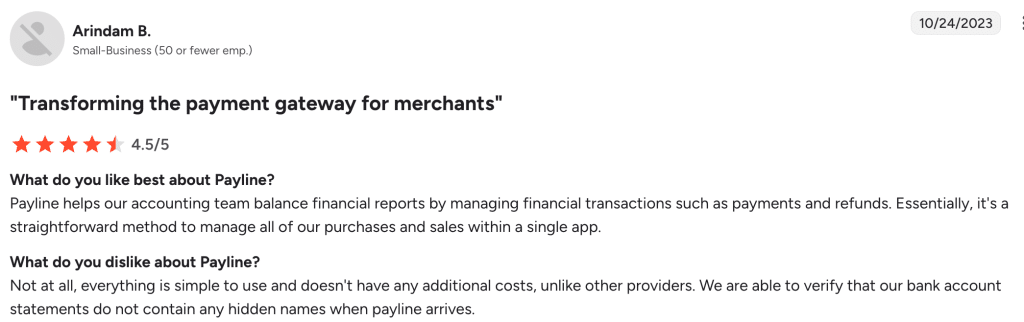
This small-business owner gave Payline a 4.5 out of 5, praising it as a simple, all-in-one tool for managing payments and refunds — with no hidden costs on their bank statements.
2. Helcim: Best Credit Card Processing For Volume Discounts
Helcim uses an interchange-plus pricing model with automatic volume discounts. As your monthly sales grow, your processing rates drop without any negotiation. There are no monthly fees, no contracts, and no cancellation penalties.
Key Features
Interchange-plus pricing model: Helcim separates the interchange fee from its own markup so you can see exactly what you pay. The model is more transparent and often cheaper than flat-rate pricing, especially for growing businesses. Learn more about interchange-plus pricing.
Automatic volume discounts: Rates drop automatically as your monthly processing volume increases. Helcim uses a 3-month rolling average to assign your tier. No phone calls or renegotiations are needed to qualify.
Free POS software: Helcim’s POS software works on any device with internet access. It includes inventory tracking, tipping, split payments, customer profiles, and order history at no extra monthly charge.
Free invoicing and online store: Every account includes online invoicing with payment tracking and customizable templates. Helcim also provides a hosted online store builder that lets you list products, accept payments, and manage orders without a developer.
Payment Extension: Launched in January 2026, the Helcim Payment Extension is a browser add-on that lets you process payments inside third-party business software like WooCommerce, QuickBooks Online, and Xero.
Fee Saver (surcharging): Helcim allows eligible merchants to pass credit card processing fees to customers. In-person surcharge is 2.4%, and online is 3.0%. The merchant pays 0% on credit card transactions with surcharging enabled.
Multi-currency and international payments: Helcim supports international credit card processing for businesses that sell to customers abroad. No extra fees are charged by Helcim, though interchange rates on international cards may be higher.
Pricing and Rates
Helcim uses interchange-plus pricing with automatic volume-based discounts across five tiers. There are no monthly fees, no PCI fees, and no contracts. You only pay when you process a transaction.
| Monthly Volume | In-Person | Keyed & Online |
|---|---|---|
| $0 – $50K | Interchange + 0.40% + 8¢ | Interchange + 0.50% + 25¢ |
| $50K – $100K | Interchange + 0.35% + 7¢ | Interchange + 0.45% + 20¢ |
| $100K – $500K | Interchange + 0.25% + 7¢ | Interchange + 0.35% + 20¢ |
| $500K – $1M | Interchange + 0.20% + 6¢ | Interchange + 0.25% + 15¢ |
| $1M – $5M | Interchange + 0.15% + 6¢ | Interchange + 0.15% + 15¢ |
| $5M+ | Custom rates | Custom rates |
Other fees to know: Chargeback fee is $15, but refunded if you win the dispute. ACH payments cost 0.5% + 25¢ per transaction, capped at $6. Recurring billing adds +0.4% per transaction. NSF or returned ACH transactions cost $5 each. Tap to Pay on iPhone costs 10¢ per transaction. Hardware is purchased outright with no leasing: Card Reader at $199 and Smart Terminal at $349. Optional 4G mobile data is $7/month.
Pros
No monthly fees at all: Helcim charges zero for monthly subscriptions, PCI compliance, setup, or statements. You only pay transaction fees when you actually process payments.
Automatic volume discounts: Rates decrease automatically as your sales grow. Helcim calculates your tier based on a 3-month rolling average, so you always get the rate your volume deserves.
Full suite of free tools: Every account includes POS software, invoicing, a virtual terminal, an online store, and customer management tools. Most competitors charge extra for similar features.
Strong customer support: Helcim offers phone and email support with real people. The company consistently receives high ratings for its responsive, helpful service on review platforms like Trustpilot and Merchant Maverick.
Cons
Not ideal for low-volume businesses: The real savings from interchange-plus pricing appear at higher volumes. Businesses processing under $5,000/month may not see significant cost advantages over flat-rate competitors like Square.
Limited third-party integrations: While the new Payment Extension expands compatibility, Helcim still supports fewer direct integrations than larger competitors like Stripe or Square.
No high-risk merchant support: Helcim does not accept businesses in industries like cannabis, gambling, or financial services. If your business falls into a high-risk category, you will need a different processor.
No same-day deposits: Funds arrive within one to two business days. Competitors like Clover and Stax offer same-day deposit options, which may matter for businesses with tight cash flow.
Reviews
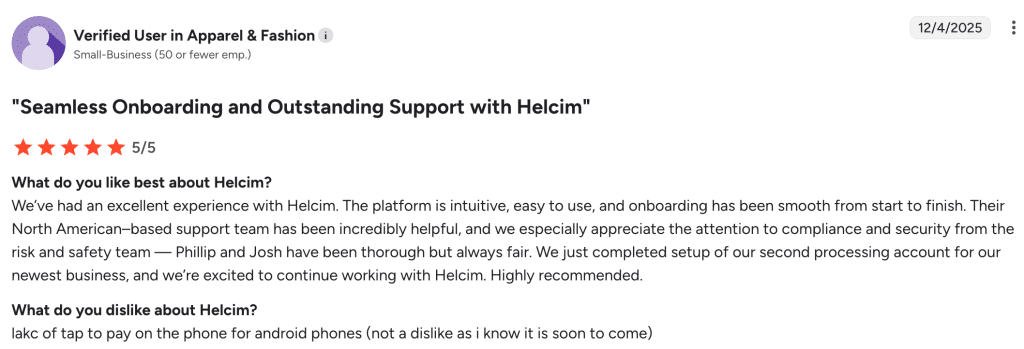
This verified small-business owner in apparel and fashion gave Helcim a perfect 5 out of 5, highlighting seamless onboarding, intuitive software, and a compliance team that is thorough but fair.
Source: G2
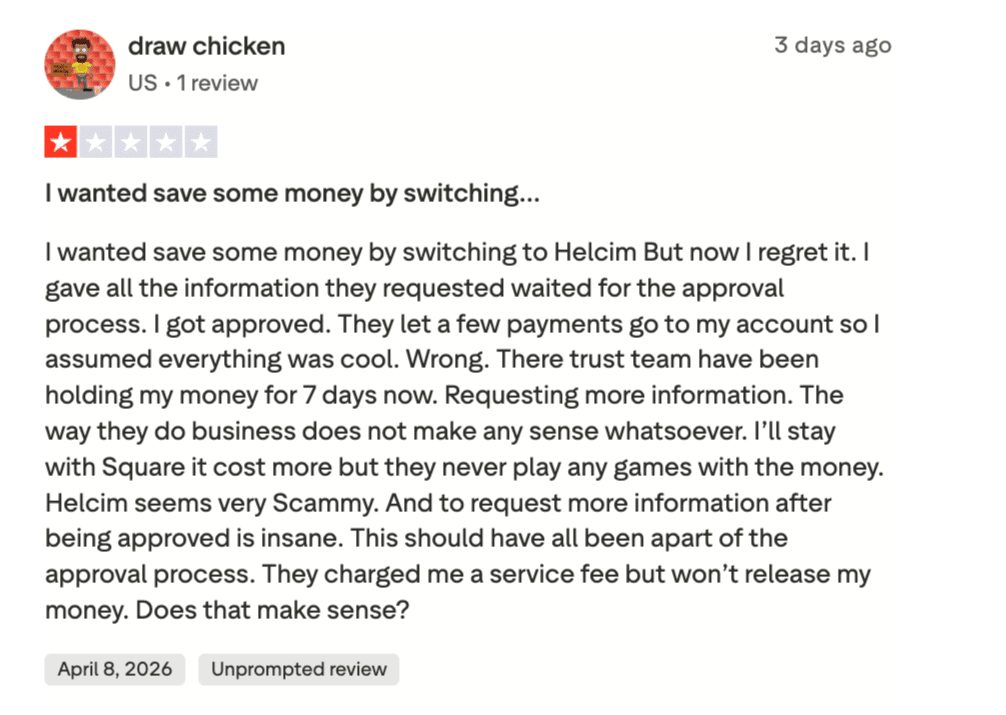
Not every merchant shares the same experience — this 1-star Trustpilot review describes funds being held for days after approval, raising concerns about Helcim’s trust and verification process.
Source: Truspilot
3. Stax: Best for high-volume businesses that want to eliminate percentage markups and pay a flat monthly fee instead.
Stax is a subscription-based payment processor built for mid-to-high-volume businesses that want to bypass percentage markups and pay wholesale interchange rates instead.
Key Features
Subscription-Based Pricing Model: Stax charges a flat monthly fee instead of a percentage markup on each transaction. Merchants pay only the interchange rate plus a small per-transaction fee, which benefits businesses that process high volumes.
All-in-One Dashboard: The Stax Pay platform combines payment processing, invoicing, reporting, customer management, and inventory tracking into a single interface accessible from any device.
200+ Integrations: Stax connects with most third-party POS systems and popular business tools like QuickBooks, Shopify, Xero, and Zoho Books. The platform is hardware-agnostic, so merchants can use existing equipment.
Multiple Payment Methods: Stax supports in-person, online, mobile, contactless, and keyed-in transactions, along with ACH payments, Text2Pay, and QR code payments.
Recurring Billing and Invoicing: Merchants can set up automated recurring charges and send branded invoices via email or text on scheduled intervals.
Surcharging: Stax offers a compliant surcharging feature, allowing merchants to pass credit card processing fees to customers where legally permitted. The add-on starts at $99/month.
Pricing
Stax ties its monthly subscription to your annual processing volume, with flat per-transaction fees across all plans.
| Annual Processing Volume | Monthly Subscription |
|---|---|
| Up to $150,000/year | $99/month |
| $150,000 to $250,000/year | $139/month |
| $250,000+/year | $199+/month |
| Higher volumes | Custom quote required |
| Transaction Type | Fee |
|---|---|
| Card processing (interchange markup) | 0% markup on interchange |
| Card present (dip, tap, swipe) | $0.08 per transaction |
| Card not present (keyed-in or online) | $0.15 per transaction |
| ACH | 1% per transaction (capped at $10) |
| Surcharge Type | Fee |
|---|---|
| Credit card surcharging | 0% paid by merchant |
| Merchant debit surcharge | 1.89% + $0.35 per transaction |
All plans include 0% markup on direct-cost interchange. Optional add-ons include chargeback protection ($25 per chargeback) and a terminal protection plan ($17/month).
Pros
Significant savings at high volume. Businesses processing $5,000+ monthly often save 20–40% over traditional flat-rate processors, according to Merchant Maverick.
Transparent cost structure. NerdWallet notes that Stax clearly discloses its margins with no long-term contracts and month-to-month billing.
Responsive customer support. Trustpilot reviewers frequently praise Stax for helpful onboarding and dedicated account managers who respond quickly.
Rich integration ecosystem. Business.com highlights that Stax works with 90% of third-party POS systems, so you likely won’t need to buy new hardware.
Cons
Expensive for low-volume businesses. NerdWallet warns that the fixed monthly fee can be costly if you process under $5,000 per month.
No proprietary hardware. Business.org notes Stax requires third-party terminals purchased separately, adding upfront costs.
PCI compliance fee. NerdWallet points out a $10/month PCI compliance charge that most competitors do not impose.
Add-on costs add up. Several.com mentions that features like ACH processing, brand customization, and surcharging carry additional monthly fees.
Reviews
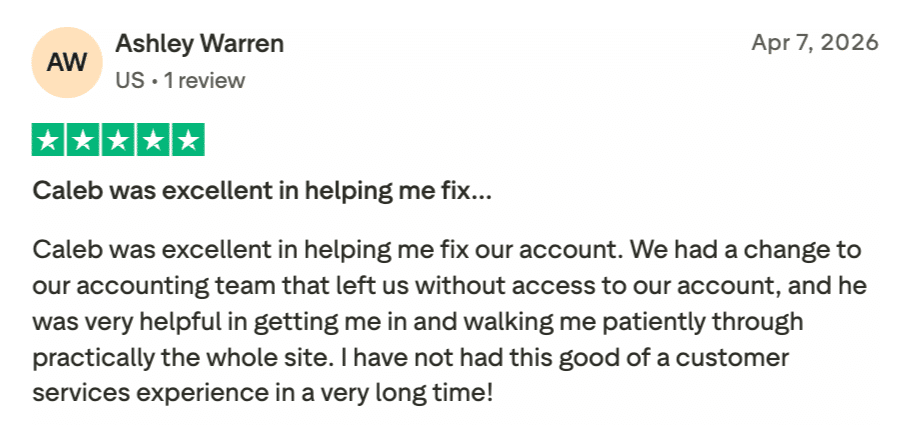
This 5-star Trustpilot reviewer highlights the kind of hands-on customer service that sets Stax apart, with a support rep who patiently walked them through the entire platform after an account access issue.
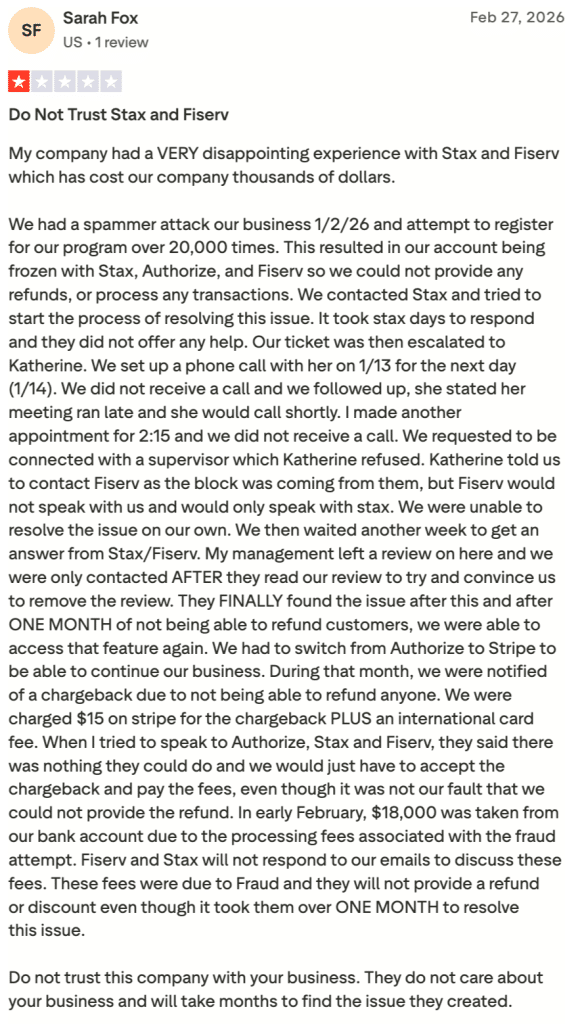
On the other end of the spectrum, this 1-star Trustpilot review describes a month-long ordeal involving a frozen account after a fraud attack, unresponsive support, and $18,000 in unrecovered processing fees
Source: Trustpilot
4. Dharma Merchant Services
Dharma is an ethics-driven payment processor known for transparent interchange-plus pricing, strong nonprofit support, and a reputation for honest business practices.
Key Features
Interchange-Plus Pricing: Dharma uses a pure interchange-plus model with fixed, clearly disclosed margins. You always know exactly what Dharma charges on top of the wholesale interchange rate.
MX Merchant Platform: Every account includes free access to MX Merchant, which bundles a virtual terminal, mobile app, online reporting, and a customer database in one system.
B2B Processing Program: Dharma offers discounted rates for merchants who process Level 2 and Level 3 data, a rare feature among smaller processors.
No Hidden Fees: Dharma does not charge annual fees, PCI compliance fees, or monthly minimums. A one-time $49 account closure fee applies if you cancel.
Socially Responsible Business: Dharma is a certified B Corp committed to sustainability and nonprofit support. Nonprofit organizations receive special pricing.
Multiple Gateway Options: Beyond MX Merchant, Dharma supports Authorize.net and other third-party gateways for e-commerce merchants who need more flexible integrations.
Pricing
Dharma keeps its pricing simple with a flat $20 monthly fee and interchange-plus rates that vary by business type.
| Business Type | Transaction Fee | Monthly Fee |
|---|---|---|
| Retail & Storefront | Interchange + 0.15% or 0.25% + $0.08 | $20/month |
| eCommerce & Online | Interchange + 0.20% or 0.30% + $0.11 | $20/month |
| Restaurant | Interchange + 0.15% or 0.25% + $0.08 | $20/month |
| High-Volume (over $100K/month or 5,000+ transactions) | Reduced margins available | $20/month |
No long-term contracts. No annual, batch, or AVS fees.
Pros
Extremely transparent pricing. Merchant Maverick calls Dharma one of the most honest processors in the industry, with margins clearly displayed on the website.
Excellent reputation with reviewers. U.S. News highlights overwhelmingly positive feedback, with merchants praising fair rates and ethical practices.
Free virtual terminal and mobile app. NerdWallet notes that the MX Merchant platform, included at no extra cost, covers most day-to-day business needs.
Strong nonprofit and B2B support. Merchant Maverick highlights exclusive programs for nonprofits and B2B merchants that few competitors offer.
Cons
Not ideal for low-volume sellers. NerdWallet advises that businesses processing under $10,000/month may find the static monthly fee too expensive relative to volume.
Limited customer support hours. Dharma support is available Monday–Thursday 9 AM–4 PM and Friday 9 AM–2 PM ET only, per their website.
No high-risk merchant support. Merchant Maverick notes Dharma does not accept high-risk or international accounts, referring them elsewhere.
Separate accounts may be required. NerdWallet mentions that merchants with significant in-person and online volumes may need to set up two different accounts.
Reviews
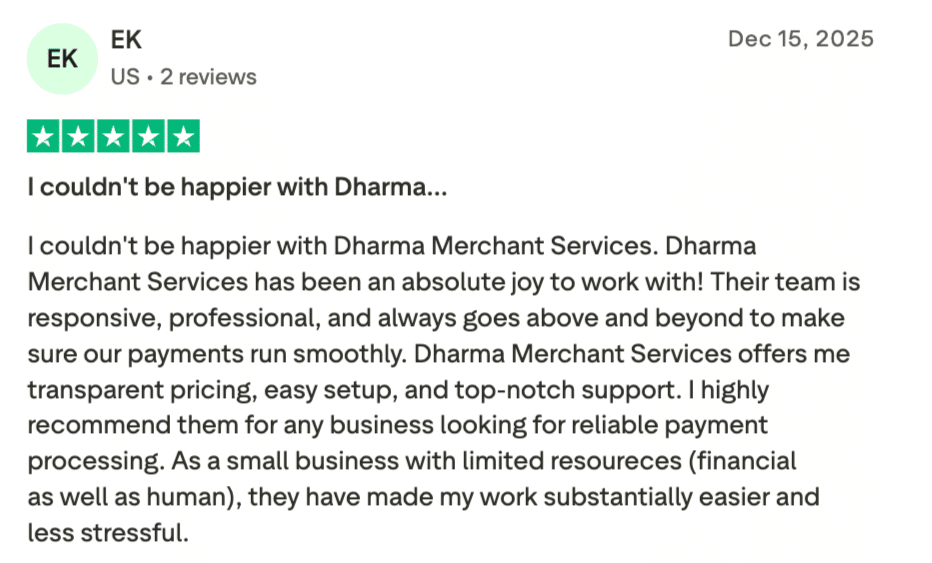
For small businesses with limited resources, Dharma can be a game-changer — as one 5-star Trustpilot reviewer puts it, the transparent pricing, easy setup, and responsive team have made their work substantially easier and less stressful.
Source: Trustpilot
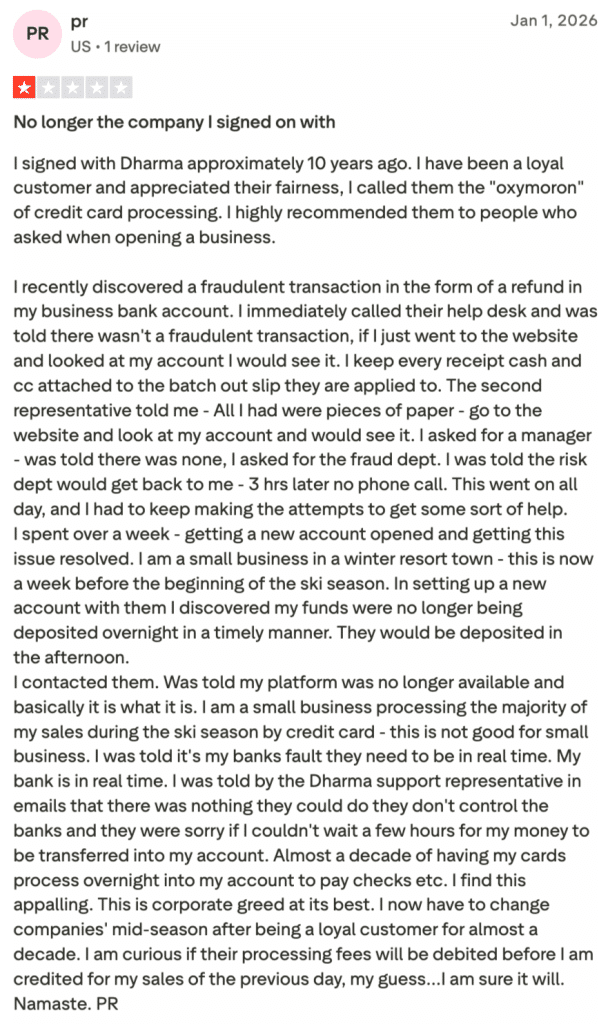
A decade of loyalty wasn’t enough to keep one merchant happy, after encountering a fraudulent transaction, they describe dismissive support, delayed fund deposits, and a company that no longer resembles the one they once recommended to fellow business owners.
5. Chase: Best for SMB that already bank with Chase and value same-day funding.
Chase Payment Solutions is the merchant services arm of JPMorgan Chase, offering payment processing backed by one of the largest financial institutions in the world.
Key Features
Direct Processor and Acquiring Bank: Chase handles both payment processing and bank acquiring in-house. Fewer intermediaries mean fewer handoffs during each transaction.
Same-Day Funding: Merchants who deposit into a Chase business checking account can access funds as soon as the same day, at no extra cost.
QuickAccept Mobile Reader: The compact card reader pairs with the Chase Mobile app, allowing small businesses to accept chip, swipe, and contactless payments on the go.
24/7 Customer Support: Live expert guidance is available around the clock, along with an online support center for self-service troubleshooting.
HIPAA-Compliant Processing: Chase is one of the few processors that offers a HIPAA-compliant payment solution for healthcare providers.
Built-In Fraud Protection: Chase’s security systems monitor transactions for suspicious activity and offer chargeback dispute assistance.
Pricing
Chase uses flat-rate pricing with the same rate across all major card networks.
| Transaction Type | Fee |
|---|---|
| Tap, dip, or swipe | 2.6% + 10¢ |
| Manually keyed-in or payment links | 3.5% + 10¢ |
| E-commerce | 2.9% + 25¢ |
Custom pricing and interchange-rate options are available for higher-volume businesses. All major card networks are accepted at the same rate.
Pros
Same-day funding at no additional cost. Business.com praises the deposit speed, especially for Chase banking customers who receive funds the same day.
Trusted brand with massive reach. CreditDonkey emphasizes the security and reliability that come with JPMorgan Chase’s infrastructure and fraud protection.
No monthly processing fee. NerdWallet highlights that Chase does not charge a monthly subscription for basic payment processing services.
Multichannel flexibility. Business.com notes Chase supports in-store, mobile, online, and phone transactions all under one account.
Cons
Flat-rate pricing gets expensive at volume. WebsitePlanet cautions that high-volume businesses would likely pay less with an interchange-plus processor.
Requires a Chase bank account for best features. NerdWallet points out that same-day funding and QuickAccept require a Chase business checking account.
Technology is behind competitors. Merchant Cost Consulting describes Chase as a legacy provider with limited integration options and dated tech.
Potential chargeback fees. Business.com mentions chargeback fees of $25 to $100 per incident, which can erode margins for dispute-prone businesses.
Reviews
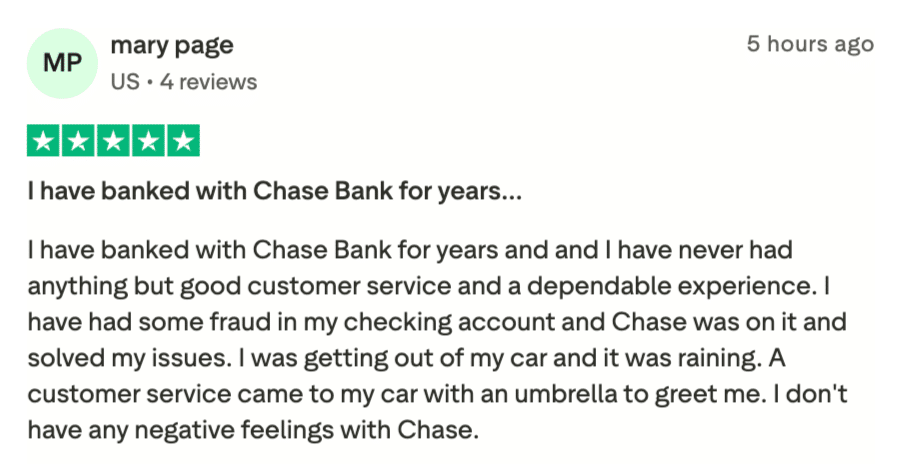
Mary Page has banked with Chase for years and says she’s never had a bad experience, from resolving fraud on her checking account to a rep who walked out with an umbrella to greet her on a rainy day.
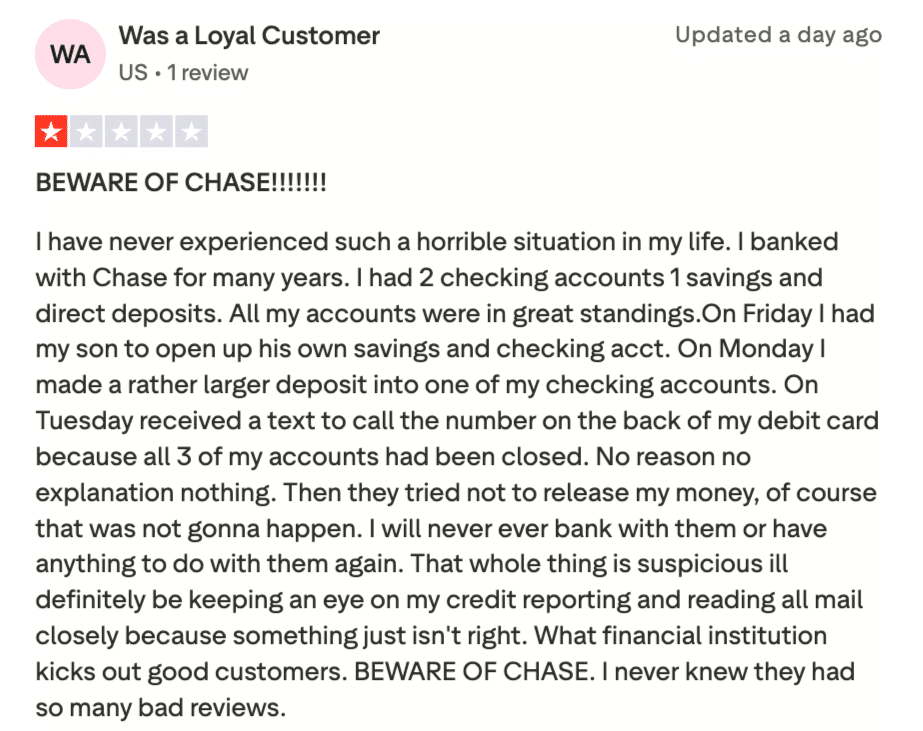
Another long-time customer didn’t fare as well after years of good standing, all three of their accounts were suddenly closed with no explanation, and Chase initially refused to release their funds.
6. Payment Depot: Best for growing businesses that need wholesale rates without committing to a high monthly subscription.
Payment Depot is a Stax subsidiary that brings wholesale interchange pricing to small and mid-sized businesses through flexible plans with no long-term contracts.
Key Features
Interchange-Plus Pricing with No Monthly Fee Option: Payment Depot offers an interchange-plus plan with rates from 0.2% to 1.95% above interchange and no mandatory monthly subscription, ideal for small or seasonal businesses.
Membership Plans for Higher Volume: For businesses wanting even lower per-transaction costs, Payment Depot provides tiered membership plans at $79, $99, and $199 per month with reduced per-transaction fees.
Free Terminal Included: All membership plans above the basic tier include a free Dejavoo terminal with EMV and contactless payment support.
Virtual Terminal and Mobile App: Payment Depot partners with SwipeSimple to provide a virtual terminal for phone orders, invoicing, recurring billing, and inventory tracking.
POS System Options: Merchants can choose between Clover and Vital Select POS systems, each with hardware and software for sales, reporting, employee management, and inventory.
No Cancellation Fees: All plans operate on a month-to-month basis with no early termination penalty.
Pricing
Payment Depot uses a quote-based system, but here’s a general overview of what to expect.
| Detail | Info |
|---|---|
| Pricing model | Interchange plus |
| Variable rates | As low as 0.2% to 1.95% above interchange |
| Cancellation fees | None |
| Software access | Unlimited, included with all accounts |
Payment Depot uses a quote-based system. Exact rates depend on business type and processing volume. Each account unlocks features like dashboards and analytics, digital invoicing, Text2Pay mobile payments, hosted payment pages, recurring and scheduled payments, accounting reconciliation, payment links, buttons, and QR codes, and data exports.
Pros
Wholesale interchange rates save money. GetApp reviewers consistently report significant savings compared to flat-rate processors, especially at higher volumes.
No long-term contracts. Business.com highlights the month-to-month flexibility with zero cancellation fees, rare among membership-based processors.
Free terminal with higher-tier plans. WebsitePlanet notes that the included Dejavoo terminal saves merchants $200+ in upfront hardware costs.
90-day money-back guarantee. Merchant Maverick mentions Payment Depot backs new accounts with a satisfaction guarantee, reducing risk for new customers.
Cons
Expensive for low-volume businesses. Business.com warns that merchants processing under $2,500/month would pay more here than with a flat-rate processor.
Basic software features. Merchant Maverick notes the dashboard and analytics are more limited compared to Stax, its parent company.
PCI noncompliance fee. NerdWallet flags a $10/month PCI compliance fee that adds $120/year in unavoidable costs.
Invoicing requires Authorize.net. Merchant Maverick notes that invoicing is only available through Authorize.net, which incurs an additional monthly fee.
Reviews
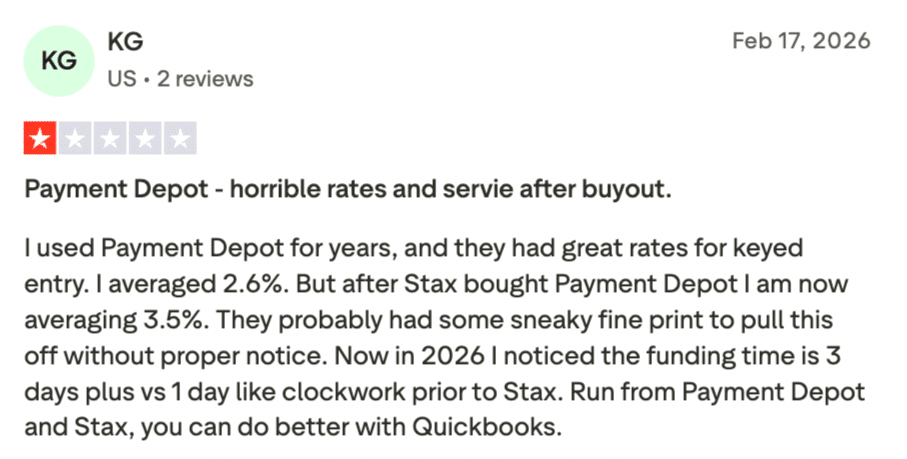
Payment Depot’s wholesale rates might catch your eye, but finding happy merchants is another story; this reviewer used the service for years with great results until Stax acquired the company, after which their rates jumped from 2.6% to 3.5%, and funding times tripled.
7. Square: Best for new or small businesses that need a free, all-in-one POS system with zero upfront commitment.
Square is a popular flat-rate processor and POS platform that lets businesses accept payments in person, online, and on mobile with zero monthly fees on its free plan.
Key Features
Free POS Software: Square’s baseline plan costs nothing per month. The free POS app includes payment processing, basic reporting, digital receipts, and inventory management.
Unified Commerce Platform: Square handles in-person, online, and mobile payments from one account. You can sell through a physical store, an online store, social media, or invoices without switching platforms.
Flat-Rate Pricing Across All Card Brands: Visa, Mastercard, American Express, and Discover all process at the same rate. No surprises when a customer hands over an Amex card.
Hardware Ecosystem: Square sells card readers ($59), terminals ($299), and full registers ($799). New accounts receive a free magstripe reader.
No Chargeback Fees: Square does not charge merchants for disputed transactions, a significant advantage for businesses in dispute-prone industries.
Built-In Business Tools: The platform includes team management, loyalty programs, gift cards, appointment scheduling, and payroll as add-ons, all accessible from the same dashboard.
Pricing
Square offers three plan tiers, each with slightly lower transaction rates as the monthly subscription increases.
| Transaction Type | Free ($0/month) | Plus ($49/month) | Premium ($149/month) |
|---|---|---|---|
| In-person | 2.6% + 15¢ | 2.5% + 15¢ | 2.4% + 15¢ |
| Online | 3.3% + 30¢ | 2.9% + 30¢ | 2.9% + 30¢ |
| Manually keyed | 3.5% + 15¢ | 3.5% + 15¢ | 3.5% + 15¢ |
Custom pricing available for businesses processing over $250,000 per year.
Pros
Zero barrier to entry. NerdWallet praises the free plan with no monthly fees or contracts, ideal for new businesses or those with unpredictable sales volume.
No chargeback fees. GetApp reviewers frequently cite the $0 dispute fee as a standout, saving $15–$25 per incident compared to most processors.
Extremely easy setup. Capterra users report going from signup to accepting payments in under 15 minutes, with a clean and intuitive interface.
All-in-one business management. NerdWallet notes that reporting, invoicing, inventory, payroll, and loyalty are all built into one ecosystem.
Cons
Online rates are high on the Free plan. NerdWallet points out that the 3.3% + 30¢ online rate is notably above competitors like Stripe at 2.9% + 30¢.
Flat-rate pricing penalizes high volume. Reddit users and WebsitePlanet both note that growing businesses eventually overpay compared to interchange-plus models.
Account stability concerns. Some Reddit users and GetApp reviewers report sudden account holds or freezes with limited explanation from Square.
Limited customization. Capterra reviewers mention that Square’s POS app offers fewer custom workflows than specialized restaurant or retail systems.
Reviews
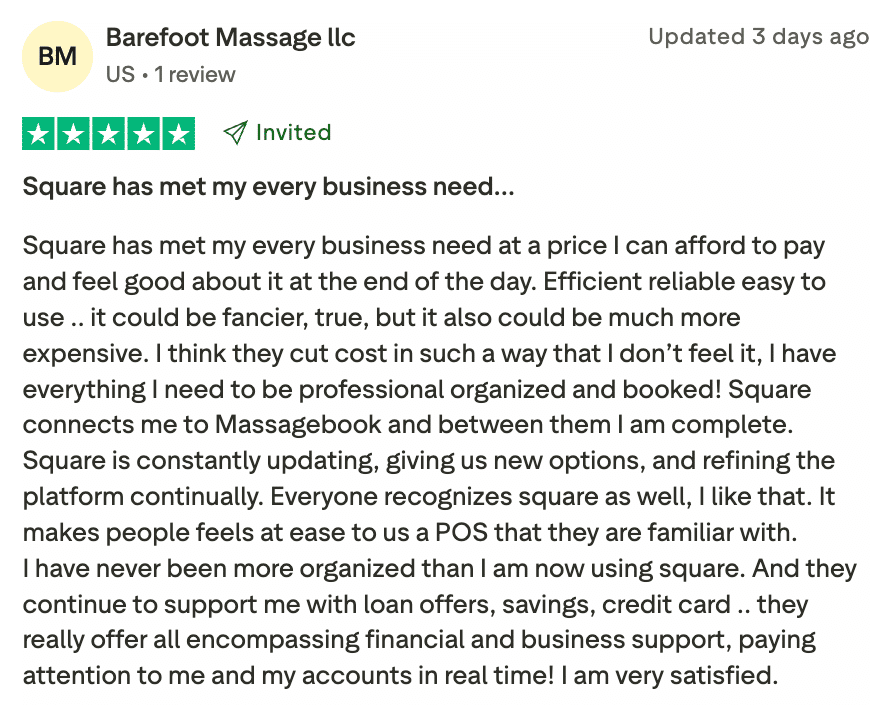
Barefoot Massage LLC says Square covers every business need at a price they can afford — from booking and payments to loan offers and savings, and appreciates that customers already recognize and trust the platform at checkout.
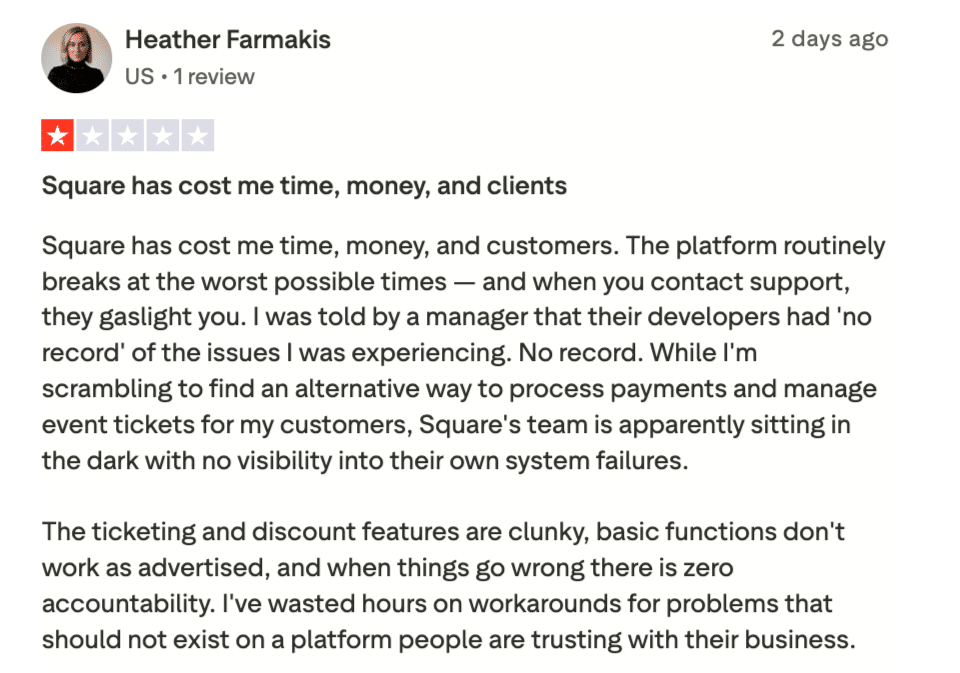
Heather Farmakis had the opposite experience — she says Square has cost her time, money, and clients, with the platform breaking at critical moments and support claiming they had no record of the issues she reported.
8. Stripe: Best for online businesses that need a powerful, API-driven payment infrastructure with global reach.
Stripe is a developer-focused payment platform powering online transactions for millions of businesses worldwide, from startups to Fortune 500 companies like Shopify and Zoom.
Key Features
Developer-First Platform: Stripe’s API is the gold standard for online payment integration. Developers can build fully custom checkout flows, subscription models, and marketplace payment systems using well-documented SDKs in every major language.
100+ Payment Methods: Stripe supports credit and debit cards, digital wallets (Apple Pay, Google Pay), ACH transfers, SEPA, bank redirects, and buy-now-pay-later options through a single integration.
Global Reach: Stripe processes payments in 195+ countries and supports 135+ currencies. Local acquiring is available in 46+ markets, which keeps cross-border fees lower for international sellers.
Stripe Radar Fraud Protection: Built-in machine learning tools analyze billions of data points to detect and block fraudulent transactions automatically.
Prebuilt Checkout Options: For merchants who do not want custom code, Stripe offers hosted Checkout pages, Payment Links (no code needed), and embeddable Elements UI components.
Subscription and Billing Tools: Stripe Billing manages recurring revenue with support for metered billing, prorations, trial periods, and failed-payment recovery.
Pricing
Stripe keeps it simple with pay-as-you-go pricing and no monthly fees: here’s the full rate breakdown.
| Transaction Type | Fee |
|---|---|
| Online card payments | 2.9% + 30¢ |
| In-person (Stripe Terminal) | 2.7% + 5¢ |
| International cards | Additional 1.5% |
| Currency conversion | Additional 1% |
| ACH direct debit | 0.8%, capped at $5 |
| Wire transfers | $8 each |
| Chargebacks | $15 per dispute |
| Monthly fee | $0 |
No setup fees, no monthly fees, no hidden fees. Custom enterprise pricing is available for large-volume businesses.
Pros
Best-in-class API and documentation. G2 and Capterra reviewers consistently rank Stripe’s developer experience as the top in the industry.
Supports virtually every payment method. NerdWallet highlights that Stripe’s 135+ currencies and 100+ payment methods cover nearly any business scenario worldwide.
No monthly fees or contracts. WebsitePlanet notes the pure pay-as-you-go model eliminates financial risk during slow months.
Advanced fraud detection. Merchant Maverick praises Stripe Radar for blocking fraudulent charges before they reach your account, with minimal false positives.
Cons
Fees stack up on international transactions. CheckThat.ai reports that a cross-border transaction with currency conversion can reach 5.4% + 30¢ total.
$15 chargeback fee is non-refundable. Multiple review sites note that you pay the dispute fee even if you win the case.
Not beginner-friendly for non-developers. NerdWallet cautions that businesses without technical resources may struggle with Stripe’s integration process.
Customer support can be slow. G2 reviewers report response times of 2–4 weeks for non-enterprise accounts during critical issues like account freezes.
Reviews
Stephen Dawson kept it short and sweet in his 5-star review — for him, Stripe’s combination of professionalism and kindness is a winning formula.

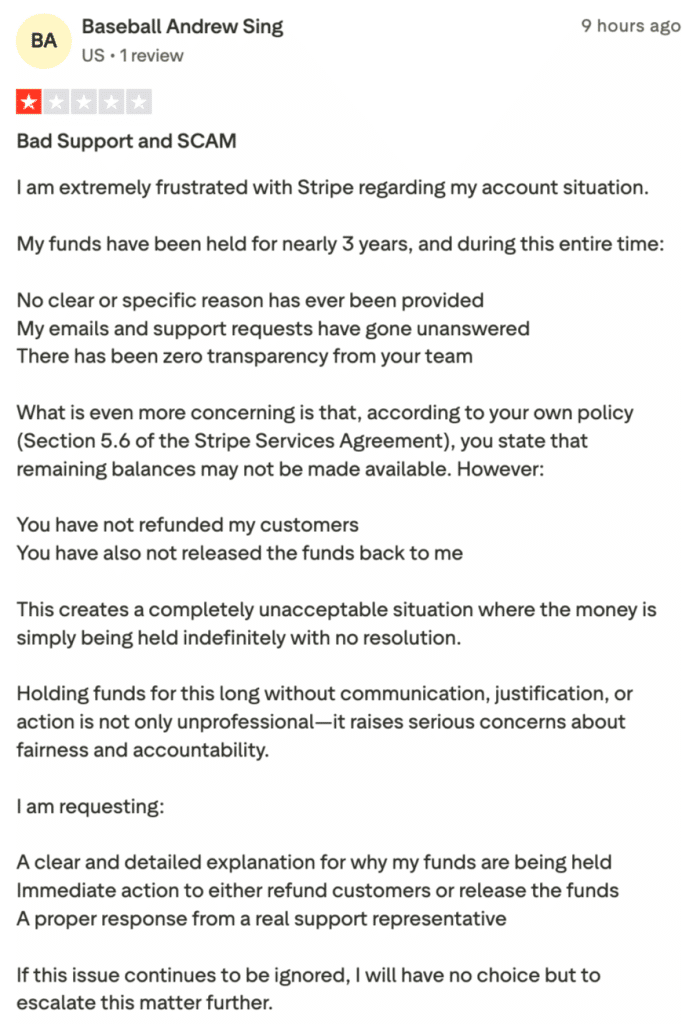
On the other hand, one merchant says Stripe has been holding their funds for nearly three years with no explanation, no response to support requests, and no resolution — raising serious concerns about transparency and accountability.
9. PayPal Zettle (now PayPal Point of Sale): Best for mobile vendors, pop-up shops, and micro-businesses that want the cheapest way to accept cards in person.
PayPal Zettle is a lightweight, mobile-first POS system designed for small businesses, pop-up shops, and service providers who need simple, affordable card acceptance.
Key Features
No Monthly Fees: The PayPal POS app is entirely free to download and use. Merchants pay only per-transaction fees with no subscription or setup costs.
Low-Cost Card Reader: The first card reader costs just $29 (additional readers are $79 each). The reader supports chip cards, contactless payments, Apple Pay, Google Pay, and Samsung Pay.
Tap to Pay on Phone: Merchants can accept contactless payments directly on their iPhone or Android device without purchasing any hardware.
PayPal and Venmo Acceptance: As a PayPal product, Zettle natively accepts PayPal and Venmo payments, giving access to millions of active PayPal users.
Built-In Inventory and Sales Tracking: The POS app includes product catalog management, stock level notifications, and sales analytics with exportable reports.
Quick Fund Access: Transaction funds are available in your PayPal balance within minutes, and can be transferred to a linked bank account.
Pricing
PayPal Zettle charges no monthly fees and keeps hardware costs low — here’s what you’ll pay per transaction.
| Item | Fee |
|---|---|
| In-person (card reader) | 2.29% + 9¢ |
| Manually keyed transactions | 3.49% + 9¢ |
| QR code payments | 2.29% + 9¢ |
| Card reader (first) | $29 |
| Card reader (additional) | $79 each |
| Terminal | $199 ($239 with barcode scanner) |
| Invoicing (PayPal payments) | $3.49% + 9¢ |
| Invoicing (cards and alternative payment methods) | $2.99% + 49¢ |
No monthly fees. No setup fees. No long-term contracts.
Pros
Lowest in-person transaction rate among flat-rate processors. Tech.co ranks PayPal POS as one of the most affordable options at 2.29% + 9¢ per tap or dip.
Dead-simple setup. G2 reviewers report that getting started takes minutes with just a phone, the free app, and a $29 card reader.
PayPal and Venmo built in. NerdWallet highlights native acceptance of PayPal, Venmo, and QR code payments, which no other POS system offers out of the box.
Unlimited users at no extra cost. G2 reviewers appreciate the ability to add as many team members as needed without paying additional per-seat fees.
Cons
No offline mode. G2 reviewers flag that Zettle requires a stable internet connection at all times, with no way to queue transactions when offline.
Limited advanced features. NerdWallet notes the lack of loyalty programs, CRM tools, email marketing, and floor plan management that competitors like Square offer.
Integration options are sparse. Tech.co and GetApp reviewers report fewer third-party integrations compared to Square or Stripe, limiting flexibility for growing businesses.
Keyed-in transactions are expensive. NerdWallet points out that the 3.49% + 9¢ rate for manual entries is steep for phone-order-heavy businesses.
Reviews
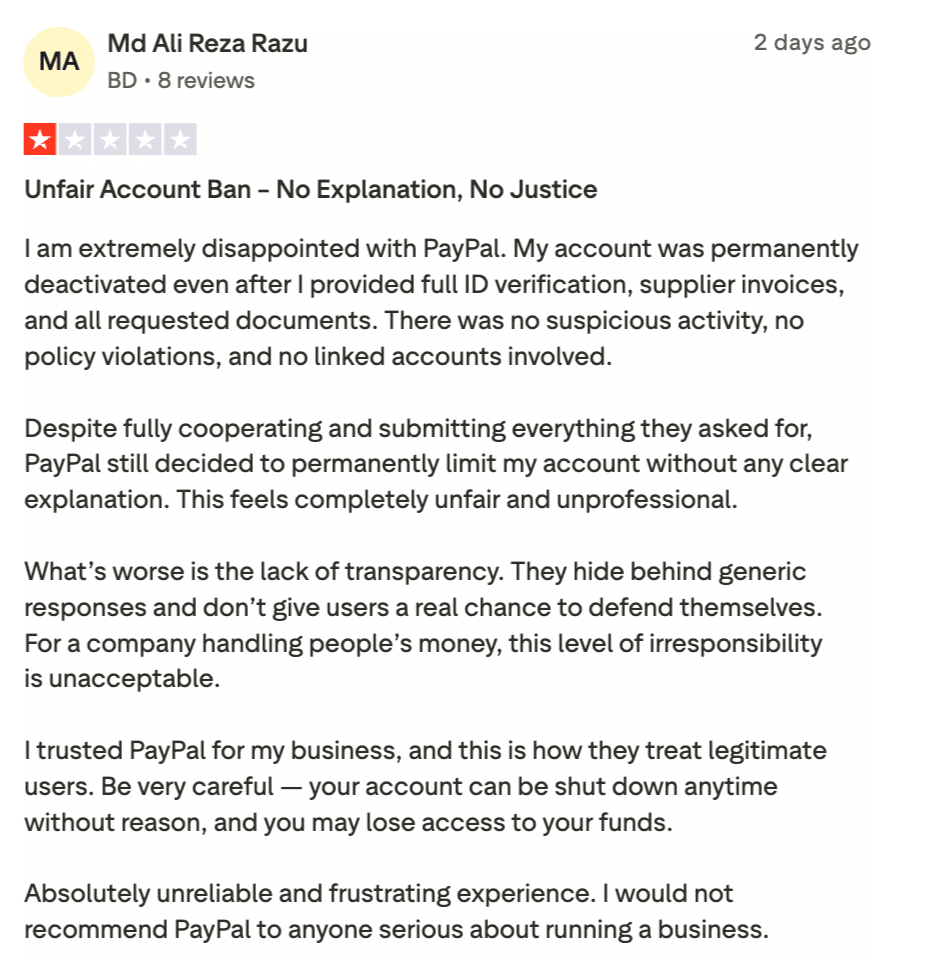
PayPal’s low fees and familiar brand might seem appealing, but positive reviews are hard to find. This merchant had their account permanently deactivated despite submitting every document PayPal requested, with no explanation and no way to recover their funds.
How To Choose a Credit Card Processor With the Best Rates?

Learn more about how credit card processing works and save your business money with this free eGuide.
Choosing a credit card processor with the best rates involves careful consideration of several factors. Here’s a guide to help you make an informed decision:
Understand Your Business Needs
Transaction Volume and Value: Assess your average transaction size and the number of transactions you process monthly.
- Payment Methods: Determine the payment methods you accept (in-person, online, or mobile).
- Additional Services: Consider if you need additional services such as POS systems, invoicing, or recurring billing.
Compare Pricing Models
Credit card processors typically offer different pricing models:
- Flat Rate: A fixed percentage per transaction. Simple but may not be the cheapest.
- Interchange-Plus: The interchange rate plus a fixed fee. More transparent and often cheaper for larger volumes.
- Tiered Pricing: Different rates for qualified, mid-qualified, and non-qualified transactions. Can be complex and sometimes more expensive.
Evaluate Fees
Look beyond the transaction rates and evaluate other potential fees:
- Monthly Fees: Charged regardless of transaction volume.
- Setup Fees: One-time fees for account setup.
- PCI Compliance Fees: Fees for meeting security standards.
- Early Termination Fees: Charges for ending the contract early.
- Chargeback Fees: Fees for handling disputed transactions.
Assess Customer Support and Reputation
- Availability: Ensure customer support is available when you need it.
- Quality: Look for responsive and knowledgeable support.
- Reputation: Check reviews and ratings from other businesses.
Check Contract Terms
- Length of Contract: Some processors require long-term contracts.
- Flexibility: Look for month-to-month agreements if you want flexibility.
- Transparency: Ensure all terms and conditions are clearly stated.
Consider Integration and Technology
- Compatibility: Ensure the processor integrates with your existing systems (POS, eCommerce platform).
- Technology: Look for advanced features like fraud protection, analytics, and mobile payments.
Request Detailed Quotes
- Custom Quotes: Provide detailed information about your business to get accurate quotes.
- Breakdown of Fees: Request a breakdown of all fees and charges.
- Negotiation: Don’t hesitate to negotiate for better rates or terms.
Try Before You Commit
- Trial Period: Some processors offer trial periods or month-to-month contracts to test their services.
- Performance: Assess the speed, reliability, and ease of use during the trial period.
How to Reduce Credit Card Processing Fees?
For a broader look at how your POS choice affects what you pay in fees, see which POS systems carry the lowest overall fees before going further.
Prevent Transaction Downgrades
Every card transaction has a target interchange rate. When a transaction fails to meet the requirements for that rate, it gets downgraded to a more expensive tier, sometimes costing you an extra 0.5% to 1.5% per sale. Common causes include not settling your batch within 24 hours, skipping Address Verification on keyed-in orders, or missing required transaction data fields.
The fix is mostly operational. Settle daily, always capture CVV and billing address on card-not-present transactions, and make sure your payment system is capturing all required fields automatically.
Submit Level 2 and Level 3 Data for B2B Sales
If your business sells to other businesses or government agencies, you can often qualify for significantly lower interchange rates by submitting additional transaction data at the point of sale. Level 2 data includes things like a tax amount and customer code. Level 3 adds itemized line-item details.
Most processors support Level 2 and Level 3 caches, but they are rarely enabled by default. Ask your processor whether your account is set up to capture and submit that data. The savings can exceed 0.5% per transaction, and for B2B merchants with large average tickets, that adds up fast.
Verify Your Merchant Category Code
Your Merchant Category Code (MCC) determines how card networks classify your business, and it directly affects the interchange rates applied to your transactions. Some businesses end up with the wrong MCC after initial setup, either because the processor defaulted to a generic code or the business has evolved since opening the account.
If your MCC does not accurately reflect what you sell, you may be paying higher rates than necessary. Contact your processor and ask them to confirm your MCC is correct for your primary business type.
Check Debit Card Routing Options
Under the Durbin Amendment, merchants have the right to route PIN debit transactions through any of several available networks, not just Visa or Mastercard. Some networks carry lower interchange rates than others, and the difference can be meaningful if a large share of your customers pay with debit.
Not every processor makes alternate routing easy or transparent. Ask specifically whether your account is configured to route debit transactions through the lowest-cost network available.
Factor in Early Termination Fees Before You Switch
If you are already with a processor and considering a move, read your contract before doing anything else. POS early termination fees can range from a few hundred dollars to several thousand, and some contracts include liquidated damages clauses that charge you for the remaining months of your term.
Whatever savings a new processor offers, subtract the termination costs first. In some cases, it makes sense to wait out the contract. In others, the new savings justify the exit cost. Either way, go in knowing the number.
Audit Your Monthly Statement Regularly
Processing statements can be difficult to read by design, but reviewing them monthly pays off. Look specifically for fees that should not be there: PCI non-compliance charges (often added quietly if your annual questionnaire lapses), gateway fees charged by a third party you may have forgotten about, and batch fees that vary from what you agreed to.
Small recurring fees that seem minor per month add up over a year. A $15 fee you did not know existed is $180 annually. An extra $30 adds up to $360. Running through your statement line by line every 30 days is one of the most straightforward ways to catch unnecessary costs.
For a broader look at how your POS choice affects what you pay in fees, see which POS systems carry the lowest overall fees before going further. POS credit card processing fees can eat into your business’s profits. Here are some strategies to reduce them:
Consider Other Strategies:
In some areas, you may be able to add a surcharge to customer bills to cover a portion of the processing fee. You can also implement cash discounting or dual pricing. Customers can pay in cash, reducing your reliance on credit cards, and you can offer them a discount. If you’re unsure which approach aligns with your goals, this overview of cash discount vs surcharge breaks down the pros, cons, and legal considerations of both.
Payment Processor Agnostic POS System
A payment processor-agnostic POS System is a type of POS system that offers the flexibility to integrate POS with any payment processor rather than being tied to a specific one. This flexibility is increasingly rare in the market, as many POS systems have evolved into their own payment processors, limiting merchants’ choices.
A processor-agnostic POS system allows seamless integration with various payment processors. This empowers businesses to choose or switch between processors based on their unique needs, often securing better rates, terms, or services.
KORONA POS is one of the few POS systems that maintains this processing-agnostic approach, making it a standout choice for retailers and other businesses. KORONA POS caters to a wide range of industries, including liquor store POS, smoke shop POS, vape shop POS, and CBD POS systems, as well as quick-service restaurants, convenience stores, sporting goods stores, dollar stores, and thrift shops.
This versatility, combined with its payment processor flexibility, allows businesses in these sectors to optimize their payment processing strategies while leveraging a robust and adaptable POS system tailored to their specific operational needs.
Are payment processors
giving you trouble?
We won’t. KORONA POS is not a payment processor. That means we’ll always find the best payment provider for your business’s needs.
Cheapest Credit Card Processing – FAQs
Are There “Zero Cost” Credit Card Processing Solutions?
Technically, no. “Zero cost” solutions usually involve passing the processing fees to the customer through a surcharge or convenience fee. This means the business doesn’t pay directly, but the cost is still borne by someone.
What is the Cheapest Way to Accept Credit Card Payments?
The cheapest method often depends on your business type and volume. For low-volume businesses, payment processors like Square or PayPal can be cost-effective. For higher volumes, negotiating rates with traditional merchant service providers may be cheaper.
Does My Business Need Credit Card Processing?
It depends on your customer base and sales model. If your customers prefer using credit cards or if you want to boost sales by offering more payment options, then credit card processing can be essential. It can enhance customer satisfaction and increase sales opportunities.
Lower Processing Fees with KORONA POS
The processor you pick matters, but so does the POS you pair it with. KORONA POS is processor-agnostic, meaning it integrates with any payment processor, so you are never locked into one provider and can always move to a better rate.
KORONA also supports dual pricing, a feature that passes card fees directly to customers, bringing your net processing cost close to zero.
For high-risk businesses like smoke shops, cannabis retailers, and dispensaries, KORONA connects with secondary processors that most standard POS systems simply will not support.
- Works with any payment processor
- Built-in dual pricing support
- Integrates with high-risk and secondary processors
- Freedom to switch processors without switching your POS
Schedule a demo, start a free trial, or call (833) 200-0213, and a product specialist will help you find the right processor for your business.


