


Merchant processing statements are some of the most confusing documents a business owner deals with each month. The fees are dense, the labels are vague, and the real cost of accepting cards is buried under dozens of line items. Most owners skim them, and that is exactly how overcharges go unnoticed. The guide below walks through a real statement section by section, explains every fee, shows you how to calculate your true effective rate, and points out red flags to catch before they cost you money.
Key Takeaways:
- Your effective rate, total fees divided by total sales, is the only number that shows what accepting cards truly costs.
- Interchange and assessments are fixed for everyone, so the processor’s markup is the one fee you can negotiate.
- Fee increases hide in the “Important Information” block, so read it every month before the charges take effect.
- A monthly comparison of past statements is the fastest way to catch billing errors and creeping fees.
- PCI non-compliance fees are pure waste, and they vanish once you complete your annual self-assessment.
What Is a Merchant Processing Statement?
A merchant processing statement is the monthly report your payment processor sends that lists every card transaction your business ran, the fees you paid to accept those cards, and the net amount deposited into your bank account. It is the one document that shows what you sold on credit and debit cards and what that acceptance actually cost you. Those fees come from each step in how credit card processing works, and the statement is where they finally surface.
The same document goes by several names. Your provider might call it a credit card processing statement, a merchant statement, a merchant account statement, or a merchant services statement. The label changes from one processor to the next, but the contents stay the same.
Every merchant statement contains the same core sections, regardless of who issues it:
- A summary of total sales, total fees, and net deposits for the period
- A breakdown of sales by day, by card type, and by batch
- An itemized list of processing fees, including interchange, assessments, and your processor’s markup
- Any chargebacks, refunds, and adjustments applied to your account
- Notices about fee changes or account requirements
- Gross sales totals reported to the IRS for tax purposes
One label trips up a lot of business owners: most statements are stamped “THIS IS NOT A BILL.” Your processor does not invoice you and wait for payment. Fees come straight out of your deposits or your bank account, so the statement is a record of money that already moved, not a request for payment.
Reading the statement every month is how you catch billing errors, spot fee increases, measure your true cost of acceptance, and judge whether your current rate is still fair. Ignore it, and small overcharges compound quietly against your margin.
How to Read Your Merchant Processing Statement, Section by Section
Read a merchant processing statement from the top down, in the order the document lays it out: header, summary, sales detail, chargebacks, fees, interchange detail, and tax totals. Each section answers a different question about your account, and reading them in sequence turns a wall of numbers into a clear picture of what you sold and what it cost.
The walkthrough below follows one real statement, page by page, so you can match each part against your own.
1. The Header and Your Merchant ID (MID)
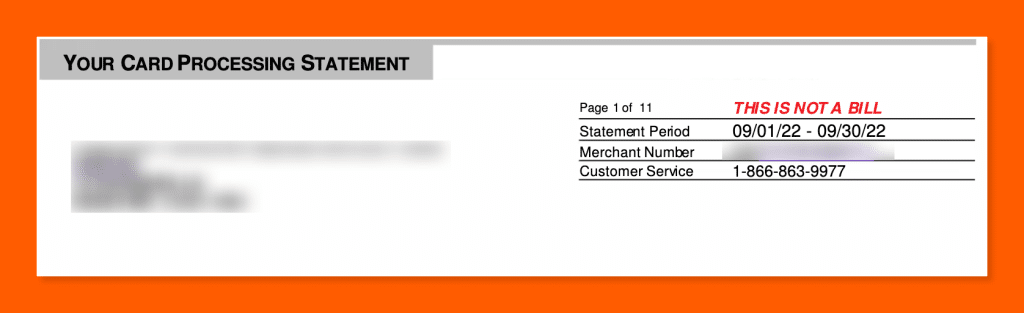
The header at the top of page one identifies the account. It carries your business name and address, the statement period, your processor’s customer service contact, and your Merchant Number, also called your Merchant ID or MID.
Keep the MID somewhere you can find it. Your processor will ask for it on every support call, and it appears at the top of every page so you can confirm each page belongs to your account. The header also carries the “THIS IS NOT A BILL” stamp, a reminder that fees are debited automatically rather than invoiced.
2. The Summary Box
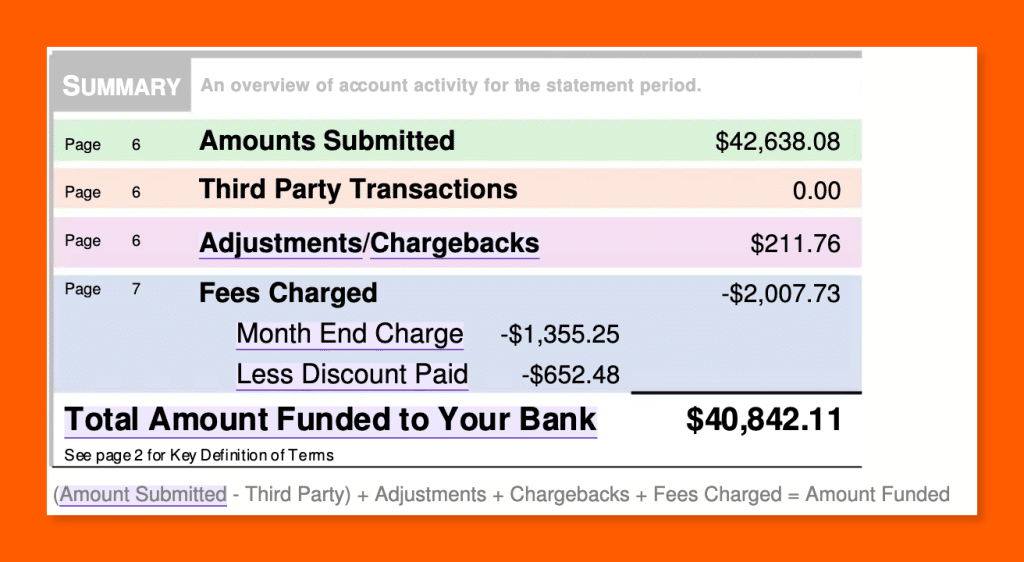
The summary box is the entire statement in five numbers. It shows your total card sales, chargebacks, adjustments, total fees, and the net amount deposited into your bank account.
In the sample, $42,638.08 in submitted sales, plus $211.76 in net adjustments, minus $2,007.73 in fees, leaves $40,842.11 funded to the bank. The statement even prints the formula it used: (Amount Submitted minus Third Party) plus Adjustments plus Chargebacks plus Fees Charged equals Amount Funded.
The page numbers printed beside each summary line point to the section deeper in the statement where that number is broken out, so the summary doubles as a table of contents.
3. Sales and Deposit Detail
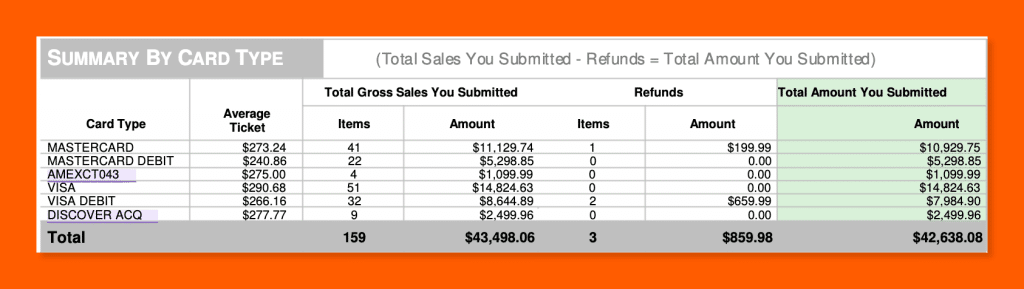
The sales detail breaks your total volume into three views: by day, by card type, and by batch. Each view helps you reconcile what you rang up with what your processor recorded.
The by-card-type view is the most useful at a glance. In the sample, Visa ran $14,824.63 across 51 transactions; Mastercard $10,929.75 across 41; Visa debit $7,984.90 across 32; Mastercard debit $5,298.85 across 22; Discover $2,499.96 across 9; and American Express $1,099.99 across 4, for 159 transactions totaling $42,638.08. Average tickets sat near $240 to $290, the profile of a higher-ticket, card-not-present business.
Compare the batch and daily totals against your POS reports and bank deposits. A batch that never settled, or a day where the submitted amount does not match your own sales records, is the first sign of a problem worth a phone call.
4. Chargebacks and Adjustments
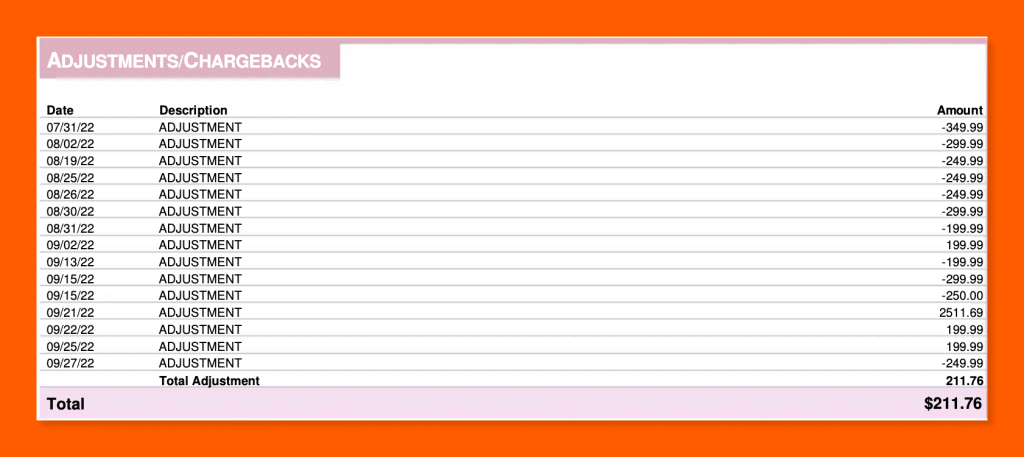
Chargebacks and adjustments are the two ways money moves on your statement outside of normal sales and fees. A chargeback is a transaction a cardholder or their bank disputes and reverses. An adjustment is a credit or debit your processor applies to correct a billing or processing discrepancy.
When either occurs, the statement lists it by date and amount. In the sample, adjustments and chargebacks net to $211.76 for the period, and the fee section shows 11 chargebacks billed at $25 each, or $275 in chargeback fees alone. Verify every line. A single chargeback carries its own fee on top of the lost sale, and a rising count signals a dispute or fraud pattern you need to address before it threatens your account.
5. The Fees Section
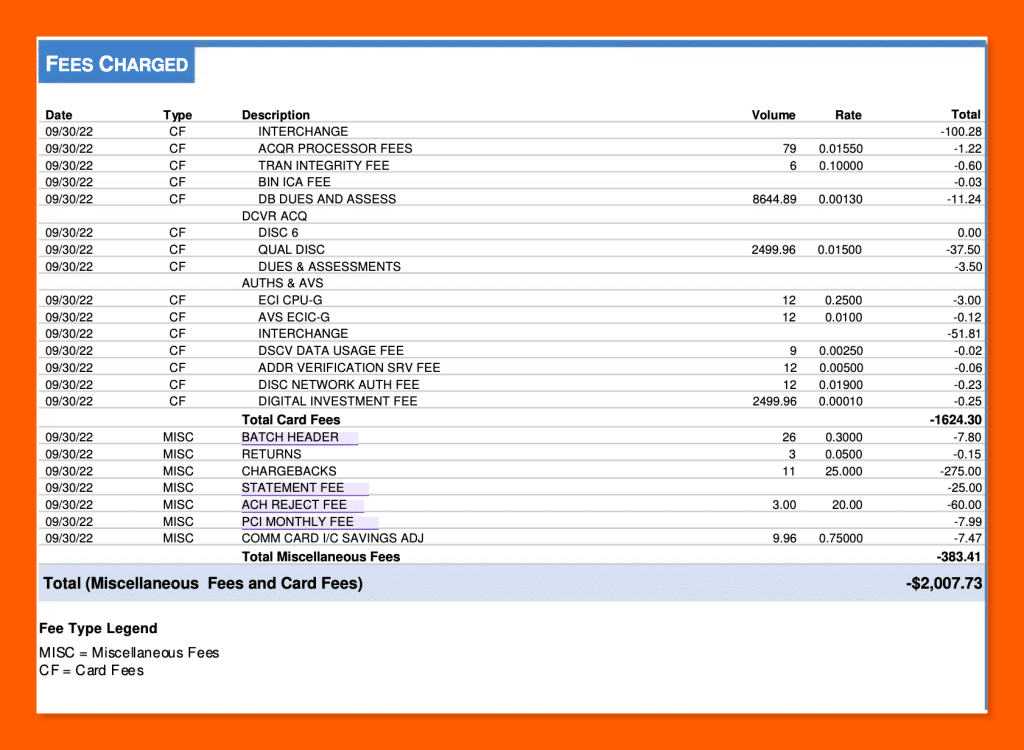
The fees section is the longest part of the statement and the part that decides your real cost of acceptance. It groups charges into transaction fees (interchange, assessments, and authorization fees), debit network fees, account fees, and equipment fees. In the sample, the $2,007.73 total breaks into $1,624.30 of card fees and $383.41 of miscellaneous fees.
6. The Interchange Detail Table
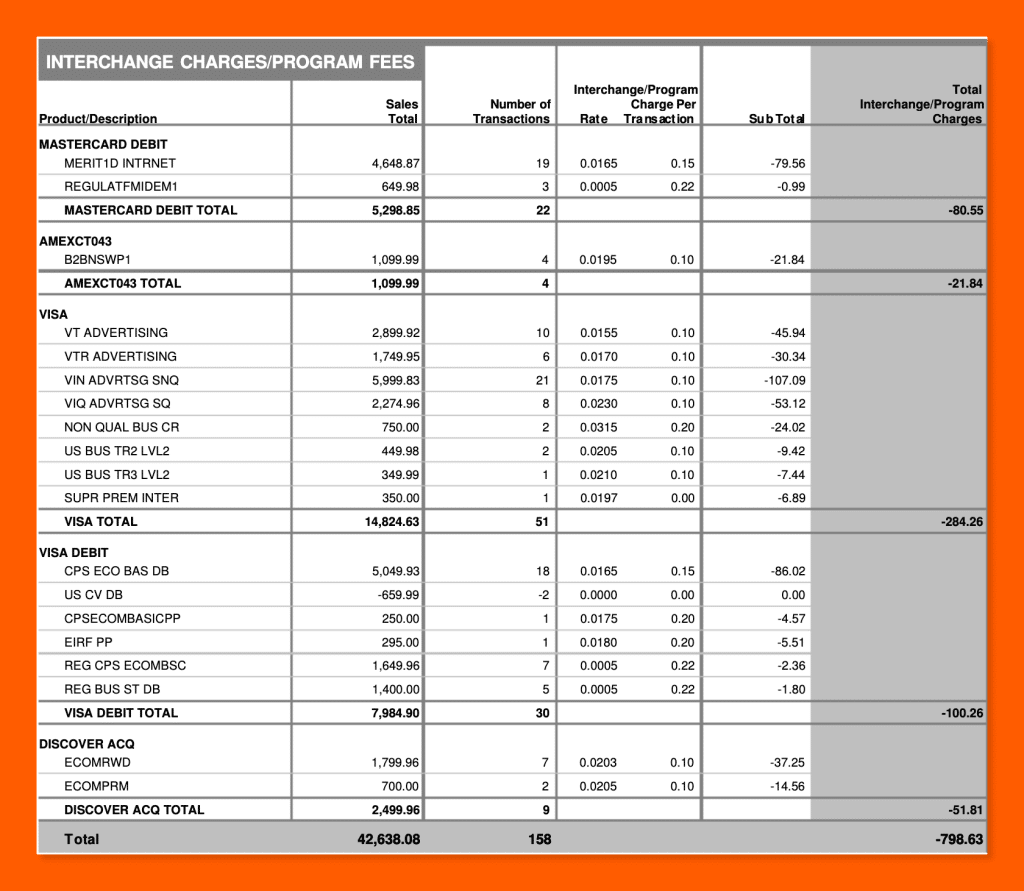
The interchange detail table is the proof behind your fees. It lists every card product you processed alongside its sales volume, transaction count, the interchange rate, the per-transaction cost, and the resulting charge.
Use it to confirm you are paying true interchange rather than a marked-up rate dressed up as interchange. In the sample, the line “WCELITE MERIT1” ran $4,949.88 across 18 transactions at 2.60% plus $0.10 per transaction, producing $130.50 in interchange, the largest interchange line on the statement. Premium consumer credit cards like that Mastercard World Elite carry the highest interchange, which is why your card mix drives your cost as much as your rate does.
7. Tax Reporting Totals (1099-K)

The final page reports your gross card sales to the IRS under section 6050W, the rule that requires processors to file a Form 1099-K for the businesses they settle payments for. The figure shown is gross, before fees, refunds, or adjustments, so it will be higher than the amount that reached your bank account.
In the sample, September gross reportable sales were $43,498.06, and 2022 year-to-date sales were $236,517.96. Notice the gross figure runs higher than the $42,638.08 submitted, because gross reporting ignores the $859.98 in refunds. Reconcile this number against your own books each year so the revenue you report matches what your processor reports for you. A mismatch is one of the easier ways to draw an IRS notice.
Every Fee on Your Statement, Explained
Your processing fees fall into a handful of categories, and only some of them are negotiable. The table below sorts the common ones by who collects the money and whether you can do anything about it. Every fee named here appears on the sample statement.
| Fee | Paid to | Typical amount | Fixed or negotiable |
|---|---|---|---|
| Interchange | Card-issuing bank | ~1.5% to 3.5% plus a per-item fee, varies by card | Fixed |
| Assessment / dues | Card network (Visa, Mastercard, Discover, Amex) | 0.12% to 0.16% of volume | Fixed |
| Processor markup (discount rate) | Your processor | Varies; the “plus” in interchange-plus | Negotiable |
| Authorization fee | Your processor or network | ~$0.02 to $0.10 per authorization | Sometimes negotiable |
| Network access / per-transaction | Card network | A few cents per transaction | Fixed |
| Monthly / account fees | Your processor | $1 to $25+ each | Negotiable |
| PCI compliance fee | Your processor | ~$5 to $20 per month | Negotiable |
| PCI non-compliance fee | Your processor | $20 to $50 per month | Avoidable |
| Equipment / terminal fee | Your processor | $5 to $30 per month per device | Negotiable |
| Debit network fee | Debit networks | A few cents per debit transaction | Fixed |
Interchange fees
Interchange is the largest fee on almost every statement and the one you cannot negotiate. Card-issuing banks set it, the card networks publish it, and every processor pays the same rate. It varies by card type, how the card was entered, and the size of the transaction, which is why it pays to understand how interchange fees are calculated before you audit your own. On the sample, premium consumer credit cards like Visa Signature Preferred cost 2.40% plus $0.10, while regulated debit ran as low as 0.05% plus $0.22. Your card mix, not just your contract, drives this number.
Assessment and dues
Assessments go to the card networks themselves rather than the issuing bank. They are small, fixed percentages of volume and, like interchange, are identical across every processor. The sample shows Visa at 0.13% to 0.14%, Mastercard at 0.12%, Discover at 0.13%, and American Express at 0.15%. Treat interchange and assessments together as your wholesale cost, the floor no processor can price below.
Processor markup (the discount rate)
The markup is the only part of your interchange-plus rate the processor keeps, and it is the number you negotiate. It usually shows up as a “discount rate” or “sales discount” line. On the sample, the processor charged 0.07%, which came to roughly $142 in service charges on $171,283.93 in volume. That is an unusually low and transparent markup. When you compare processors, the markup is the figure to pin down, because everything beneath it is wholesale cost nobody controls.
Authorization and per-transaction fees
Authorization fees apply each time a card is approved or declined, whether or not the sale completes. They run a few cents apiece and add up at high transaction counts. The sample charged $0.07 per authorization across roughly 3,300 transactions, plus small network access fees of $0.0155 to $0.0195 each. A high average ticket absorbs these easily, while a low average ticket lets them eat into thin margins.
Monthly and account fees
Account fees cover the processor’s ongoing services and are frequently negotiable or waivable. The sample includes a monthly location fee of $1.25, a network fee of $2.00, and a Visa transaction integrity fee of $0.10 per qualifying transaction. None are large on their own, but they recur every month, whether you sell anything or not.
PCI compliance fees
A PCI compliance fee covers the processor’s help in meeting card security requirements. A separate, larger non-compliance fee kicks in if you fail to certify. The sample charges a $9.50 PCI administration fee and warns that the non-compliance penalty is rising to $49.95 per month for accounts that let their certification lapse. Complete your annual self-assessment questionnaire, and you avoid the bigger charge entirely.
Equipment fees
Equipment fees rent you a terminal or related hardware and are negotiable, especially if you already own compatible devices. The sample carries a $14.95 monthly maintenance fee. Over a year that is roughly $179 for a single terminal, so confirm you are paying for hardware you actually use.
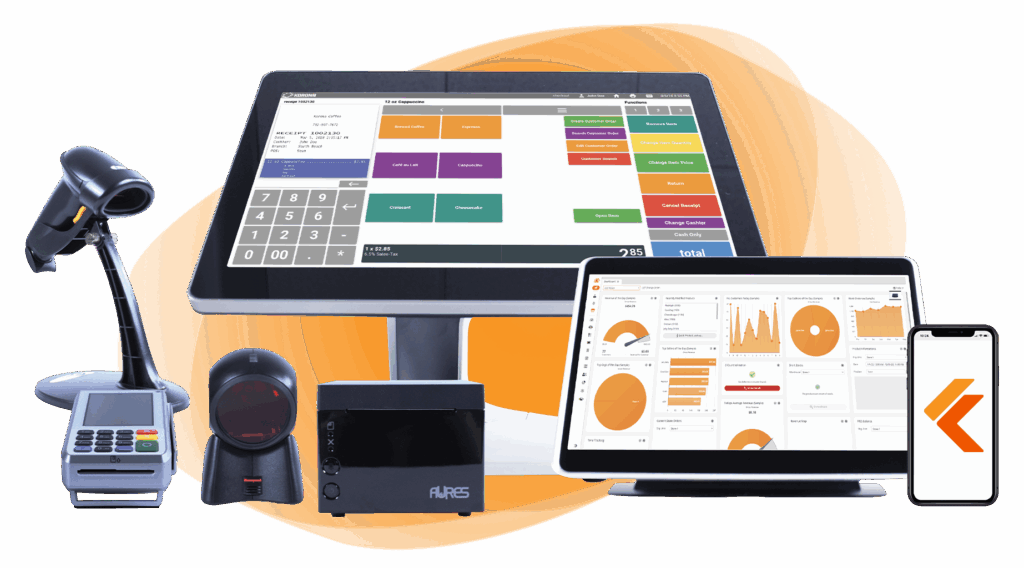
Build Your Own POS
Whether you run a retail store, café, or admissions booth, we have the point of sale hardware designed for your specific needs. Start building your ideal POS system now.
Debit network fees
Debit network fees go to the PIN-debit networks that route debit transactions. They are small, fixed, and not negotiable. The sample shows a single $5.95 debit network line. On statements with heavy debit volume, this section grows accordingly.
Add up every fee outside interchange and assessments, and you have your true cost of working with that processor. The next section turns that into a single percentage you can compare and negotiate against.
How to Calculate Your Effective Rate
Your effective rate is the most useful number on the entire statement. Calculate it by dividing your total fees by your total sales volume for the month. The result is the real percentage you pay to accept cards, with every fee folded in.
On the sample statement, $3,552.45 in total fees divided by $171,283.93 in sales gives an effective rate of 2.07%. Every interchange charge, assessment, markup, and account fee is already baked into that figure, which is what makes it the honest measure of cost. A quoted rate from a sales rep tells you almost nothing. Your effective rate tells you everything.
What counts as a good effective rate
Benchmark against current averages rather than a single magic number. The average Visa and Mastercard effective rate in 2025 was 2.36%, according to the Merchants Payments Coalition. Where your business should land depends on how you take payments:
- In-person, swiped or tapped: roughly 1.8% to 2.6%
- Online or keyed (card-not-present): roughly 2.25% to 3% or higher, because of added fraud risk
- Debit-heavy: lower still, since regulated debit is capped
At 2.07%, the sample restaurant sits below the national average, which is what you expect from a card-present business on a clean interchange-plus deal. If your effective rate sits well above the range for your business type and you do not run a high-risk merchant account, you are probably overpaying.
Isolating the markup
Your effective rate tells you what you pay in total. To find what you can actually change, separate the wholesale cost from the markup. Interchange and assessments are wholesale, identical across processors, and beyond anyone’s control. Whatever is left over is your processor’s markup, the one number on the statement you can negotiate.
On the sample, interchange and assessments account for the bulk of the $3,552.45, while the processor’s markup, shown as service charges, totals about $142, or 0.08% of sales. A markup that small is the mark of a fair interchange-plus agreement. A markup several times higher, or one you cannot even locate because the statement uses tiered or flat-rate pricing, is your cue to start asking questions.
Pricing Models and How They Change Your Statement
The pricing model in your contract decides how your fees appear on the statement and how easily you can audit them. Four models dominate the market. Two show you your real costs, and two bury them.
| Pricing model | How it appears on your statement | Transparency | Best for |
|---|---|---|---|
| Interchange-plus | Interchange and assessments itemized, with a separate, visible markup line | Highest | Established businesses with steady volume |
| Subscription / membership | Interchange at cost, plus a flat monthly fee and a small fixed per-transaction markup | High | High-volume businesses |
| Flat-rate | One blended percentage and per-item fee on every card, with no breakdown | Low | New or low-volume businesses |
| Tiered | Transactions sorted into “qualified,” “mid-qualified,” and “non-qualified” buckets at different rates | Lowest | Rarely the best deal for the merchant |
Interchange-plus
Interchange-plus is the most transparent model and the one used on the sample statement. You see the true interchange, the network assessments, and the processor’s markup as a separate line, which means you can calculate exactly what the processor keeps. On the sample, that markup is the 0.07% “sales discount” line. Interchange-plus suits established businesses with steady volume, because the transparency lets you hold the processor accountable month after month.
Subscription/membership
Subscription pricing passes interchange through at cost and adds a flat monthly fee plus a small fixed markup per transaction. Your statement looks much like an interchange-plus statement, with interchange itemized and the membership fee listed separately. For high-volume businesses, the low per-transaction markup can beat every other model, as long as the monthly fee is worth it for your volume.
Flat-rate
Flat-rate pricing charges one blended percentage and per-item fee on every card, regardless of type. For example, Square’s in-person rate is 2.6% plus $0.15 per transaction. The statement is short and easy to read, which is the appeal, but you cannot separate interchange from markup because everything is bundled into one number. Flat-rate works for new or low-volume merchants who value simplicity, and it tends to cost more as sales grow.
Tiered
Tiered pricing sorts your transactions into buckets, usually labeled qualified, mid-qualified, and non-qualified, each at a different rate. The processor decides which bucket each transaction falls into, and rewards cards, business cards, and keyed transactions are routinely downgraded to the most expensive tier. Tiered pricing is the least transparent model on the market and the hardest to audit. If your statement shows qualified and non-qualified buckets, treat it as a reason to shop your rate.
To tell which model you are on, look at how the markup appears. A separate, visible markup line points to interchange-plus or subscription. A single blended rate on every card points to flat-rate. Qualified and non-qualified tiers point to tiered pricing, and that is the one worth leaving.
Payment processors giving you trouble?
We won’t. KORONA POS is not a payment processor. That means we’ll always find the best payment provider for your business’s needs.
Red Flags and Hidden Fees to Watch For
Most overcharges hide in plain sight, in the dense block of text your statement buries near the front and in line items you have trained yourself to skip. Knowing where to look turns a confusing document into an early warning system.
Read the statement messages every month
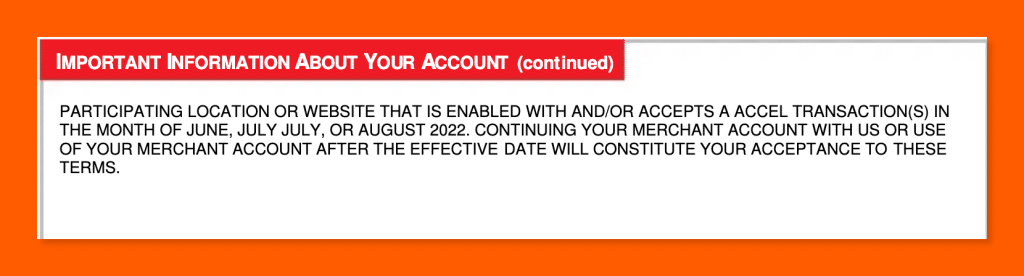
The “Important Information About Your Account” block is where fee increases are announced, and almost nobody reads it. On the sample, that single block discloses several changes at once. Visa and Mastercard move international acquirer fees onto separate lines, American Express raises its assessment from 0.15% to 0.16%, Discover raises its assessment to 0.14% and adds a new Program Integrity Fee, Visa introduces new authorization consistency fees, and the PCI non-compliance penalty rises to $49.95 per month. Each change is easy to miss and permanent once it takes effect. Visa in particular revises its schedule often, so it pays to track new Visa interchange rates as they roll out.
Processors generally have to give advance notice of fee changes, and the statement message is usually where that notice shows up. Reading it is your one chance to question a fee before it starts hitting your account.
Watch for markup creep
A markup that drifts upward over time is one of the most common quiet overcharges. Compare your markup line month over month. On interchange-plus it is a single visible figure, so a change stands out. On flat-rate or tiered pricing you cannot see it directly, which is exactly why those models make creep easy to hide.
Check interchange against published rates
Some processors pad interchange and label the padding as interchange so it blends in. The card networks publish their interchange tables, so you can spot-check a few of your largest line items against them. On the sample, the biggest line, Visa Signature Preferred at 2.40% plus $0.10, matches Visa’s published rate, the sign of a clean pass-through.
Avoid PCI non-compliance fees
A PCI non-compliance fee is pure waste, and it is avoidable. Complete your annual self-assessment questionnaire, keep your store PCI compliant, and the penalty never applies. The sample warns of a $49.95 monthly charge for accounts that let certification lapse, which works out to roughly $600 a year for paperwork you could have filed for free.
Question tiered downgrades
On tiered pricing, watch how many transactions land in the “non-qualified” bucket. Rewards cards, corporate cards, and keyed transactions get downgraded there at the highest rate. A large non-qualified share is a sign the model is working against you.
Compare month over month
The single best detection method is comparison. Keep your statements and line up the effective rate, the markup, and the major fee categories against prior months. A number that jumps without explanation is your prompt to call the processor and ask why.
Where to Find Your Merchant Processing Statement
Your merchant processing statement is available through your payment processor, the third-party company that handles your card transactions, almost always in the online portal or mobile app you use to manage your account. Most processors post the prior month’s statement within the first few business days of the new month.
To pull yours, log into your processor’s portal and look for a section labeled statements, documents, or reporting, then download the PDF. If you cannot find it, call or message customer service with your Merchant ID and ask for a copy. Some processors charge a fee for mailed paper statements, so switch to digital delivery if you have not already.
Download and save each month’s statement as you go. A year of archived statements is what lets you compare month over month, spot creeping fees, and reconcile your numbers at tax time without chasing down documents.
What to Do If You’re Overpaying
If your effective rate sits above the range for your business type, you have three moves: negotiate the markup, cut the junk fees, or switch processors. Work them in that order.
- Negotiate the markup. The markup is the only negotiable part of your rate. Bring your effective rate and a rate comparison from other processors, then ask your processor to match or beat it. Negotiating that markup is one of the most reliable ways to lower your merchant fees.
- Cut the junk fees. Ask for waivers on PCI fees, statement fees, monthly minimums, and other account charges. Processors often drop these to keep your business.
- Switch if negotiation stalls. When a processor will not move and your rate stays high, moving your processing elsewhere is the last and strongest lever. Check your contract first so you are not caught by early termination fees.
The catch with switching is that many POS systems lock you to a single processor, so changing your rate means replacing your hardware and software at the same time. KORONA POS works differently. KORONA POS is processor-agnostic and not a payment processor itself, so you choose your merchant services provider inside the POS and switch processors without replacing your system. That keeps the leverage with you, because your processor knows you can leave without tearing out your checkout.
Frequently Asked Questions
What is a merchant processing statement?
A merchant processing statement is the monthly report from your payment processor that lists your card sales, the fees you paid to accept them, any chargebacks and adjustments, and the net amount deposited to your bank account. It shows the true cost of accepting cards.
How do I read a merchant processing statement?
Read it top to bottom. Start with the summary box, check sales by day and card type, review chargebacks, then study the fee section and interchange detail. Finish by dividing total fees by total sales to find your effective rate.
What is a good effective rate?
The average effective rate across Visa and Mastercard in 2025 was about 2.36%. In-person businesses often pay 1.8% to 2.6%, while online businesses pay more. If your rate sits well above your category and you are not high-risk, you are likely overpaying.
Why are my fees different from the rate I was quoted?
Quoted rates usually reflect only the cheapest card type or qualified tier. Your real cost depends on your card mix, transaction methods, and added fees. Premium cards, keyed transactions, and account fees all push your effective rate above any single quoted number.
Are merchant statement fees negotiable?
Some are. Interchange and assessments are set by the card networks and fixed for everyone. Your processor’s markup, plus account fees like PCI, statement, and monthly minimums, are often negotiable or waivable. The markup is the main lever, so start there.
What is the difference between interchange and processor markup?
Interchange is the fee paid to the card-issuing bank, set by the networks and identical across processors. Markup is what your processor adds on top for its service. Interchange is fixed and non-negotiable, while the markup is the only piece you can negotiate.
How often should I review my merchant statement?
Review it every month. Monthly checks catch fee increases, billing errors, and rising chargebacks before they compound. Compare your effective rate and markup against prior months, so any unexplained jump prompts a quick call to your processor.
Why doesn’t my statement’s gross sales match my bank deposits?
Your deposits are net of fees, refunds, and chargebacks, while the gross sales figure, including the 1099-K total, is reported before any deductions. The gap between the two is the money taken out along the way, most of it processing fees.


