



A Quick look: BEST Cloud-Based POS
- KORONA POS: Best for independent retailers, liquor stores, convenience stores, and specialty verticals
- Square POS: Best for new or micro businesses
- Shopify POS: Best for eCommerce-first brands
- Lightspeed: Best for multi-location retailers and full-service restaurants
- Toast POS: Best for QSRs, cafés, bars, or food trucks
- Clover POS: Best for businesses that want app-driven capabilities
Cloud POS systems have effectively replaced legacy on-premise systems for most retailers — here’s how the six leading platforms stack up for 2026, and which one fits your business model.
6 Best Cloud-Based POS Systems: A Quick Overview
| Product | Best For | Standout Features | Starting Price |
|---|---|---|---|
| KORONA POS | Retail, specialty verticals, multi-location | Processor-agnostic payments, advanced inventory, no contracts | $59/mo |
| Square POS | New & small businesses, mobile sellers | Free plan available, built-in eCommerce, simple onboarding | $0/mo |
| Shopify POS | eCommerce brands with physical locations | Omnichannel sync, strong CRM, 24/7 support | $39/mo |
| Lightspeed | Multi-location retail & restaurants | Advanced reporting, inventory matrix, multi-store management | $69/mo |
| Toast POS | Restaurants, cafés, bars, food trucks | Kitchen display integration, tableside ordering, online ordering | $0/mo (pay-as-you-go) |
| Clover POS | SMBs in retail and hospitality | App marketplace, sleek hardware options, flexible setup | $16/mo for 36 mo |
KORONA POS: Best Cloud-Based POS for Retail & Specialty Verticals
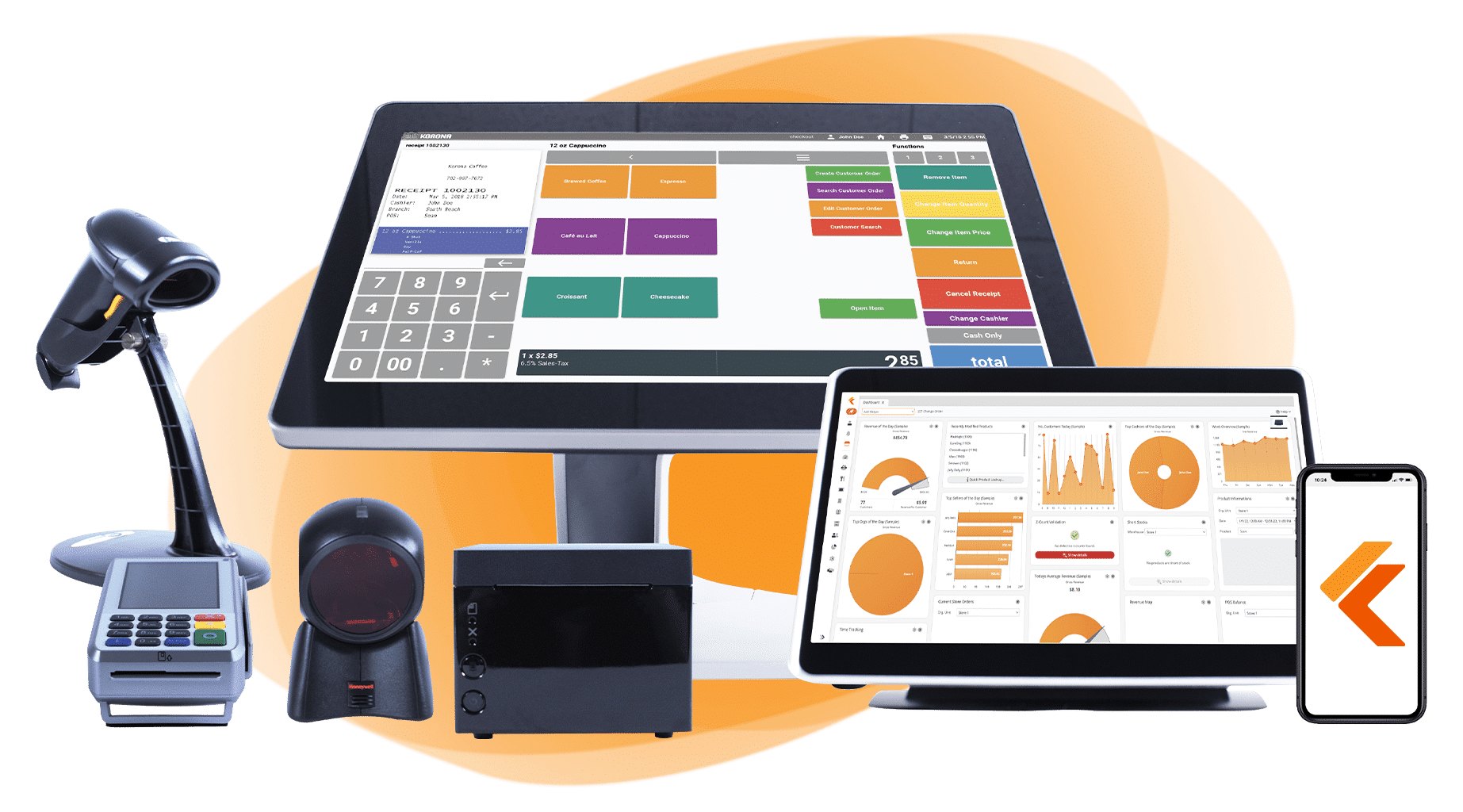
KORONA POS is a cloud-based point of sale system developed by COMBASE USA, built specifically for retailers, quick-service restaurants, wineries, amusement parks, and ticketed events. While many POS systems try to be everything to everyone, KORONA has carved out a reputation in specialty retail verticals such as liquor stores, CBD shops, convenience stores, smoke shops, museums, and more.
Key Features
- Advanced inventory management: KORONA’s inventory tools go well beyond basic stock tracking. The system handles auto-reordering, smart barcode generation, real-time stock level monitoring, and case-break functionality for bulk items. Whether you’re running one store or ten, inventory data syncs across all locations through a central cloud dashboard.
- In-depth reporting and analytics: KORONA Studio gives you a comprehensive reporting suite covering best/worst sellers, day-to-day sales patterns, transaction values, inventory valuations, employee performance, and more. Reports are customizable, exportable, and accessible from any internet-connected device.
- Multi-location and franchise scalability: KORONA is built to scale without adding infrastructure headaches. Adding a new location doesn’t require a new server. The KORONA Franchise add-on centralizes inventory across locations and handles royalty configurations.
Pricing
| Plan | Price | What’s Included |
|---|---|---|
| KORONA Core | $59/month | 24/7 customer support, payment processor choice, customizable dashboard, unlimited users and sales, gift cards, eCommerce integration, API access |
| KORONA Retail | $79/month | Everything in Core + inventory counts, stock management, barcode automations, supplier interface integration, customer management, real-time tracking, and more |
| KORONA Plus | $99/month | Everything in Core and Retail + advanced stock management, assortment cleanup, key performance reports, custom ABC analysis, order level optimization, and more |
| Add-ons | $10–$50/month | KORONA Food (+$10), KORONA Franchise (+$30), KORONA Ticketing (+$50/gate) |
Where KORONA POS Shines
- Processor freedom: KORONA POS lets you choose your processor, negotiate your own rates, and avoid debilitating markups as your business grows.
- Inventory depth purpose-built for specialty retail: KORONA’s inventory tooling goes deep for verticals like liquor, CBD, convenience, and tobacco, where accurate stock counts and age-verification integrations matter.
- Transparent, no-contract pricing: Month-to-month subscription, no cancellation fees, and a 15-day money-back guarantee make KORONA a low-risk commitment, especially compared to competitors that lock you into multi-year hardware leases.
Where KORONA POS Falls Short
- Not designed for full-service restaurants: KORONA supports QSRs and coffee shops reasonably well, but if you need table management, server-specific workflows, or a full hospitality feature set, you’ll hit its limits.
- UI feels functional, not polished: Multiple Capterra and G2 reviewers note that the interface, particularly the back-office, doesn’t have the sleek, modern feel of Square or Shopify. It’s powerful and customizable, but the learning curve is steep, especially for first-time POS users.
Customer Reviews
😊
“We transitioned multiple software solutions looking to find something that would fully integrate while also helping us dig deeper into our sales data and manage our inventory more closely. Korona has provided solutions for all of those things and made it so much easier to manage our business uniformly across all three tasting room locations as well as managing our Wine Club and online store.” –Oniqueh G. (Source: Capterra)
😖
“When I say I spent probably 100 hours on the phone last year, I truly mean it. Customer service was always willing to help, but every single time we knocked one problem out, another would arise.” –Jennifer G. (Source: Capterra)
Who KORONA POS Is Best For
- Wineries, amusement parks, and ticketed venues: KORONA has vertical-specific features built out for these categories that generic retail POS platforms don’t always support.
- Specialty retailers: Liquor stores, CBD shops, smoke shops, convenience stores, and tobacco retailers that need strong inventory controls and compliance-friendly workflows.
- Multi-location store owners: Operators running 2–20+ locations who want centralized inventory and reporting without managing separate systems per store.
Square POS: Best Cloud-Based POS for Small Businesses and New Retailers
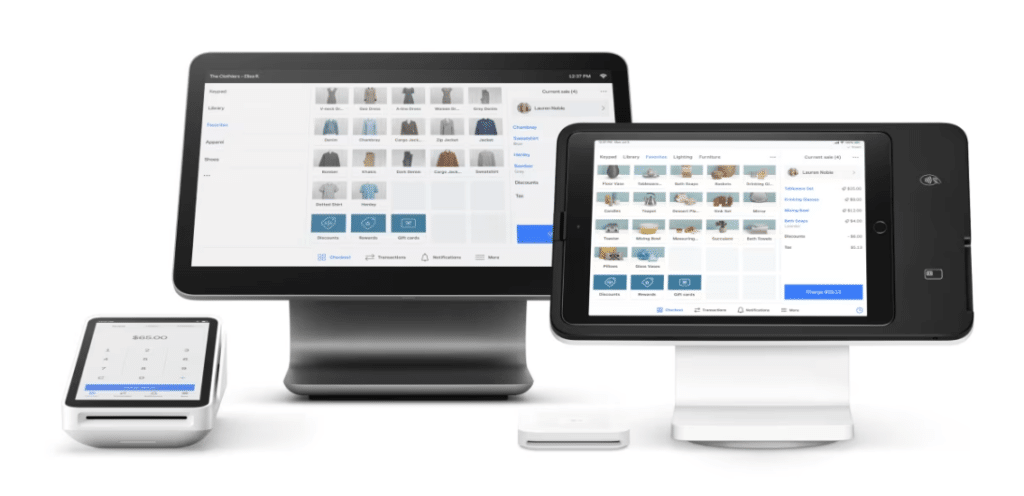
Square powers over 2 million businesses across retail, food service, and other sectors, and remains one of the most accessible entry points to cloud-based POS.
The appeal is straightforward: you can get started for free, the hardware is affordable, and the interface is intuitive enough that staff training takes minutes. For early-stage businesses or operators who don’t need deep customization, it’s a go-to.
Key Features
- Free plan with real functionality: Square’s free includes inventory tracking, customer profiles, sales analytics, returns, and eCommerce integration. You pay processing fees per transaction (2.6% + $0.10 in person), but there’s no monthly software fee.
- Omnichannel selling built in: Square Online integrates natively with Square POS, syncing inventory and orders across in-person and online channels automatically. You can list products online, sell through social platforms, and manage everything from one dashboard.
- Flexible hardware lineup: From a simple card reader that plugs into a smartphone ($0–$59) to fully equipped countertop terminals ($799+), Square offers a solid hardware range.
Pricing
| Plan | Price | Key features |
|---|---|---|
| Free | $0/mo | POS app, website builder, item library |
| Plus | $49/mo | Staff management, site customization, loyalty rewards |
| Premium | $149/mo | Advanced reporting, no gift card fees, 24/7 support |
| Pro | Custom | For businesses processing $250K+/year |
Where Square POS Shines
- Zero-cost entry: The free plan is genuinely useful. New businesses can process real transactions, track inventory, and sell online without paying a dollar in monthly fees.
- Fastest onboarding of any POS on this list: Square is designed for minimal training. The interface is clean, the logic is intuitive, and most staff can figure it out in under an hour.
- Ecosystem breadth: Square has built out a wide ecosystem of adjacent tools (Square Appointments, Square Payroll, Square Marketing, Square Loans) that many small businesses can use to consolidate their software stack.
Where Square POS Falls Short
- Advanced features cost extra: Inventory management and CRM tools require paid upgrades or third-party integrations with Square.
- Customer support is inconsistent: Square operates lean on customer service. Many users report delays in receiving timely support, and live phone support isn’t available on all plans.
- Processing lock-in: Square requires you to use Square Payments. If your volume grows and you want to negotiate better processing rates, sorry, you can’t.
Customer Reviews
😊
“Overall, my experience with Square Point of Sale has been great. It helps me run my small business smoothly by making it easy to accept payments, track sales, and stay organized. Even though the fees are a downside, the convenience and tools it offers make it worth it.” –Anonymous User (Source: Capterra)
😖
“I do appreciate that Square is widely available and well known which provides a level of comfort to clients for using it for transactions. However, I will definitely not be utilizing Square for my own business moving forward due to their high transaction fees that take money out of my pocket.” –Erika B. (Source: Capterra)
Who Square POS Is Best For
- New and micro businesses: If you’re just launching and want a functional POS without upfront cost, Square is the most accessible option on this list.
- Mobile and pop-up sellers: Farmers markets, craft fairs, and food trucks without a fixed location benefit from Square. Its mobile card reader and lightweight app are purpose-built for this.
Shopify POS: Best Cloud-Based POS for eCommerce Integration

In 2013, Shopify extended its reach into physical retail with Shopify POS, giving brick-and-mortar businesses a way to connect in-store sales to their existing Shopify online store.
Shopify POS is genuinely excellent at keeping product catalogs, customer profiles, and inventory in sync across online and physical channels. If you’re already on Shopify for eCommerce, adding the POS component is a natural extension.
Key Features
- Omnichannel inventory sync: Every sale, whether in-store, online, or through a third-party marketplace, updates the same inventory in real time.
- Buy online, return in-store: Customers can purchase through your online store and return at any physical location.
- Integrated digital marketing: Shopify connects natively to email campaigns, Google Shopping, and social commerce platforms, making it easier to run campaigns that drive both online and in-store traffic.
Pricing
| Plan | Price | Standout features |
|---|---|---|
| Basic | $39/mo | Limited staff POS access, simple customer profiles, returns at original purchase location |
| Grow | $105/mo | Unlimited POS logins, simple customer profiles, returns at original purchase location |
| Advanced | $399/mo | Unlimited POS logins, lower card rates, international selling capabilities |
| Plus | From $2,300/mo | Rich customer profiles, returns at any location, staff roles & permissions, loyalty insights, inventory management, professional retail reports, omnichannel selling |
Where Shopify POS Shines
- The best omnichannel experience on this list: If your business lives across both an online store and a physical location, Shopify’s integration between the two is the tightest of any platform here.
- CRM and loyalty across channels: Customer profiles merge online and in-store data automatically. This gives you a complete picture of purchasing behavior and makes personalized outreach genuinely actionable.
Where Shopify POS Falls Short
- eCommerce-first DNA shows up in-store: Some users report that the in-store checkout experience isn’t as snappy as that of dedicated retail POS systems. Shopify’s foundation is online commerce.
- Third-party payment processors come with a surcharge: Shopify strongly incentivizes using Shopify Payments. If you prefer a different processor, you’ll pay an additional fee for every transaction, which adds up quickly at high volumes.
Customer Reviews
😊
“I have used Shopify POS for over five years, and after switching from WooCommerce for my online company, it has been worth the investment. Everything is easy to use, the back of house updates with inventory, visuals, SEO, titles, etc., all work in real time.”
–Dr. Mario C.M. (Source: Capterra)
😖
“What I don’t like is the cost structure and the fact that it works best and it’s way easier when you’re using all Shopify tools integrated to the system. Therefore, besides the Shopify subscription, it can become expensive when you need to upgrade your plan to use some of the features not available in the basic plan.” –Verified Reviewer (Source: Capterra)
Who Shopify POS is Best For
- eCommerce brands expanding into physical retail: If your business started online and you’re opening your first store, Shopify is the most natural extension.
- Retailers who need unified inventory across channels: Use Shopify if your online store and physical locations need to stay perfectly in sync without manual intervention.
Lightspeed: Best Cloud-Based POS for Multi-Location Retail and Restaurants
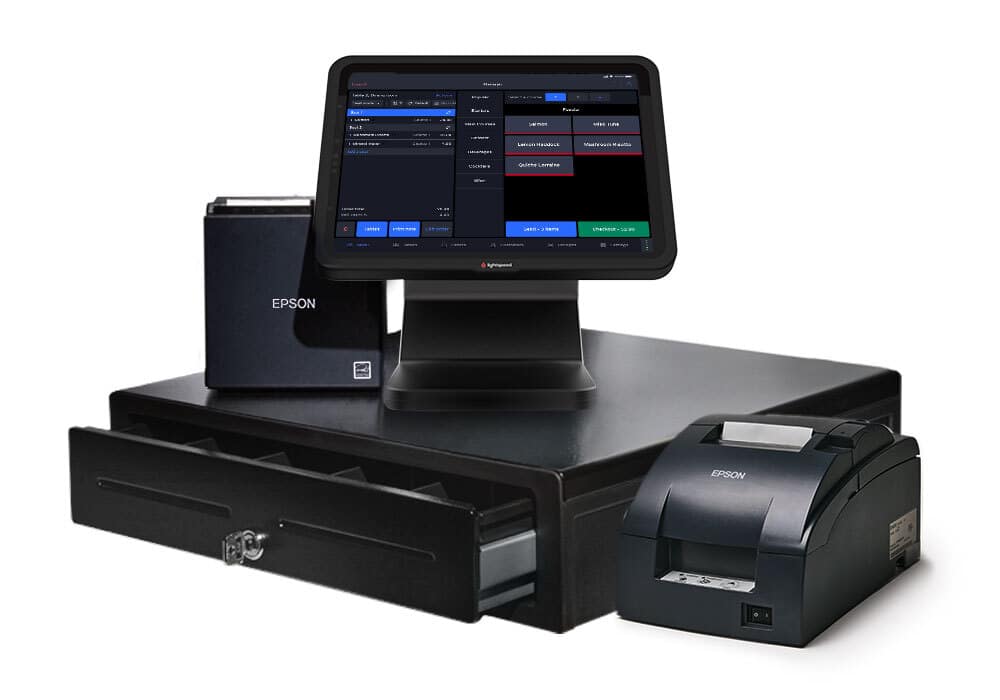
Lightspeed was founded in 2005 and has grown through both organic development and a series of strategic acquisitions to become one of the most feature-rich cloud POS platforms available.
Lightspeed is the most capable system on this list for businesses with complex inventory needs and multiple locations. It’s particularly strong in specialty retail categories like bike shops, pet stores, apparel, and home décor, as well as in full-service restaurants that need robust table management.
Key Features
- Advanced inventory matrix: Lightspeed handles complex product variants and tracks them at the variant level across multiple locations. You can manage hundreds of SKUs across locations.
- Integrated supplier ordering: Lightspeed connects directly to supplier catalogs, allowing you to place purchase orders from within the system and have incoming stock automatically update your inventory records.
- Restaurant-specific features: For the restaurant side, Lightspeed supports table management, floor plan configuration, menu customization, tableside ordering, and integrated online ordering.
Pricing
| Plan | Price | Key features |
|---|---|---|
| Restaurant | ||
| Starter | $69/mo | Customizable POS, menu manager, floor plans, integrated payments, takeout & delivery |
| Essential | $189/mo | Everything in Starter + Advanced Insights, Lightspeed AI, online ordering, order & pay at table, Lightspeed Pulse app |
| Premium | $399/mo | Everything in Essential + Lightspeed Tempo, multi-location management, advanced inventory, raw API access |
| Enterprise | Custom | Fully customizable plan for complex, multi-location operations |
| Retail | ||
| Basic | From $89/mo | 1 location, 1 register |
| Core | $149/mo | 1 location, 1 register |
| Plus | $289/mo | 1 location, 1 register |
Where Lightspeed Shines
- Inventory complexity at scale: If you manage hundreds or thousands of SKUs across multiple locations, Lightspeed’s inventory matrix and supplier ordering features reduce the manual work significantly.
- The best multi-location reporting on this list: Lightspeed’s analytics are genuinely enterprise-grade for mid-market retailers, including side-by-side location comparisons, staff performance metrics, and product velocity by store.
- Strong restaurant feature set: Table management, course management, menu customization, and kitchen routing are all built in.
Where Lightspeed Falls Short
- Learning curve: New users consistently report a steeper onboarding experience than competitors like Square or Shopify. You can expect more time to get staff up to speed.
- Price point is high for small businesses: The jump from Starter ($69/mo) to Essential ($189/mo) is steep, and most businesses quickly discover they need features behind that paywall.
Customer Reviews
😊
“Integration across POS, eCommerce, Accounting, Data Analytics is excellent. We have been able to increase both sales and efficiency with this system. The accounting feature and its daily export to QuickBooks allows me to spend only a few minutes each day keeping books up to date.” –Steve J. (Source: Capterra)
😖
“I have spent hours on chat and phone support, trying to come up with a solution to an outdated machine that does not connect/stay connected. It is embarrassing to have to punch customers’ credit card numbers in manually because you cannot obtain a functioning credit card machine.” –Elissa S. (Source: Capterra)
Who Lightspeed is Best For
- Complex inventory retailers: Bike shops, apparel stores, pet retailers, and similar businesses with large, variant-heavy product catalogs across multiple locations.
- Full-service restaurants: Operations that need table management, course routing, and front-of-house/back-of-house workflow management built into one system.
5. Toast POS: Best Cloud-Based POS for Restaurants
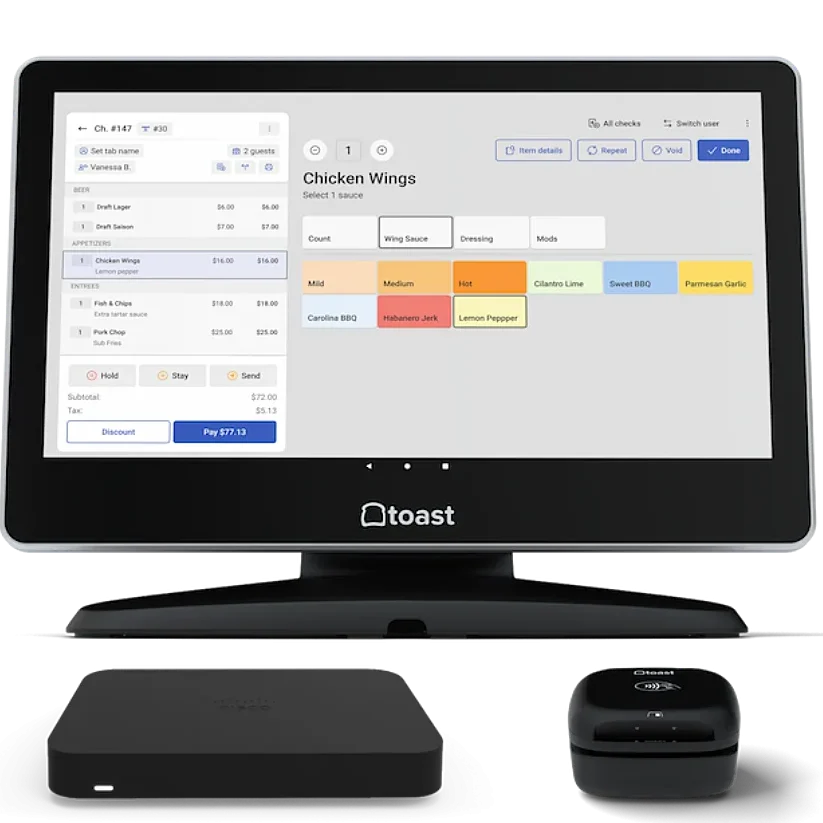
Toast POS was built from the ground up for one industry: food service. That specificity shows in every part of the product, from spill-resistant hardware to kitchen display integration to tableside ordering with QR codes. Over 155,000 restaurant locations run on Toast, making it one of the most widely adopted restaurant POS systems in the US.
Key Features
- Kitchen display system (KDS) integration: Orders fire from the front of house to the kitchen display in real time, with no paper tickets. Servers can modify orders on the fly, and the KDS shows prep times and order status across every station.
- Tableside ordering and QR-code payments: With Toast Go 2 handhelds, servers can take orders and process payments tableside. Guests can also order and pay from their own devices using QR codes.
- Online ordering and third-party delivery integration: Toast’s online ordering is natively integrated with the POS. It partners with Grubhub, Uber Eats, and DoorDash.
Pricing
| Plan | Price | Key features |
|---|---|---|
| Starter Kit | $0/mo | Cloud-based POS, 1 terminal included, no upfront hardware costs |
| Point of Sale | $69/mo | Cloud-based POS, custom hardware configuration, add-ons available |
| Build Your Own | Custom | Perpetual inventory, payroll & tips, employee scheduling, marketing, loyalty & gift cards |
Where Toast POS Shines
- End-to-end restaurant operations: POS, kitchen display, online ordering, payroll, and delivery management are all connected and sync automatically. Eliminating the manual reconciliation between separate systems could prove worth the price alone.
- Purpose-built hardware that survives in a kitchen: Toast’s proprietary Android hardware is designed to function in conditions that would kill a standard tablet. Toast’s hardware accounts for grease, heat, and drops.
Where Toast POS Falls Short
- Processor lock-in with no exceptions: Toast requires you to use Toast Payments. You cannot bring your own processor.
- Multi-year contracts and proprietary hardware create switching costs: Most Toast implementations involve 2–3 year contracts. If your restaurant struggles and you need to exit, early termination fees apply.
Customer Reviews
😊
“Overall, my experience with Toast POS has been great. Programming is relatively easy and intuitive to figure out. The reporting features, tip management, and online ordering are just a few of my favorite things about Toast.” –Sara B. (Source: Capterra)
😖
“The cost was not worth what you get from the software and was much higher than its competitors. While the start-up cost was relatively low, the monthly fees, hidden fees, and fees for every single thing add up, and it becomes a very expensive monthly bill.”
–Jessica R. (Source: Capterra)
Who Toast POS Is Best For
- Cafés, bars, and food trucks: Toast scales down to simple operations as well, with the Starter plan letting smaller venues access core functionality at no monthly cost.
- Full-service restaurants: Toast serves operations with complex order modifiers, table management, and front-of-house/back-of-house coordination needs.
- QSRs and fast-casual operations: Toast works well in high-volume environments where kitchen display speed and online order integration are essential.
6. Clover POS: Best Cloud-Based POS for Businesses That Want App-Driven Hardware
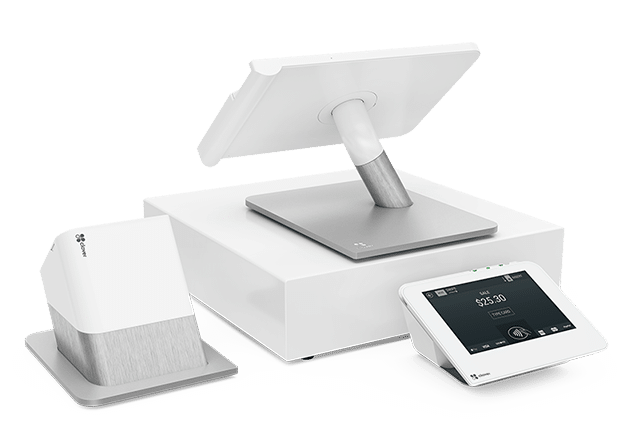
Clover is a cloud-based POS platform that has become one of the most recognizable names in small business payments. It’s used across retail, restaurants, and service businesses, and its app marketplace model gives ample flexibility to retailers.
Clover’s appeal is hardware-first: the Clover Station, Mini, Flex, and Go cover a range of use cases from full countertop setups to mobile payment terminals, and they all look great in your store.
Key Features
- App marketplace: Clover operates an app marketplace where you can add functionality like scheduling, loyalty programs, gift cards, time tracking, and more from third-party developers.
- Flexible hardware options: From Clover Go (a simple mobile reader) to the Clover Station Duo (a full countertop dual-screen setup), the range of hardware is among the widest available.
Pricing
| Plan | Starting price |
|---|---|
| Full-service dining | |
| Starter | $179/mo (36-mo) or $1,799 + $89.95/mo |
| Standard | $239/mo (36-mo) or $2,548 + $109.90/mo |
| Advanced | $354/mo (36-mo) or $4,447 + $129.85/mo |
| Quick-service dining | |
| Starter | $135/mo (36-mo) or $849 + $89.95/mo |
| Standard | $185/mo (36-mo) or $1,899 + $89.95/mo |
| Advanced | $245/mo (36-mo) or $2,648 + $109.90/mo |
| Retail | |
| Basic | $16/mo (36-mo) or $349 |
| Standard | $180/mo (36-mo) or $1,899 + $84.95/mo |
| Advanced | $240/mo (36-mo) or $2,648 + $104.90/mo |
Where Clover POS Shines
- App marketplace flexibility: The ability to add functionality through third-party apps means Clover can be configured for a wide variety of business types without requiring a custom build.
- Premium hardware design: Clover’s devices are among the most aesthetically refined in the industry. For businesses where the physical checkout experience is part of the brand — boutique retailers, upscale cafés — Clover hardware fits the bill.
- Wide availability through banks and resellers: Clover is available through many financial institutions, which makes it accessible for business owners who prefer to bundle their banking and payments.
Where Clover POS Falls Short
- Proprietary hardware creates real lock-in: Clover’s hardware is locked to your Clover account and cannot be resold or repurposed. Combined with multi-year contracts from bank resellers, exiting can be very costly.
- App costs add up quickly: Basic features that come standard in other POS platforms often require separate paid app subscriptions on Clover.
- Customer support is inconsistent: Capterra and G2 reviews frequently cite difficulty reaching knowledgeable support, particularly for multi-location issues or billing disputes.
Customer Reviews
😊
“A true lifesaver for a seamless payment process at events large and small. As an event planner, having this option on site has made on-site event payments a breeze for clients and guests.” –Mai M. (Source: Capterra)
😖
“A duplicate charge caused by the Clover system during a service outage cannot be refunded by their support team or by me. After spending a long time in chat, being told repeatedly the issue was resolved (it wasn’t), I was ultimately told nothing could be done. Meanwhile, my customer is double-charged.”
–Tiffany L. (Source: Capterra)
Who Clover POS Is Best For
- Businesses already banking with Clover-supporting institutions: The bundled offering from certain banks can simplify setup, though you should read contract terms carefully before committing.
- Businesses that prioritize hardware aesthetics: Clover is great for boutiques, upscale food service, and service businesses where the checkout experience is integral to customer interaction.
How to Choose the Best Cloud-Based POS
Choosing a cloud POS comes down to five things:
- Total cost of ownership: Monthly fees are just the start. Factor in hardware, processing rates, add-ons, and contract terms before deciding what’s actually affordable.
- Inventory management depth: Can it track stock in real time, trigger auto-reorders, and handle product variants across locations? If inventory accuracy drives your margins, don’t compromise here.
- Payment processing flexibility: Many systems lock you into their processor. If you want to shop for better rates, look for a processor-agnostic option.
- Scalability: A good cloud POS should handle your tenth location as cleanly as your first. Look for centralized inventory, location-specific reporting, and bulk price updates.
- Integrations: Map out what you need (accounting, eCommerce, loyalty, payroll) before committing, and verify those connections actually exist.
Conclusion: The Best Cloud-Based POS Systems and Your Business
The best cloud-based POS is the one that fits your business model without locking you into costs you didn’t see coming. Use this guide to shortlist two or three options, take advantage of free trials, and pressure-test the features that matter most to your operation before committing.
Free printable templates and checklists to help you manage retail operations with ease
FAQs: Cloud-Based POS Systems
Can I use a cloud POS without internet?
Most modern cloud POS systems include an offline mode that allows you to keep processing transactions during an outage, syncing data automatically once the connection is restored.
Is it hard to switch POS systems?
The biggest friction points are data migration and hardware compatibility. Most platforms offer import tools for products and customer data, but proprietary hardware (like Clover or Toast) can’t be repurposed.
Do cloud POS systems work for multi-location businesses?
Yes — it’s one of their core advantages over legacy systems. Most cloud platforms let you manage inventory, pricing, and reporting across all locations from a single dashboard, with no need for on-site servers at each location.


