



Key Takeaways:
- A dispensary tech stack has six layers: compliance tracking, point of sale, payments, online menus, customer marketing, and analytics.
- Your state chooses your mandated compliance layer. Every system you buy must integrate with it.
- Your POS is the hub of the stack. It’s the system that touches compliance, payments, inventory, menus, and customer data at once.
- Most stack failures come from missing integrations. Double data entry between your POS and Metrc is the most expensive problem to fix later.
Running a dispensary means you’ll run more software than almost any other type of retail store. Where a liquor store needs a POS and maybe an e-commerce plugin, you’ll need state-mandated compliance tracking, a cannabis-legal payment setup, synced online menus, and marketing tools that won’t get your texts blocked by carriers.
The good news is that the cannabis tech stack follows a predictable structure. This guide walks through all six layers of the dispensary tech stack, what each does, and the order in which you should build them. It also covers the integration issues that could drain hours from your week.
What Is a Dispensary Tech Stack?
Your tech stack is the collection of software systems that run your store and the connections between them. For a dispensary, the stack is unusual in two ways. First, one layer of it is legally required and chosen by your state. Second, every layer in your tech stack must accurately pass data to the required compliance layer every single day.
That second point is the whole game. A dispensary with great software that doesn’t talk to itself is worse off than a dispensary with average software that syncs well. Keep that in mind as you evaluate each layer below.
Layer 1: State Compliance Tracking
Legal cannabis is tracked from seed to sale. Every plant, package, and transaction gets recorded in a state-run traceability system, and your store is legally responsible for keeping its records in sync with that system.
Metrc: The Government-Facing System
Metrc is the track-and-trace system most legal states have contracted to monitor their cannabis markets. It uses RFID package tags to follow product from cultivation through your back door and out to the customer. If your state uses Metrc, you don’t get a vote. Reporting into it is a condition of your license.
BioTrack: The Business-Facing Alternative
BioTrack serves a similar tracking function but is built for businesses rather than regulators, and a handful of medical states (such as Arkansas, Florida, and New Mexico) use it as their government system instead of Metrc. Some operators also run BioTrack internally for seed-to-sale visibility even in Metrc states.
The One Rule of This Layer
You don’t choose your compliance system. Your state chooses it for you. That means every POS system you consider should receive a simple pass-fail test on whether it has a native, certified integration with your state’s system. For dispensaries, no integration means no deal, regardless of what else the software does well.
How this connects in KORONA POS:
KORONA POS integrates with both Metrc and BioTrack and transmits sales data directly to the state or province that requires it. Your registers report as they sell, so compliance isn’t a separate task.
Layer 2: Point of Sale and Inventory (The Hub)
Your dispensary POS is the center of the stack. It’s the only system that touches everything: it pushes sales to your compliance system, receives inventory from your suppliers, syncs stock counts to your online menu, processes payments, and captures the customer data your marketing tools run on. Get this layer right and the rest of your tech stack becomes plug and play.
Here’s what a dispensary POS needs to handle that a generic retail POS can’t:
- Native compliance sync. Every sale should report to Metrc or BioTrack automatically, with package tags attached, no end-of-day manual uploads.
- Purchase limit enforcement. The system should automatically block a transaction that would exceed your state’s per-visit limits.
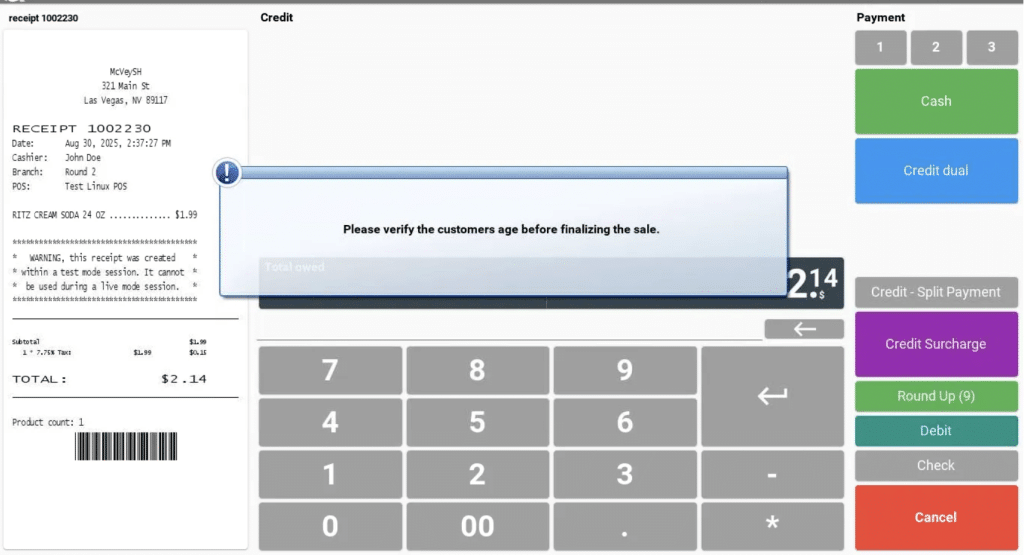
- ID and age verification at the register. In KORONA POS, this is configured under Settings > Verification Requirements, so the register physically won’t complete a restricted sale without a verified check.
- Package-level inventory. Cannabis inventory includes SKUs tied to state-tagged packages, so your counts need to reconcile at the package level.
- Real reporting. You need to track product velocity, margin by category, and slow-mover identification. In KORONA Studio, the Evaluations tab includes an ABC Analysis that ranks every product by its contribution to revenue, which matters in a market where flower prices compress a little more every year.
Layer 3: Payments
Cannabis payments are their own puzzle because major card networks still don’t allow standard credit card processing for cannabis purchases. Your realistic options are cash, PIN debit, and ACH-based payment apps. Each carries different fees, different hardware, and different levels of regulatory comfort.
Be careful with anything marketed as a workaround. So-called cashless ATM setups, which disguise a purchase as an ATM withdrawal, have drawn crackdowns from card networks, and stores relying on them have had processing shut off with little warning. Whatever you choose, it should be a payment method your POS supports directly, so every transaction still lands in your compliance reporting with a clean record.
How this connects in KORONA POS:
KORONA POS is processor-agnostic and integrates with all major credit card processors. Dispensaries can’t accept credit cards today, but if federal rules change, stores running KORONA POS can switch on card acceptance without replacing their system. That’s a future-proofing detail most dispensary software locks you out of, because many cannabis POS providers tie you to their own payment rails.
Layer 4: Ecommerce and Online Menus
Most dispensary customers browse before they buy. Platforms like Weedmaps, Leafly, and Jane put your live menu in front of shoppers searching nearby, and many stores also run their own ordering site. Treat all of these as channels, but not as software to build your business on.
The e-commerce option is only as good as its inventory sync. If your menu shows a product you sold out of two hours ago, you get canceled pickups, refunds, and one-star reviews. Your POS should push stock levels to every menu in near real time.
How this connects in KORONA POS:
KORONA POS integrates with the major online menu platforms, including Weedmaps, Leafly, Olla, and iheartjane, and offers a WooCommerce integration for stores that want a fully owned ordering site with online pre-orders. All of it reads from the same inventory as your registers.
This layer is where the payoff shows up fastest. Green 2 Go, a dispensary running KORONA POS, reports that online ordering cut the lines outside their store by 20 to 30 percent, and they now process between 200 and 300 orders per day through the KORONA POS eCommerce system. They also connected the POS to their time clocks and dropped a separate payroll tool in the process.
Layer 5: CRM, Loyalty, and SMS Marketing
Customer marketing is where dispensaries have the least room for generic tools. Cannabis-related texts get filtered aggressively by carriers, ad platforms restrict cannabis advertising, and several states limit how you can use customer data. Purpose-built cannabis marketing platforms exist specifically to navigate those constraints.
What matters at the tech stack level is where the customer data comes from. Loyalty points, visit history, and purchase preferences all originate at the register, so your marketing platform is only as good as its POS integration. A loyalty program that attaches to the customer account at checkout is the way to go.
How this connects in KORONA POS:
KORONA POS integrates with leading cannabis loyalty platforms, including Springbig, Splango, and Data Owl. Sign-ups, point redemptions, and SMS campaign data all tie back to the customer account at the register, so your marketing platform works from live purchase history instead of stale exports.
Layer 6: Reporting and Analytics
Your POS already holds the numbers that determine whether you make money, including product-level sales velocity, category-level margin, average basket size, and units per transaction. Some operators layer a dedicated analytics or business intelligence tool on top, and larger multi-store groups usually should. For a single location, start by using the reports you already have. Review your slow movers monthly, and let the data decide what gets reordered.
Discover Advanced Analytics and Custom Reports
Speak with a product specialist and learn how KORONA POS can work for your business.
The Assembled Stack at a Glance
Here’s what the full stack looks like when it’s built around one hub. Each layer connects through the POS.
The Dispensary Tech Stack, Assembled Around KORONA POS
| Stack Layer | What It Handles | How It Connects in KORONA POS |
|---|---|---|
| 1Compliance Tracking | State-mandated seed-to-sale reporting for every package and sale | Direct integration with Metrc and BioTrack, transmitting sales data to the state as transactions happen |
| 2Point of Sale & Inventory | Checkout, ID verification, purchase limits, package-level stock counts | The hub itself: age checks via Verification Requirements, real-time inventory across all locations |
| 3Payments | Cash, PIN debit, and ACH options in a card-restricted industry | Processor-agnostic, so stores can adopt card payments the moment regulations allow |
| 4Menus & Ecommerce | Online menus, pre-orders, and pickup channels | Integrations with Weedmaps, Leafly, Olla, and iheartjane, plus WooCommerce for an owned ordering site, all synced to one inventory count |
| 5Loyalty & Marketing | Rewards programs, SMS campaigns, and customer profiles | Integrations with springbig, Splango, and Data Owl, tied to customer accounts at checkout |
| 6Reporting & Analytics | Product velocity, margins, and multi-location performance | KORONA Studio back office with ABC Analysis in the Evaluations tab, accessible from any device |
Where Dispensary Tech Stacks Break Down
Danielle runs a dispensary in Nevada, a Metrc state, and for her first year she ran a POS with a half-built compliance integration. Every night after close, she exported the day’s sales, checked them against Metrc, and manually corrected the mismatche. It averaged 45 minutes a night, six nights a week, which works out to more than 230 hours a year spent doing a computer’s job.
That’s a typical failure, almost always stemming from a missing or shallow integration. The three most common breakpoints include:
- POS-to-compliance drift. Sales, voids, and returns don’t sync cleanly, forcing manual Metrc reconciliation.
- Menu inventory lag. Online menus show phantom stock, generating canceled orders.
- Orphaned customer data. Loyalty and CRM tools don’t read from the register, so customer profiles go stale.
PRO TIP!
Every one of these is invisible during a sales demo and painful within 90 days of opening, so test for them specifically.
How to Build Your Stack in the Right Order
If you’re opening a new store or replacing your systems, sequence the decisions like this:
- Confirm your state’s compliance system. Find out if your state uses Metrc, BioTrack, or another platform.
- Choose a POS with a native integration to that system.
- Pick a payment method your POS supports. PIN debit through your POS works best every time.
- Connect your menus. Start with one or two channels where your customers actually search, and verify the inventory sync before adding more.
- Add loyalty and marketing. Do this after checkout data is flowing cleanly in your POS system.
- Build a reporting habit. Do this at least monthly. Track velocity, margin, slow movers.
Notice that five of the six steps depend on step two. That’s why the POS decision deserves most of your evaluation time.
Your Stack Should Feel Like One System
You need six systems to run a dispensary, and five of them depend on the POS you choose. Pick one that reports directly to your state’s compliance system, pushes a single inventory count to every menu, and connects to your loyalty program at the register. Skip that test, and you’ll pay for it in nightly Metrc reconciliation. Pass it, and the rest of the stack consists of small decisions rather than expensive ones.
Speak with a product specialist to learn exactly what you need and how we can help.
Dispensary Tech Stack: FAQs
How much does dispensary software cost?
Expect a monthly POS subscription per terminal, payment processing fees per transaction, and separate subscriptions for menu platforms and marketing tools. Metrc itself charges licensees a modest monthly reporting fee plus the cost of package tags in most states. All in, a single-location dispensary typically spends several hundred to a few thousand dollars per month on its full stack depending on channels and tools.
Is Metrc a POS system?
No. Metrc is a government traceability database, not a sales tool. It has no register functions, no pricing, and no customer records. Your POS reports into Metrc, but you can’t run a store on Metrc alone.
Can I run a dispensary on Square or another general retail POS?
No. Major mainstream POS providers prohibit cannabis sales in their terms of service, and they have no compliance integrations, purchase limit enforcement, or package-level tracking. Dispensaries need cannabis-specific point of sale software.
Do I need separate seed-to-sale software if my state uses Metrc?
Usually not at the retail level. Metrc handles the state’s tracking requirement, and a POS with a native Metrc integration covers your reporting obligations. Cultivators and vertically integrated operators sometimes add business-facing seed-to-sale tools for internal visibility, but a standalone retail store rarely needs one.
What happens if my POS and Metrc don’t match?
Discrepancies between your physical inventory, your POS counts, and your Metrc records can trigger notices, fines, or license action depending on your state and the size of the gap. Small mismatches are normal and correctable, but they need to be reconciled promptly and documented. This is why native integration quality matters more than any other POS feature.


