Key Takeaways:
- POS system security protects customer data, payments, and operations by combining software safeguards, hardware controls, and staff permissions.
- Modern POS security reduces fraud and chargebacks through real-time monitoring, EMV support, and advanced reporting tools.
- Choosing a secure POS system means prioritizing PCI compliance, updates, permissions, vendor transparency, and price.
Retail data breaches hit small and mid-sized retailers every day, often through weak POS system security. If you’re wondering how to protect your business, customers, and revenue, the short answer is this: a secure POS system is your first line of defense.
In this guide, we’ll explain what POS system security is, how it works, and how modern POS tools actively prevent fraud. You’ll also learn practical best practices and what to look for when choosing a secure POS system for your business.
What Is POS System Security?
POS system security refers to the safeguards that protect payment data, customer information, and business operations at the point of sale. It includes software protections, hardware controls, user permissions, and compliance standards that reduce the risk of fraud and data breaches.
How POS Security Works
POS security works by layering multiple protections into a single system, starting with the POS system’s design. A modern POS system integrates payment processing, inventory management, reporting, and user access into a single, controlled environment.
Key POS security mechanisms include:
- Data encryption: Protects cardholder and transaction data in transit and at rest
- User permissions: Limits what employees can see or do inside the POS
- Monitoring & reporting: Flags unusual activity across registers, locations, or time periods
- Automatic updates: Closes security gaps without manual intervention
Why Point of Sale Security Can’t Be Ignored
POS security failures damage trust, cost money, and disrupt your operations significantly. Retailers that ignore security risks expose themselves to preventable losses.
Reason #1: Customer trust is fragile
A single data breach can permanently damage your reputation. Shoppers expect their payment data to be protected every time they tap, swipe, or scan.
Reason #2: Chargebacks drain revenue
Weak security increases fraudulent transactions and disputes. Over time, chargebacks add up and can even threaten your merchant account.
Reason #3: Employee misuse is real
Not all losses come from hackers. Without strong controls, internal theft and accidental misuse become far more likely.
Reason #4: Multi-location risk multiplies
The more stores or terminals you run, the more exposure you have—especially for high-volume environments like convenience stores.
Reason #5: Compliance isn’t optional
Failing to meet PCI standards can lead to fines, higher processing fees, and restricted payment capabilities. Learn how to improve retail data security to prevent major headaches.
Have trouble getting your POS customer service on the phone?
KORONA POS offers 24/7 phone, chat, and email support. Call us at 833.200.0213 to see how reliable we are.
Common POS System Security Risks
Most POS breaches stem from a small set of recurring vulnerabilities. Understanding these risks helps you prioritize protections before problems arise.
Risk #1: Malware and POS attacks
Outdated POS software is a common entry point for malware. Once installed, attackers can skim card data directly from memory before it’s encrypted, making PCI compliance critical.
Risk #2: Poor access controls
Shared logins make it impossible to trace activity. Retailers without role-based permissions—especially growing small businesses—often discover losses only after they compound.
Risk #3: Unsecured multi-location systems
Franchises and multi-location stores face higher exposure when locations aren’t centrally managed. Without unified controls, inconsistencies across stores can become security gaps.
Risk #4: Network vulnerabilities
Public Wi-Fi, weak firewalls, or improperly segmented networks can expose POS systems. Retail environments using legacy hardware are especially vulnerable compared to modern retail POS systems because all data is stored in local servers rather than secure cloud infrastructure.
5 Best Practices for POS System Security
Strong POS security comes from consistent habits. These best practices help retailers reduce risk without slowing down operations:
Best Practice #1: Use role-based user permissions
Give employees access only to what they need to do their jobs. Limiting permissions using POS security features reduces both accidental errors and intentional misuse.
PRO TIP!
Disable shared logins and require unique credentials for every user.
Best Practice #2: Keep software updated automatically
Security patches close known vulnerabilities. Cloud-based POS systems automatically handle updates, reducing human error and downtime.
PRO TIP!
Avoid systems that require manual updates or local server maintenance.
Best Practice #3: Train staff on security awareness
Even the best POS system can’t fix human error. Ongoing employee retail security awareness training helps staff recognize phishing, suspicious behavior, and shortcuts that pose risks.
Best Practice #4: Centralize oversight for multi-store operations
Managing multiple locations from one dashboard improves visibility and consistency. A multi-store POS system makes it easier to enforce security standards everywhere.
Best Practice #5: Secure checkout hardware and workflows
Self-checkout and unattended terminals require additional controls. Use POS systems designed with secure workflows for self-checkout systems.

Learn more about how credit card processing works and save your business money with this free eGuide.
How to Use POS Systems to Prevent Fraud
Modern POS systems actively help prevent fraud when configured correctly:
- Detect suspicious activity: Advanced POS reporting and analytics flag unusual transactions, voids, and refund patterns in real time.
- Reduce chargebacks: Secure POS features, PCI compliance through payment integrations, and staff point-of-sale training reduce errors that lead to disputes.
- Support EMV & contactless payments: EMV and tap-to-pay significantly lower fraud risk compared to mag-stripe transactions.
With a cloud POS system, retailers gain centralized fraud protection without managing servers or security patches themselves.
How to Choose a Secure POS System
Choosing a secure POS system means looking beyond features and pricing. Security should be built into the platform from the onset rather than added later.
Retailer security checklist:
- PCI compliance
- Automatic updates
- User permissions
- Security audits
- Vendor transparency
Consideration #1: Built-in loss prevention
POS systems with retail loss prevention tools help identify theft and fraud patterns early.
Consideration #2: Cloud vs. server architecture
Cloud systems reduce maintenance risk and simplify updates compared to local servers.
Consideration #3: Integrated inventory and payments
Unified inventory management and POS payments improve visibility and reduce reconciliation errors.
Speak with a product specialist and learn how KORONA POS can power your business.
Secure Your Business with KORONA POS’s Enterprise-Level Security
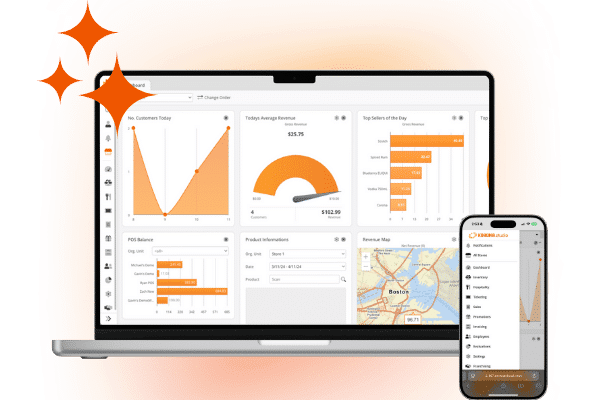
POS security is foundational for protecting your customers, staff, and revenue. KORONA POS combines PCI-compliant payments, granular permissions, real-time reporting, and cloud-based updates into one secure platform built for growing retailers.
Ready to strengthen your POS security? Book a free demo or explore more insights in our retail security resource library to keep your business protected as it scales.