
In this blog post, we’ll cover the difference between SKUs and UPCs, explain what SKU management involves, outline key benefits, address common challenges, and share proven best practices.
SKU management controls your inventory through internal tracking codes. You’ll learn how to build an effective SKU system that scales with your business.
Key Takeaways:
- SKUs are internal codes you create. They keep your inventory organized, trackable, and easy to manage at scale.
- Inconsistent naming and duplicate SKUs are the most common pitfalls. Standardize your format early and audit regularly.
- A centralized POS like KORONA POS keeps SKU data clean across all locations and sales channels.
What Is SKU?
A stock-keeping unit (SKU) is a number assigned to a product for inventory management. The number is a code of letters and numbers that uniquely identifies and lists each product in your inventory.
Inventory auditing is the process of cross-referencing financial records with physical inventory records. In other words, an SKU number is a unique identifier assigned to each product to facilitate more efficient recordkeeping.
The Difference Between SKU and UPC
SKU (Stock Keeping Unit) is your internal tracking code. UPC (Universal Product Code) is the manufacturer’s barcode.
Key differences:
- SKU: You create it for inventory management within your store
- UPC: Manufacturer assigns it; remains identical across all retailers
- SKU: Alphanumeric format you design • UPC: 12-digit standardized barcode
📌 Example: Blue Nike sneakers, size 10
- Your SKU: NIKE-BLU-10-W24
- UPC: 012345678905 (same at every store)
What Is SKU Management?
SKU management tracks and organizes your inventory through stock-keeping units. Proper inventory management helps you monitor stock levels, calculate ownership costs, and maintain optimal purchasing decisions. You can handle SKUs manually or automatically. Poor management leads to higher holding costs and tied-up capital.
What is a SKU Number?
An SKU number is an alphanumeric code you assign to products for internal tracking. Each number identifies specific product attributes like brand, color, size, or style. Retailers create their own SKU formats, so the same product carries different SKUs at different stores. SKUs help track inventory and analyze sales performance.
Key Benefits of SKUs in Retail
Good SKU management gives you the data to predict demand, cut unnecessary expenses, and pinpoint your best-sellers for smarter replenishment. Pair it with the right POS software, and you can actively prevent stockouts and overstock, two of the biggest threats to your inventory ROI.
Track Inventory Accurately
SKUs let you monitor exact stock quantities for each product variant. Your inventory management database becomes more precise when every item has a unique identifier. You’ll know exactly what’s in stock, where it’s located, and when to reorder without manual counting.
Analyze Sales Performance
Track which products, sizes, or colors sell fastest. SKUs reveal performance patterns by allowing you to compare sales data across different variants. You can identify your best sellers and eliminate slow-moving inventory based on concrete numbers.
Discover Advanced Analytics and Custom Reports
Speak with a product specialist and learn how KORONA POS can work for your business.
Identify Products Faster
Employees locate items quickly during customer inquiries or restocking. Instead of searching through general descriptions, staff can scan or enter an SKU code. Your team saves time, and customers get faster service at checkout or when requesting specific products.
Optimize Reordering Decisions
SKUs help calculate optimal reorder points for each product variant. Effective retail inventory management relies on knowing when stock reaches critical levels. You’ll maintain adequate inventory without over-purchasing or running out of popular items.
Minimize Human Error
Unique codes reduce mistakes during receiving, picking, and shipping. When each product has a distinct SKU, your staff can verify they’re handling the correct item. Fewer errors mean less time spent on returns and corrections.
Common Challenges in SKU Management
Retailers face numerous inventory management challenges when organizing SKUs. Poor SKU practices lead to stockouts, overstocking, and lost sales. Below are the most frequent obstacles and their solutions.
Duplicate SKUs
Creating multiple codes for the same product causes inventory confusion. Your system shows incorrect stock levels when identical items carry different SKUs. Establish strict creation protocols and conduct regular audits to eliminate duplicates.
PRO TIP!
Modern systems like KORONA POS prevent duplicate entries by flagging identical product information during SKU creation.
Inconsistent Naming Conventions
Without standardized formats, staff create random SKU codes that nobody else understands. One employee might code a red shirt as “SHRT-RED-M” while another writes “R-SHIRT-MED.” Develop a clear SKU structure and train all team members on the exact format to follow.
SKU Proliferation
Adding too many product variants creates unnecessary complexity. Every size and color combination generates another SKU to track. Analyze sales data to identify low-performing variants and discontinue items that don’t justify the space or effort required for their management.
Manual Data Entry Errors
Typing SKUs by hand introduces mistakes during receiving, transfers, and sales. A single wrong digit can send products to the wrong locations or create phantom inventory. Implement barcode scanning throughout your operations to eliminate typing errors and speed up processing.
Poor Cross-Channel Synchronization
Multichannel inventory management becomes chaotic when SKUs don’t match across platforms. Your online store shows different codes than your physical location. Centralized systems like KORONA POS sync SKU data across all sales channels so inventory levels and product identifiers remain consistent everywhere.
Lack of SKU Documentation
Team members struggle when there is no reference guide for your SKU structure. New employees can’t decode product information from the alphanumeric strings. Create a master document that defines each segment of your SKU format and keep it accessible to all staff.
Failure to Retire Obsolete SKUs
Old product codes remain active in your system long after they are discontinued. Dead SKUs clutter reports and confuse inventory counts. Schedule quarterly reviews to archive or delete SKUs for products you no longer carry or plan to restock.
Inadequate Variant Tracking
Similar products with slight differences need distinct SKUs. A medium blue shirt and a large blue shirt require separate codes. Define clear criteria for when products need unique SKUs and when they can share one, and apply those rules consistently across your catalog.
PRO TIP!
A system like KORONA POS keeps all SKU data accurate and centralized across locations, so your team always works from a single source of truth.
Best Practices for Effective SKU Management
SKUs contain letters and numbers that reveal product details like brand, model, and color. Each business builds SKU structures differently, but following proven practices keeps your inventory organized and error-free.
Avoid Starting SKUs with Zero
Never begin SKU codes with zeros. Many storage tools and spreadsheet programs automatically drop leading zeros. Excel converts 04563 to 4563, creating mismatches between your physical labels and digital records.
PRO TIP!
Start with letters or non-zero numbers to maintain data integrity across all platforms.
Group SKUs by Similarity
Organize related products with similar SKU prefixes. Sports retailers might code all running shoes with “RUN” and all jerseys with “JER.” When customers request a black shoe in red, staff can quickly identify alternative colors by scanning similar SKU patterns. Grouping improves shopping experiences and reveals which product variations customers prefer most.
Avoid Confusing Characters
Skip spaces, special characters, and ambiguous letters. The letter O looks identical to zero, while I resembles the number 1. Stick to uppercase letters and clear numerals. Keep SKUs brief—long codes become difficult to scan and may exceed character limits in older inventory management software for small business systems.
Prioritize High-Value Products
Apply ABC analysis to focus on products that drive revenue. A-level items deserve more detailed SKU tracking with specific attributes, while C-level products can share simpler codes.
PRO TIP!
Allocate your SKU management resources where they generate the highest return on investment.
Maintain Consistent SKU Length
Standardize character counts across product categories. All apparel SKUs might contain 10 characters, while electronics contain 12. Consistent length makes visual scanning easier and prevents database errors. Your team can spot mistakes immediately when a SKU appears too short or too long.
Conduct Regular SKU Audits
Schedule quarterly reviews to clean your SKU database. Remove discontinued products, merge duplicates, and update outdated conventions.
PRO TIP!
Consider the inventory management software cost when evaluating automated audit tools that flag inconsistencies.
Document Your SKU Logic
Create a reference guide that explains each segment of your SKU format. New employees need clear instructions on how to build and interpret code. Thrift store inventory management particularly benefits from documentation since one-of-a-kind items require quick SKU creation at donation intake.
Manual vs. Automated SKU Management
Manual SKU management relies on spreadsheets and physical counts, while automated systems track inventory through retail management software that updates instantly with each transaction. Manual methods demand constant human input, whereas automation handles tracking, reordering, and analysis without daily intervention.
Aspect | Manual Management | Automated Management |
Data Entry | Staff manually records all inventory changes | System automatically updates with sales and receipts |
Error Rate | High; typing mistakes and miscounts are common | Minimal; barcode scanning eliminates human error |
Time Investment | Hours spent on spreadsheets and physical counts | Minutes to review automated reports |
Scalability | Becomes overwhelming as inventory grows | Handles thousands of SKUs without added effort |
Cost | Low initial investment, high labor costs | Higher setup cost, lower ongoing expenses |
Reporting | Manual calculations for sales trends and stock levels | Instant analytics and forecasting built in |
Multi-Location | Difficult to sync inventory across stores | Centralized data shared across all locations |
Reorder Alerts | Staff must remember or check stock manually | Automatic notifications when levels drop |
Example of an SKU application
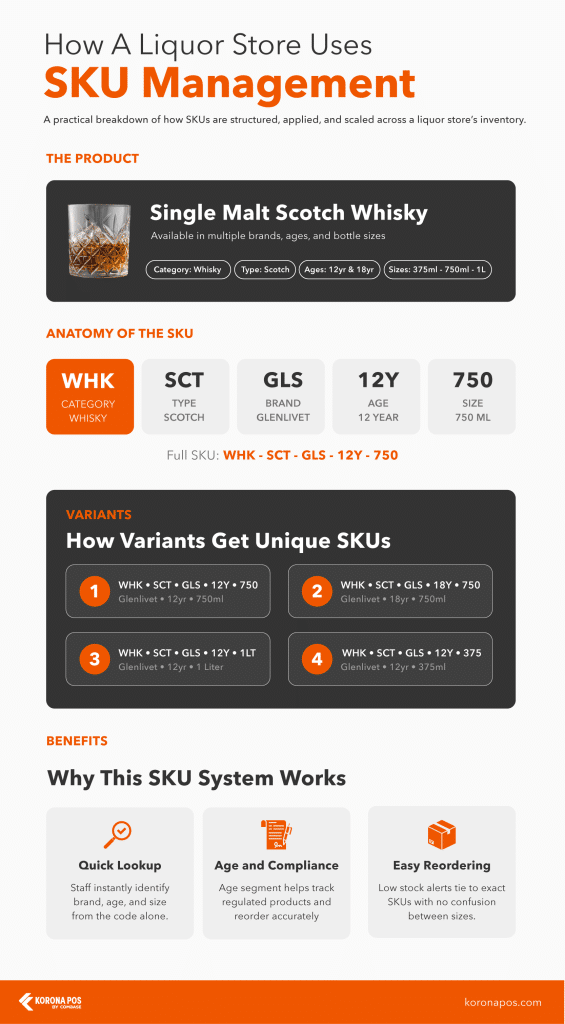
This is a practical breakdown of how SKUs are structured, applied, and scaled across a liquor store’s inventory.
The infographic uses Glenlivet Single Malt Scotch Whisky as a real-world example, showing how each SKU segment captures key product details such as type, brand, age, and bottle size, so every variant, from a 375ml 12-year to a 1-liter 18-year, gets its own unique, trackable code.
By breaking the SKU into segments (category, type, brand, age, and size), every variation gets its own unique code. WHK·SCT·GLS·12Y·750 identifies a 750ml, 12-year Glenlivet Scotch instantly.
PRO TIP!
Change the age or bottle size, and you get a brand new SKU. Staff can look it up, reorder it, and stay compliant all from a single code.
Use KORONA POS to Easily Organize and Manage Your SKUs
KORONA POS is built for the complexity that high-risk retailers actually deal with. Liquor stores get case break functionality, and inventory can be tracked by bottle, six-pack, or case under one SKU. Vape and tobacco shops manage age verification and compliance right at the point of sale.
Tobacco retailers can also track individual carton-to-pack breakdowns and manage floor stock versus back stock separately, critical when state tax reporting requires precise unit-level counts. CBD and smoke shops get the same centralized SKU tracking across every location, with processor-agnostic payments and dual pricing included.
NOTE
KORONA POS isn’t limited to high-risk retail. It also powers QSR businesses like bakeries and coffee shops, as well as admission-based operations like water parks and theme parks, all with the same centralized SKU and inventory management.
Ready to simplify your inventory? Start a free trial, book a demo, or call us at 833-200-0213.