


Some of the best multi-store retail management software include KORONA POS, Shopify POS, Brightpearl, Celerant Technology, Square for Retail, Lightspeed Retail, and Toast POS.
Managing multiple retail locations requires systems that synchronize inventory, track sales across stores, and provide centralized control without sacrificing local flexibility.
We’ve evaluated these platforms based on inventory management capabilities, multi-location features, pricing transparency, and scalability for both independent chains and franchise operators.
Key Takeaways:
- Seamless POS Integration: Offers robust point of sale systems that handle fast transactions, multiple payment methods, and sync with inventory and customer data for efficient checkouts.
- Advanced CRM Features: Includes tools for customer segmentation, loyalty programs, and purchase history tracking to personalize marketing and boost customer retention.
- Employee Management Tools: Tracks staff performance, schedules, and permissions, ensuring accountability and efficient resource allocation across locations.
- Centralized Management: Enables oversight of multiple store locations from a single platform, ensuring consistent operations, pricing, and promotions across all sites.
- Omnichannel Support: Integrates in-store, online, and marketplace sales (e.g., Amazon, Shopify) for a unified view of inventory, sales, and customer data across all channels.
1. KORONA POS: Best Multi-store Retail Management Software
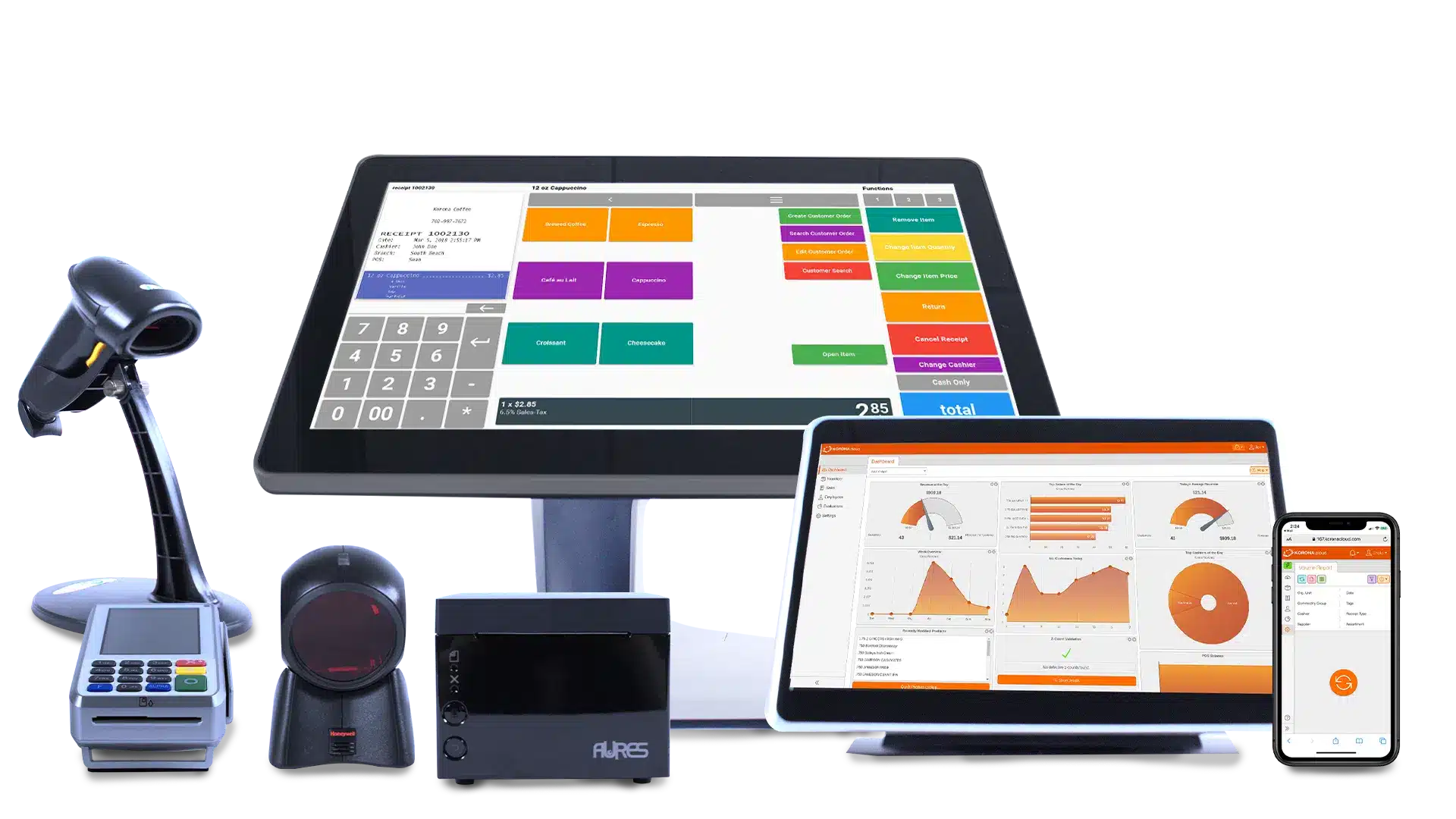
KORONA POS is a customizable, scalable point-of-sale system designed for multi-store retail management. It offers transparent pricing without hidden fees or long-term contracts. It supports businesses like retail stores, wineries, and cafes with tools for inventory, reporting, and integrations.
The system is mobile-ready, ensuring flexibility across locations, and includes robust customer support, free and unlimited, by phone, chat, or email.
With advanced inventory management for centralized control and powerful analytics for multi-location insights, KORONA POS helps prevent overstock/understock issues and enables quick reallocations during demand shifts.
KORONA POS overview
KORONA POS offers a cloud-based POS system tailored for small to medium-sized businesses. Key features include inventory management, sales reporting, customer relationship management (CRM), and employee management.
For multi-stores retail businesses, KORONA POS is particularly beneficial due to its efficient inventory tracking capabilities.

Pros
- Unlimited free trial
- Processing-agnostic
- Excellent customer POS support
- Robust inventory tracking
Cons
- Steep learning curve
- Not ideal for complex menus
- No warehouse management
Korona POS Pricing
Core
$59/mo
- Various reporting
- Product data base
- Promotions and gift cards
Retail
$79/mo
- Barcode automation
- Supplier interface integration
- Real-time tracking
Adds-on
From $10 to $50
- KORONA Plus
- KORONA Integration
- KORONA Invoicing
Key features
KORONA POS handles the complexity of running multiple retail locations through one unified platform. You get centralized inventory control, automated reordering, and employee management tools built specifically for growing chains.
Automated Stock Transfers and Reordering
KORONA’s multi-store POS system automates stock transfers between your locations. Create orders directly from the backend or terminal, with dispatch notifications tracking every shipment from warehouse to store or between branches.
Smart Reorder Optimization
Cloud-based tools use your sales history to calculate optimal reorder quantities automatically. The system factors in sales velocity and supplier lead times, then generates orders at scheduled intervals for each location’s unique demand patterns.
Centralized Multi-Location Control
Manage every store from one platform. Franchise and multi-location features let you customize regional data views instead of drowning in aggregated numbers. Set permissions, pricing, and promotions differently for each market.
Product Performance Tracking
Built-in reporting and analytics show exactly which products drive profit at each location. ABC inventory grading identifies your top performers so you can stock smarter and cut dead weight from your shelves.
Employee Management Across Locations
Track shifts, tips, and commissions for staff across all stores from a single dashboard. The system automatically calculates payroll data, saving hours of manual spreadsheet work each pay period.
Loss Prevention Tools
Retail loss prevention features include forced drawer closing and void restrictions. Set permission levels to prevent unauthorized discounts, refunds, or transaction deletions that often mask internal theft.
Unified Promotion Control
Run sales and discounts at one store, a region, or your entire chain. Gift card programs work across all locations, letting customers purchase at one branch and redeem anywhere you operate.
eCommerce Sync
WooCommerce integration connects your online and physical inventory. When a product sells in your web store, stock levels update automatically across all retail locations to prevent overselling.
Pricing
KORONA POS offers a transparent pricing structure with a few different options for businesses. The base plan, KORONA POS Core, starts at $59 per month per terminal and includes fundamental POS features, reporting, eCommerce capabilities, and 24/7 customer support. For businesses that require more advanced features, such as advanced inventory management and automation, the KORONA POS Retail plan is available for $79 per month per terminal.
In addition to these core plans, KORONA POS offers optional add-on modules tailored to specific industries and needs. These modules are priced on a monthly basis per terminal, gate, or franchise, depending on the module.
For example, the KORONA Food module, designed for quick-service restaurants, costs an additional $10 per terminal per month, while KORONA Ticketing for admission-based businesses is $50 per month per gate. There are also modules for invoicing, franchise management, and integrations, all with their own individual costs.
Where KORONA POS shines
- Exceptional customer support: 24/7 US-based assistance by phone, chat, or email resolves issues quickly, making transitions and troubleshooting seamless for multi-store owners.
- High customization for specific industries: Tailored features such as age-restricted compliance and loss prevention excel in high-risk retail, reducing theft and ensuring regulatory compliance.
- Scalable and transparent pricing: No contracts or hidden fees mean businesses can grow without unexpected costs, making it ideal for expanding chains.
Find out how much you’re spending.
Where KORONA POS falls short
- Learning curve for advanced features: The system’s depth can be overwhelming initially.
- Limited mobile back-office functionality: While POS is mobile-ready, some advanced reporting and features are better suited to desktop, limiting on-the-go management.
Customer reviews
- From Capterra: “I had such an antiquated system before; implementing Korona has been a huge game-changer for my overall profitability. Implementation was seamless and painless! The support staff is great and always ready to help. Had I known it would be this easy, I would have made the switch sooner.”
- From G2: “KORONA POS stands out for its intuitive interface and robust reporting tools, which make managing inventory and tracking sales incredibly efficient. The cloud-based system allows for real-time access from anywhere, and the customer support team is consistently responsive and helpful.
Who KORONA POS is best for
- Small to mid-sized businesses seeking affordability: Transparent pricing and no contracts suit budget-conscious owners needing robust features without long-term commitments.
- High-risk retailers like liquor, vape, and tobacco shops: Advanced loss prevention and compliance tools ensure secure operations for age-restricted sales.
- Multi-store chains in retail or hospitality: Centralized inventory and reporting support scalable growth for businesses with 5+ locations.
Speak with a product specialist and learn how KORONA POS can power your business.
2. Shopify POS: Best Multi-Store Retail Management Software for eCommerce
shopify POS overview
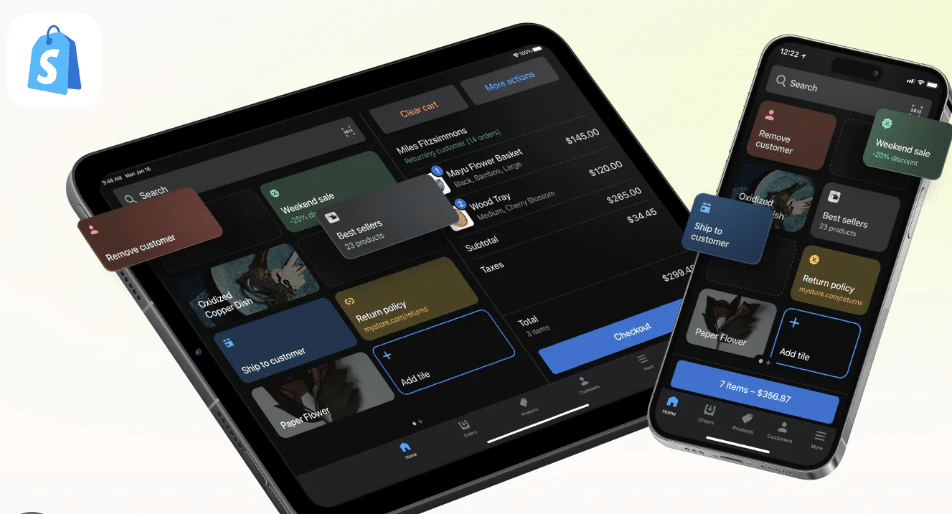
Shopify POS is a cloud-based point of sale system designed for online retail businesses of all sizes.
It offers many features that help businesses manage inventory, accept payments, and track sales.
Shopify POS is also integrated with Shopify’s eCommerce platform, meaning businesses can sell in-store and online.
Pros
- Seamless omnichannel integration
- Robust inventory management
- Robust customer management features
Cons
- Short trial period
- Advanced features cost more
- Dependence on internet
- Can be expensive for businesses with low sales volume
- eCommerce focus
Pricing
Basic
$19/mo
- For “solo entrepreneurs”
- Shipping discounts
- 24/7 support
Shopify
$54/mo
- For “small teams”
- Additional staff logins
- Lower processing rates
Advanced
$299/mo
- For scaling a business
- Custom reporting
- Enhanced support
Plus
$2300/mo
- For “more complex businesses”
- Unlimited staff accounts
- Customizable checkout
Shopify POS manages multiple retail locations with unified inventory, reporting, and customer data across all stores. The platform connects your physical locations with online sales, social media, and marketplaces for true omnichannel operations.
Choose from various hardware options or use existing devices to process payments through Shopify Payments, which reaches over 100 million active shoppers.
The system integrates with your current inventory and order management tools while tracking staff performance and customer purchase history. Free plans are available, with extensive customization through apps and partner integrations.
Key Features
- Omnichannel Selling Tools: Shopify POS bridges online and physical retail with Buy Online, Pick Up In Store capabilities and accepts returns at any location regardless of purchase origin. Staff can check online inventory from the sales floor to prevent missed sales opportunities.
- Unified Inventory Management: Inventory syncs across all sales channels and physical locations in real time. Shopify POS Pro includes restock alerts, stock transfers between stores, and barcode scanning for efficient counts. You get one accurate view of stock levels everywhere.
- Staff Management and Permissions: Create custom roles and permissions to control employee access to sensitive functions, such as refunds or discounts. Managers can limit what each team member can see and do within the system.
- Integrated Payments and Hardware: Shopify Payments supports multiple payment methods and works with Shopify’s proprietary hardware, such as card readers and barcode scanners. The comparison with KORONA POS shows how integrated payment systems stack up against competitors.
- Sales Analytics and Reporting: Built-in analytics track sales patterns, product performance, and customer behavior across locations. Reports break down revenue by store, staff member, or time period to identify trends and opportunities.
- Customer Relationship Management: Unified customer profiles store purchase history, preferences, and contact details across all channels. Use these profiles to create targeted marketing campaigns and personalized shopping experiences that boost repeat business.
Pricing
Shopify POS pricing includes multiple tiers:
• POS Lite: Free with all paid Shopify plans ($5 to $2,000/month depending on features)
• POS Pro: $89/month per location ($79/month annual billing)
• Hardware: $49 to $459 for card readers and kits • Transaction fees: 2.4% to 2.9% + $0.10 to $0.30 per sale
Use the Shopify fee calculator to estimate your total costs.
Where Shopify POS Shines
Seamless eCommerce integration syncs catalogs, perfect for online businesses expanding to physical stores. User-friendly setup works for pop-ups and growing chains with flexible hardware options. Built-in loyalty and customer tools create unified profiles.
Where Shopify POS Falls Short
Core functions often require paid add-ons, increasing costs beyond the base subscription. Transaction fees apply unless you use Shopify Payments exclusively. Some users report connectivity and outage issues with printers and scanners. Those exploring Shopify alternatives often cite these limitations.
Customer Reviews
From Capterra: “For its price point, Shopify POS is easier to use and more customizable than other POS software/hardware combos like Square, but greater ease of access and business use is locked behind paywall tiers.” (4.6/5 overall rating).
From G2: “Shopify POS integrates seamlessly with the Shopify online store, making it easy to manage inventory and sales across channels. The system is user-friendly, with tools like analytics and customer management.” (4.4/5 overall rating). The Shopify vs Square comparison provides additional user perspectives.
Who Shopify POS Is Best For
- eCommerce businesses expanding offline: Automatic syncing suits online sellers opening pop-ups or chains.
- Hybrid retail operations: Ideal for blending in-store and online with loyalty programs.
- Small to mid-sized startups: Free start and scalable plans for budget-conscious growth.
Retailers comparing Clover vs Shopify should consider their primary sales channel before choosing
3. Celerant Technology: Best for Customizable Specialty Retail
Celerant Technology is a retail management system for multi-store operations that unifies the entire business on a single platform. It supports specialty retail with deep customization, firearm compliance, and complex catalog management. Celerant Retail Commerce offers inventory management, point of sale, eCommerce integration, and customer relationship management.
CELERANT overview
Celerant Technology is located in Staten Island, New York. The company provides solutions for various retail sectors, including apparel, footwear, and sporting goods.
Cloud-based for remote access, in-house payments, and 24/7 support. Tailored for gun shops and outdoor gear, Celerant offers unified vendor management and scalable solutions for expansions, ensuring efficiency across locations with no hidden fees.
Pros
- Great reporting features
- Easy user-friendly interface
- Specific inventory features for clothing stores
Cons
- Poor customer support
- Not much flexibility in payment processing
Pricing
Cumulus Retail Point of Sale
$125/mo
- Product and pricing
- Customers and loyalty
- Purchasing and inventory
- Employee management
Cumulus Retail eCommerce
$250/mo
- Responsive templates
- Dynamic navigation
- Smart product search/filter
- Shopping cart
Cumulus Retail All-In-One
$350/mo
- Point of sale and eCommerce
- In-store features
- Online features
- POS and web integration
Stratus Enterprise
Custom
- Enterprise
Key features
- Customizable Inventory Management: The platform handles complex product catalogs with multiple variants, sizes, and attributes for specialty retail. Configure custom fields, tags, and categories to match your unique merchandise without forcing products into generic templates.
- Firearm Compliance Tools: ATF Form 4473 integration and FFL license management ensure regulatory compliance for gun shops. The system tracks serial numbers, performs automated background checks, and maintains required records for federal audits.
- Unified Vendor Management: Centralize all supplier information and purchase orders across locations from one dashboard. Compare vendor pricing, track delivery schedules, and manage relationships with multiple suppliers simultaneously to negotiate better terms.
- AI-Powered Reordering: Automated replenishment analyzes sales velocity and seasonal trends to suggest optimal order quantities. The system factors in supplier lead times and minimum order requirements to prevent stockouts while minimizing excess inventory.
- Cloud Remote Access: Cloud-based infrastructure lets you monitor sales, inventory, and staff performance from any mobile device. Check store performance during off hours or while traveling, without being tied to your back-office computer.
- Integrated Payment Processing: Built-in payment solutions handle credit cards, debit cards, and contactless payments with consistent processing rates across all locations. Eliminate the complexity of managing separate payment providers for each store.
- Multi-Location Reporting: Advanced reporting tools compare performance metrics between stores, regions, and time periods. Generate consolidated reports or drill down into individual location data to identify top performers and underperforming branches.
- Customer Loyalty Programs: Create tiered reward systems that work across all your stores. Track customer purchase history, preferences, and lifetime value to design targeted promotions that drive repeat visits and increase average transaction values.
- 24/7 Support: Unlimited technical assistance covers all locations without additional fees. Support teams understand retail management systems and can troubleshoot issues during peak business hours or after closing.
Pricing
- Monthly SaaS subscription starts at $150 per location
- Custom quotes required for final pricing
- No setup or installation fees
- Hardware bundles available from $999 with manufacturer rebates
Component | Cost |
Monthly subscription | From $150/location |
Hardware bundle | ~$999 (with rebates) |
Setup fees | $0 |
Support | Included |
Contact Celerant directly for multi-store pricing tailored to your location count and feature requirements.
Where Celerant shines
- Deep customization for specialty retail: Flexible configuration adapts to complex product catalogs like outdoor gear, sporting goods, or firearm inventories without workarounds.
- Compliance and vendor tools: Built-in firearm regulations and centralized supplier management simplify operations for regulated industries with strict documentation requirements.
- Scalable with strong support: 24/7 assistance and transparent pricing help businesses expand from single stores to multi-location operations without unexpected costs.
Where Celerant falls short
- Custom pricing opacity: No published rate tiers require businesses to request quotes before comparing costs to competitors.
- Limited public documentation: Sparse feature details in marketing materials make thorough evaluation difficult without scheduling demos or sales calls.
- Integration complexity: Third-party connections may require custom development work or professional services to implement fully functional workflows.
Customer reviews
- Capterra: Users praise the platform’s customization capabilities for specialty retail but note the learning curve for advanced features. Reviews highlight responsive support teams.
- G2: Positive feedback centers on inventory flexibility and firearm compliance tools. Some reviewers mention the need for better documentation and onboarding materials.
- General sentiment: Strong ratings for businesses with unique inventory needs. Convenience store operators report good experiences but note the system may offer more features than simpler operations require.
Who Celerant is best for
- Specialty retailers like gun shops: ATF compliance features and serial number tracking handle regulated product requirements without manual workarounds.
- Outdoor gear and sporting goods chains: Custom catalogs manage complex inventories with thousands of SKUs, sizes, colors, and seasonal variations across multiple locations.
- Mid-sized customizable operations: Businesses with 5+ locations needing deep personalization beyond basic POS capabilities but not requiring enterprise-level complexity.
4. Brightpearl: Best for Multichannel Retailers with Complex Order Fulfillment
Brightpearl overview
Brightpearl combines order management, inventory control, and accounting automation for multichannel retailers. The platform works as a retail operating system for businesses selling across eCommerce platforms and marketplaces that need automated workflows and financial integration.

Pros
- Great order fulfillment capabilities
- Streamlined and easy to use
- Various integration options
Cons
- Relatively high pricing
- Steep learning curve
- Limited customization options
Brightpearl POS Pricing
Quote-based pricing model
Key Features
- Order and Inventory Orchestration: Stock levels sync across all sales channels automatically. Similar to advanced multichannel inventory management tools, fulfillment rules route orders to the optimal warehouse or store location based on proximity and availability.
- Accounting Automation: Built-in financial tools handle accounts receivable, accounts payable, and ledger posting for every transaction. Reconciliation happens automatically, reducing manual bookkeeping and slowing down retail inventory management.
- Marketplace and 3PL Integrations: Prebuilt connectors link to major ecommerce platforms, marketplaces, and third-party logistics providers. Shipping automation processes orders without manual data entry.
- Warehouse Management System: Track stock movements, pick and pack operations, and bin locations across multiple warehouses. Among the various types of inventory management systems, Brightpearl optimizes fulfillment paths to reduce shipping costs and delivery times.
- Demand Forecasting and Purchasing: Purchase order automation uses sales history and seasonality to suggest reorder points. Forecast tools help prevent stockouts during peak periods while controlling carrying costs.
- Customer and Sales Management: Centralized customer profiles store purchase history, payment methods, and communication logs across all channels. Sales team features track quotes, backorders, and customer-specific pricing better than basic retail POS systems.
Pricing
Brightpearl uses custom subscription pricing based on order volume and features needed. Understanding inventory management software cost helps set budget expectations:
- Base subscription: Quote-based per business requirements
- Order volume tiers: Pricing scales with monthly order count
- Module add-ons: Additional costs for advanced features
- Implementation: Onboarding and setup fees may apply
Component | Details |
Pricing model | Custom quotes |
Base cost | Varies by volume |
Contract term | Annual typical |
Support | Included in subscription |
Contact Brightpearl for accurate pricing tailored to your operation.
Where Brightpearl Shines
- Multichannel order management centralizes operations across ecommerce, marketplaces, and physical stores
- Automated fulfillment routing reduces overselling and optimizes shipping costs
- Built-in accounting eliminates double entry between commerce and finance systems
- Strong integrations with popular ecommerce platforms and 3PLs
- Scales well for growing retailers crossing $1M to $50M in annual revenue
- Purchase order automation streamlines supplier relationships
Where Brightpearl Falls Short
- Custom pricing lacks transparency compared to tiered SaaS models
- May not provide deep ERP functionality needed by large enterprise retailers
- Learning curve steeper than simpler point of sale solutions
- Limited physical store features compared to dedicated POS platforms
- Implementation timeline can be lengthy for complex businesses
- No native loyalty program features like retail-focused competitors
Customer Reviews
- Capterra and G2 users praise order automation and marketplace integrations
- Common positive feedback: Strong customer support and regular feature updates
- Noted limitations: Some features require workarounds when replacing full ERP systems
- Overall sentiment: Excellent for multichannel retail operations within its target market
- Typical rating range: 4.0 to 4.5 out of 5 across review platforms
Who Brightpearl Is Best For
- Multichannel retailers selling across ecommerce stores, Amazon, eBay, and other marketplaces
- Growing brands with $1M+ in annual revenue, needing to scale operations
- Businesses using 3PLs requiring automated order routing and fulfillment integration
- Retailers wanting accounting integration to eliminate manual financial reconciliation
- Companies outgrowing basic inventory systems but not ready for full enterprise ERP
- Omnichannel operations coordinating warehouse, dropship, and store fulfillment
5. Square for Retail: Best for Simple Multi-Store Operations
SQUARE POS overview
Square for Retail combines POS software, payment processing, and hardware from a single vendor. The platform works best for small to midsize retail chains that want straightforward setup, transparent pricing, and integrated payments without juggling multiple providers.

Pros
- Free to use (Basically)
- Flexible payment methods
- Great integration features
Cons
- Not ideal for complex and retail businesses
- Poor customer support
- Not ideal for businesses with high sales volume
- Insufficient reporting metrics
Pricing
Square Free
$0
- POS app and payments
- Website builder with SEO tools
- Courses
- Item library
Square Plus
$49/mo
- Staff management
- Expanded site customization
- Loyalty rewards program
Square Premium
$149/mo
- Advanced reporting
- No gift card load fees
- 24/7 phone support
Key Features
- Integrated Payments and Hardware: Square Payments processes all transactions through a single vendor that handles both software and payment processing. Hardware options include the Square Terminal, Register, and Stand. The comparison with KORONA POS shows how integrated systems differ from traditional POS providers.
- Multi-Location Inventory Management: Track stock levels across all store locations with inventory transfers, purchase orders, and low stock alerts. Barcode printing and scanning streamline receiving and cycle counts. Understanding the differences between Square for Retail and Square POS helps choose the right plan.
- Employee Management Tools: Create staff accounts with custom permissions, track hours worked, and manage commissions. Time clock features record shifts directly through the POS terminal for payroll processing.
- Customer Directory and Profiles: Store customer contact information, purchase history, and preferences across all locations. Use profiles to personalize service and track loyalty program participation.
- Ecommerce Integration: Connect your Square Online store with physical locations to sync inventory and orders. Customers can buy online and pick up in store at any location.
- Sales Reporting and Analytics: Access sales data, inventory reports, and employee performance metrics from any device. Reports break down revenue by location, product category, time period, and staff member.
- Vendor and Purchase Order Management: Create and track purchase orders to suppliers directly in the system. Manage vendor relationships and receiving processes across multiple store locations. Check Square POS pricing to understand subscription costs.
Pricing
Square for Retail uses tiered subscription pricing with transaction fees. Use the Square fee calculator to estimate total costs:
- Free Plan: Basic POS features with 2.6% + $0.10 per transaction
- Plus Plan: $29/month per location with 2.5% + $0.10 per swipe
- Premium Plan: Custom pricing for high-volume businesses
- Hardware: $299 for Terminal, $799 for Register
Where Square Shines
- Simple onboarding process gets stores operational quickly without lengthy implementation
- Single vendor relationship for hardware, software, and payment processing
- Transparent pricing with no hidden fees or surprise charges
- Modern hardware options, including portable terminals for flexible checkout
- Built-in ecommerce integration for online and in-store sales
- Predictable monthly costs – ideal for budget planning
Where Square Falls Short
- Limited advanced features for complex multi-location promotions and pricing strategies
- Basic inventory management compared to specialized retail systems
- Pretty bad customer service
- Transaction fees add up for high volume businesses
- Restricted product categories like CBD require special compliance requirements
- Less customization than enterprise retail platforms
- Customer support can be slow during peak times
- Migration challenges when switching from competitors like Revel
Customer Reviews
- G2 and Capterra users appreciate the ease of use and quick setup process
- Common praise: Integrated payments eliminate third-party processor hassles •
- Hardware feedback: Terminals and readers work reliably for daily operations
- Noted limitations: Some retailers need deeper reporting and inventory features
- Overall ratings: Typically 4.3 to 4.5 out of 5 across major review platforms
- Support experiences: Mixed reviews on response times for complex issues
Who Square Is Best For
- Small retail chains with 2 to 10 locations needing straightforward inventory and sales tracking
- Independent retailers who want one vendor for payments, hardware, and software
- Startups and new businesses prioritizing low upfront costs and simple onboarding
- Retailers with basic needs not requiring advanced promotions or multi-warehouse management
- Businesses comparing options like Zettle vs Square for payment processing simplicity
- Stores wanting omnichannel capabilities without complex enterprise systems
6. Lightspeed Retail: Best for Specialty Retailers with Complex Catalogs
Lightspeed Retail overview
Lightspeed Retail serves specialty retailers needing advanced inventory management, detailed product variants, and robust ecommerce integration.
The platform targets fashion boutiques, sporting goods stores, and other retailers with extensive SKU catalogs across multiple locations.
Comparing Lightspeed to competitors highlights its specialty retail focus.

Pros
- Centralized employee management
- Built-in marketing tools
- Cloud-based accessibility
Cons
- Customer service issues
- Dependence on internet connection
Lightspeed Retail Pricing
Basic
$109/mo
- Registers
- Free training and onboarding resources
- Dedicated account manager
Core
$179/mo
- Lightspeed B2B
- Accounting
- eCommerce
Plus
$389/mo
- Omnichannel loyalty
- Advanced reporting
Key features
- Advanced Inventory Management: Handle complex product matrices with unlimited variants for size, color, style, and custom attributes. Track inventory across all locations with automatic stock level updates. The system supports serial number tracking, lot management, and expiration date monitoring for regulated products.
- Matrix Inventory for Variants: Handle products with multiple attributes like size, color, and style through matrix inventory. Perfect for apparel and footwear retailers managing complex SKU structures across locations.
- Integrated eCommerce Platform: Built-in online store syncs inventory and orders with physical locations automatically. Customers can buy online and pick up in store or return eCommerce purchases at any retail location. Product catalogs, pricing, and promotions are updated simultaneously across all channels.
- Customer Relationship Management: Build detailed customer profiles with purchase history, preferences, and contact information across all touchpoints. Send targeted email campaigns, track customer lifetime value, and create segmented lists for personalized marketing. Loyalty programs reward repeat purchases across all locations.
- Detailed Reporting and Analytics: Access over 50 pre-built reports covering sales, inventory, employees, and customers. Compare performance between locations, analyze product margins, and identify slow-moving stock. Custom report builder lets you create specific views tailored to your business needs.
Pricing
Plan | Monthly Cost | Key Features |
Basic | $109/location | Essential POS and inventory |
Core | $179/location | Advanced reporting, eCommerce |
Plus | $389/location | Customer insights, integrations |
Lightspeed POS pricing varies based on features and the number of locations. Payment processing fees are separate from the software subscription.
Where Lightspeed shines
- Specialty retail expertise: Matrix inventory management handles complex product catalogs with thousands of variants. Fashion, footwear, and sporting goods retailers benefit from size and color tracking capabilities.
- Strong ecommerce integration: Native online store eliminates third-party platform costs. Inventory synchronization prevents overselling across channels without manual reconciliation.
- Detailed analytics and reporting: Extensive pre-built reports provide insights into product performance, customer behavior, and employee productivity. Full Lightspeed review details additional reporting capabilities.
Where Lightspeed falls short
- Higher price point: Monthly subscription costs exceed budget-friendly alternatives. Comparing Lightspeed to Square shows significant price differences for similar location counts.
- Complex setup process: Initial configuration requires time to map product variants, set up integrations, and train staff. Implementation can take weeks for retailers with large catalogs.
- Customer service concerns: User reviews mention inconsistent support response times. Several Lightspeed alternatives offer more responsive customer service teams.
Customer reviews
- Capterra: Users appreciate inventory management for complex catalogs and variant tracking. Some reviewers note the learning curve during initial setup and mention support delays during peak seasons.
- G2: Strong ratings for ecommerce integration and reporting depth. Customers highlight the system’s ability to handle specialty retail needs but mention the higher cost compared to basic POS systems.
- General sentiment: Specialty retailers value the platform’s robust features. Compared to Clover, Lightspeed offers more advanced inventory but at a premium price. Shopify POS comparisons show different strengths for online versus retail-focused businesses.
Who Lightspeed is best for
- Fashion and apparel retailers: Boutiques and clothing stores with extensive size, color, and style matrices need robust variant tracking across multiple locations.
- Specialty stores with complex inventory: Sporting goods, outdoor gear, and hobby shops benefit from detailed product attributes and serial number tracking capabilities.
- Retailers prioritizing eCommerce: Businesses wanting native online stores integrated directly with physical inventory rather than managing separate platforms or third-party integrations.
7. Toast POS: Best for Restaurant and Food Service Chains
Toast POS overview
Toast POS specializes in restaurant operations, with features designed specifically for foodservice businesses operating multiple locations.
The platform handles complex menu management, kitchen display systems, and table service workflows. Toast POS overview covers its restaurant-focused capabilities in detail.

Pros
- Inventory management built-in
- Integrated online ordering & payments
- Detailed reporting and analytics
Cons
- Mixed customer support reviews
- Contract required
Toast POS Pricing
Starter Kit:
$0/mo
- Reporting & analytics
- Menu management
- Toast invoicing
Core
$69/mo
- Toast mobile order and pay
- Toast delivery services
- Scheduling, powered by Sling
Build Your Own
Custom Pricing
- Payroll & team management
- Toast pay card and payOut
Key features
Restaurant-Specific Order Management: Handle dine-in, takeout, delivery, and online orders from one system. Kitchen display screens route orders to the appropriate prep stations automatically. Servers can fire courses at specific times, split checks by seat, and process partial payments.
Multi-Location Menu Control: Create master menus and customize offerings by location based on local preferences or ingredient availability. Update pricing, item descriptions, and modifiers across all restaurants simultaneously or adjust individual locations. The system tracks menu item performance to identify top sellers.
Integrated Online Ordering: Built-in ordering website syncs directly with kitchen operations without third-party commission fees. Customers place orders for pickup or delivery with menu accuracy guaranteed. Online orders flow to kitchen displays alongside dine-in tickets.
Labor Management and Scheduling: Schedule employees across multiple locations with shift templates and availability tracking. The platform monitors labor costs as a percentage of sales in real time. Track clock-ins, breaks, and overtime automatically for accurate payroll processing.
Pricing
Plan | Monthly Cost | Key Features |
Core | $0 | 2.49% + $0.15 |
Essentials | $69/terminal | Custom rates |
Enterprise | Quote required | Custom rates |
Calculate total costs, including hardware, software, and payment processing. Hardware packages start around $799 per terminal.
Toast POS Pricing Calculator
Calculate your total costs including payment processing, hardware, and software add-ons
Choose Pricing Model
Business Details
Hardware Add-ons
Software Add-ons
Cost Breakdown
Where Toast POS shines
- Purpose-built for restaurants: Kitchen display integration, table management, and course firing address food service needs better than generic retail systems.
- Streamlined online ordering: Native ordering platform eliminates third-party commission fees. Orders integrate directly with kitchen operations without manual entry.
- Labor cost tracking: Real-time labor percentage monitoring helps managers control staffing expenses. Scheduling tools optimize coverage based on historical traffic patterns.
Where Toast POS falls short
- Restaurant focus limits versatility: The platform excels at food service but lacks features for traditional retail, specialty shops, or non-food businesses.
- Payment processing lock-in: Toast requires using their payment processor. Businesses cannot bring existing merchant accounts or choose alternative processors.
- Higher total costs: Combined software, hardware, and processing fees exceed competitors. Long-term contracts and early termination penalties can lock businesses into unfavorable terms.
Customer reviews
- Capterra: Users praise restaurant-specific features like kitchen displays and table management. Some mention the learning curve for staff and frustration with mandatory payment processing.
- G2: Strong ratings for online ordering integration and menu management across locations. Reviewers note the cost adds up quickly with multiple terminals and processing volume.
- General sentiment: Restaurant operators appreciate the industry-specific design. Complaints center on pricing transparency, contract terms, and customer support response times during peak service hours.
Who Toast POS is best for
- Multi-location restaurant chains: Quick service, fast casual, and full-service restaurants with 3+ locations benefit from centralized menu and labor management.
- Food service businesses prioritizing online ordering: Restaurants wanting commission-free ordering platforms integrated directly with kitchen operations rather than relying on third-party delivery apps.
- Operators needing restaurant-specific tools: Businesses requiring table management, course firing, kitchen display systems, and ingredient-level inventory tracking designed specifically for food service.
How to Choose A Multi-store Retail Management Software
Managing multiple retail locations requires software that keeps all your stores connected and running smoothly. The right system helps you track inventory, monitor sales, and manage employees across every location from one central platform.
Centralized Inventory Management
Your software should give you a complete view of stock levels across all locations. The ability to transfer products between stores prevents stockouts at busy locations while reducing excess inventory at slower ones. Real-time synchronization ensures accurate counts no matter where items move. KORONA POS offers robust inventory tracking that updates instantly when products move between locations, helping you maintain optimal stock levels everywhere.
Understanding inventory management challenges becomes easier when your system automates reordering and tracks product movement. Good retail inventory management software should alert you to low stock situations before they become problems.
Unified Reporting and Analytics
You need to see performance data from all stores in one dashboard. Sales reports should break down by location, product category, employee, and time period. The system should identify trends across your retail network and highlight which locations perform best. KORONA POS provides detailed analytics that compare store performance side-by-side, making it easy to spot opportunities and address problems quickly.
Effective retail sales analytics help you understand customer behavior patterns and adjust your strategy accordingly. When you can compare metrics across locations, you discover what works and replicate success.
Cloud-Based Accessibility
Modern multi-store systems operate in the cloud, allowing you to access data from anywhere with an internet connection. You can check on your California store while standing in your New York location.
Updates and new features roll out automatically without requiring IT visits to each site. KORONA POS runs entirely in the cloud, giving you the flexibility to manage your business from any device.
The decision between cloud vs server POS systems often comes down to accessibility and maintenance. Cloud solutions eliminate the need for expensive on-site servers at each location.
Employee Management Across Locations
Your software should handle scheduling, time tracking, and staff permissions across all stores. Managers need different access levels than cashiers, and some employees might work at multiple locations.
The system should track sales performance by employee and calculate commissions accurately. KORONA POS includes detailed employee management tools that let you set custom permissions and track productivity across your entire workforce.
Scalability for Growth
Choose software that grows with your business. Adding a new store should be straightforward without requiring expensive upgrades or complicated migrations. The pricing structure should make sense as you expand, whether you’re opening your third location or your thirtieth. KORONA POS scales seamlessly, allowing you to add new stores without disrupting existing operations.
Building a successful multi-store retail business requires technology that supports expansion rather than limiting it.
Integration Capabilities
Your management software needs to work with other tools you already use. Accounting software, eCommerce platforms, payment processors, and marketing tools should connect smoothly.
Data should flow between systems without manual entry or file imports. KORONA POS integrates with major business applications, creating a connected ecosystem that saves time and reduces errors.
Easy Setup and Training
When you’re setting up a new location, you can’t afford weeks of downtime learning complicated software. The interface should be intuitive enough that new employees can start ringing up sales quickly. Look for providers that offer strong onboarding support and training resources. KORONA POS provides straightforward setup guides and responsive customer support to get your stores running fast.
Learning how to set up a POS system shouldn’t require technical expertise or extensive training programs.
Customizable for Your Industry
Different retail verticals have unique needs. A coffee shop chain requires different features than a clothing boutique or hardware store network. Your software should adapt to your specific product types, pricing structures, and operational workflows. KORONA POS offers industry-specific configurations for various retail segments, from specialty retail to quick-service businesses.
If you operate coffee shops, finding the best POS system for coffee shop operations means looking for features like ingredient tracking and modifier management.
Inventory Planning Tools
Advanced planning features help you forecast demand and prepare for seasonal changes. The system should analyze historical sales data to suggest optimal order quantities for each location. Automated purchase orders based on reorder points save time and prevent stock issues. KORONA POS includes sophisticated inventory planning that considers sales velocity and lead times when recommending orders.
Strong inventory planning capabilities distinguish basic systems from comprehensive solutions that actively help manage your supply chain.
Inventory management a headache?
KORONA POS makes stock control easy. Automate tasks, generate custom reports, and learn how you can start improving your business.
Equipment and Asset Tracking
Beyond product inventory, you need to track equipment, fixtures, and other assets across locations. Point-of-sale hardware, computers, display cases, and other items represent significant investments.
Your software should maintain records of each assetis location and when it needs maintenance or replacement. KORONA POS helps you monitor equipment alongside your product inventory for complete asset visibility.
Many retailers overlook equipment inventory management until they encounter missing or broken equipment.
Multi-Location Pricing Control
You might need different prices at different stores based on local market conditions or operating costs. The software should let you set location-specific pricing while maintaining centralized product catalogs. Promotional pricing and discounts should be controllable at the corporate level or delegated to store managers. KORONA POS offers flexible pricing options that balance central control with local autonomy.
Customer Data Synchronization
Loyalty programs and customer databases should work across all your stores. When a customer makes a purchase at any location, their profile and rewards should update automatically. You want to recognize and reward customers regardless of which store they prefer. KORONA POS maintains unified customer records that travel with shoppers across your retail network.
Reliable Support and Uptime
When a system goes down at any location, you’re losing money every minute. Look for providers with strong uptime guarantees and responsive technical support. Support teams should be available when you need them, especially during peak retail hours. KORONA POS provides dedicated support and maintains high system reliability to keep your stores operating smoothly.
Have trouble getting your POS customer service on the phone?
KORONA POS offers 24/7 phone, chat, and email support. Call us at 833.200.0213 to see how reliable we are.
Cost and Value Analysis
Compare total cost of ownership across different solutions. Monthly fees, transaction charges, hardware costs, and support fees all add up. Calculate the cost per location and consider what features you’re getting for that investment. The cheapest option rarely delivers the best value for growing businesses. KORONA POS offers transparent pricing that scales appropriately as your business expands.
For smaller operations, a small business POS system might provide everything needed without enterprise-level complexity and costs.
Security and Compliance
Multi-location retailers handle sensitive customer payment data at numerous points. Your software must maintain PCI compliance and protect against data breaches. User permissions should prevent unauthorized access to financial information and reports.
Regular security updates should happen automatically without disrupting operations. KORONA POS prioritizes security, maintaining industry certifications and implementing encryption to protect your business and customers.
Use KORONA POS to Simplify Multi-Location Retail Management Today
KORONA POS supports liquor stores, smoke shops, convenience stores, cannabis retailers, QSRs, specialty retailers, and admissions operations across multiple locations.
Franchisees benefit from built-in royalty tracking, consolidated databases, and automated product imports that streamline operations. Advanced inventory features include theft protection, order level optimization, and automated counting.
The system offers processor-agnostic flexibility with dual pricing capabilities, backed by industry-leading support. Ready to see how KORONA POS works for your multi-location retail management business? Book a live demo with one of our product specialists or call 833-200-0213 today.


