


This guide breaks down the pricing structure of inventory management software, from budget-friendly solutions for small businesses to advanced enterprise systems. It also explores hidden costs, factors affecting pricing, and key considerations when choosing the right software.
Understanding these costs will help you make an informed investment, whether you’re a brick-and-mortar retailer, wholesaler, or eCommerce business.
Key Takeaways:
- Inventory management software costs range from $50/month for basic solutions to over $1,000/month for enterprise-level systems.
- Pricing depends on the number of users, scalability, third-party integrations, hardware requirements, and whether the system is cloud-based or on-premise.
- Additional expenses include onboarding and training, data migration, integration with existing systems, and ongoing maintenance and support fees.
- Before selecting a solution, Businesses should assess their needs, define KPIs, evaluate features, ensure scalability, and consider integration capabilities.
How Much Does Inventory Management Software Cost?
Inventory management software pricing varies widely based on features, business size, and deployment type:
- Basic plans ($50–$150/month): Simple tracking tools suited for small businesses with straightforward needs.
- Mid-tier plans ($150–$500/month): Include automation and reporting features, ideal for growing retailers and wholesalers.
- Enterprise plans ($1,000+/month): Cover AI-driven forecasting, multi-location tracking, and advanced integrations.
Pricing structures also differ by provider. Some charge per user or per location, while others offer flat monthly rates.
Beyond the subscription fee, budget for potential add-on costs:
- Setup and onboarding fees
- Hardware requirements
- Premium support packages
Free options are available, but they typically come with notable feature limitations.
Most Popular Inventory Management Software
Product
Best For
Price
Trial Info
Key Features
Best for:
Retail stores, high-risk businesses (liquor, vape, smoke shops).
Price:
Pricing starts at $59/mo
Processing Fees:
Unlimited free trial
Key Feature:
Automated minimum and maximum inventory levels; barcode-enabled return and exchange system

Best for:
Small to medium-sized businesses across various industries.
Price:
Paid plans start at $39/mo
Processing Fees:
14-day free trial
Key Feature:
Item kitting; automatic reordering with set reorder points and reminders

Best for:
Wholesale, distribution, manufacturing, and eCommerce businesses.
Price:
Pricing begins at $186/mo
Processing Fees:
14-day free trial
Key Feature:
Bill of Materials (BOM) and assemblies management; vast eCommerce and accounting integrations

Best for:
eCommerce and wholesale businesses.
Price:
Pricing starts at $0/mo
Processing Fees:
No free trial
Key Feature:
Automated inventory management with real-time stock updates; omni-channel eCommerce integrations

Best for:
Product sellers, including retail, wholesale, and eCommerce businesses.
Price:
Pricing starts at $349/mo
Processing Fees:
14-day free trial
Key Feature:
Warehouse management integration; smart reordering system with forecasting capabilities
Best for:
Large enterprises, multi-channel retailers, and wholesalers.
Price:
Custom pricing
Processing Fees:
No free trial
Key Feature:
Demand planning to anticipate inventory needs, lot and serial number tracking
Factors That Affect the Cost of Inventory Management Software
Choosing the right inventory management software depends on various factors. Pricing varies based on automation, integrations, scalability, and the necessary level of analytics.
Number of Users and Scalability
Pricing is influenced by the number of users and the system’s scalability requirements. Many providers charge per user, with costs increasing as more users are added. Additionally, systems designed to scale with business growth may have a higher price point due to the need for enhanced capabilities and infrastructure.
Integration with Third-Party Systems
The need to integrate with POS systems, accounting software (e.g., QuickBooks), eCommerce platforms, and supply chain management tools affects costs. A hardware store relying on supplier-direct ordering may need advanced B2B integrations, which will increase the software price.
Support and Maintenance
Ongoing support and maintenance are essential for the smooth operation of inventory management software. Some providers include support in their pricing, while others offer it as an add-on service. Maintenance ensures the system remains up-to-date with the latest features and security patches, contributing to the total cost of ownership.
Hardware & Barcode Scanning Requirements
Some businesses require additional hardware, which affects costs. For example, a convenience store scanning thousands of items daily might need to invest in barcode scanners and RFID technology, increasing software and hardware expenses. A clothing store managing a warehouse may require mobile inventory scanning devices, adding to upfront costs.
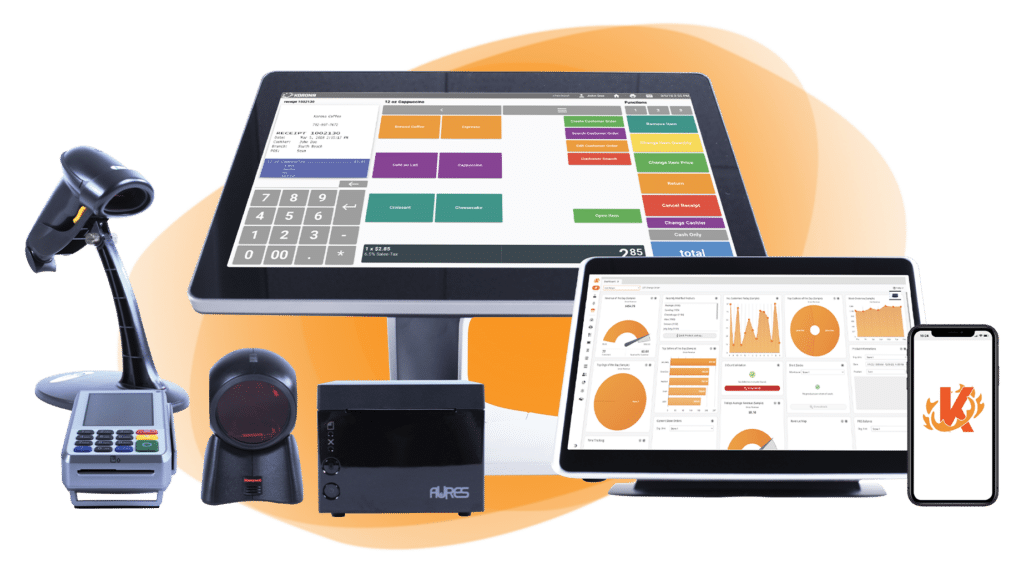
Build Your Own POS Setup
Whether you run a café, retail store, or event booth, we have the point of sale hardware designed for your specific needs. Start building your ideal POS system now.
Deployment Method
The choice between cloud-based and on-premise solutions significantly impacts cost. Cloud-based systems typically operate on a subscription model, with prices ranging from $50 to $500 per month, depending on features and scalability. On-premise solutions often involve higher upfront costs, including hardware and licensing fees, ranging from $10,000 to over $100,000.
Hidden Costs to Watch For
When selecting inventory management software, businesses should be aware of potential hidden costs beyond the initial purchase price.
Onboarding and Training Costs
Implementing new software almost always requires staff training. Skipping proper onboarding can lead to:
- Operational inefficiencies and slower workflows
- Increased labor costs from avoidable errors
- Revenue loss due to inventory mismanagement
Investing in thorough training from the start is essential to getting full value from the software.
Integration Expenses
Connecting new software with your existing systems can add significant costs. Common sources of integration expenses include:
- Custom development work to bridge incompatible platforms
- Extended implementation timelines
- Potential disruptions during the integration process
- Connecting to accounting tools (e.g., QuickBooks), eCommerce platforms, or supply chain systems
Budget for these costs upfront rather than treating them as afterthoughts.
Maintenance and Support Fees
Ongoing maintenance and support are vital for smooth day-to-day operations. Watch out for:
- Separate customer support fees not included in the base plan
- Charges for regular inventory software updates
- Additional costs for troubleshooting and technical assistance
Some providers bundle support into their pricing, while others treat it as a paid add-on. Always confirm what is covered before signing a contract.
Have trouble getting your POS customer service on the phone?
KORONA POS offers 24/7 phone, chat, and email support. Call us at 833.200.0213 to see how reliable we are.
Data Migration Costs
Moving existing inventory data into a new system is often more complex than it appears. Key cost drivers include:
- Specialized migration services to ensure data accuracy
- Time spent cleaning and reformatting data before transfer
- Potential downtime or disruptions during the migration period
- Risk of data integrity issues if the process is rushed
Proper planning and resource allocation are essential. Factoring in migration costs early can prevent budget surprises down the line.
How to Choose the Right Inventory Software?
The appropriate inventory management software is crucial for smooth business operations. A well-chosen system can improve stock control, reduce waste, and improve decision-making.
1. Assess Your Business Needs
Begin by evaluating your specific requirements. Consider factors such as the size of your inventory, the complexity of your supply chain, and any industry-specific needs. This assessment will help you identify essential features and functionalities.
2. Define Key Performance Indicators (KPIs)
Establish clear KPIs to measure the effectiveness of the software. Metrics like inventory turnover, order accuracy, and stockouts can guide your decision. Utilizing a retail KPI dashboard can assist in monitoring these metrics effectively.
Discover Advanced Analytics and Custom Reports
Speak with a product specialist and learn how KORONA POS can work for your business.
3. Evaluate Software Features
Examine the features offered by different software options. Look for capabilities such as real-time tracking, reporting and analytics, and integration with existing systems. For instance, POS reporting and analytics can provide valuable insights into sales and inventory data.
4. Consider Scalability
Choose software that can grow with your business. Scalability ensures that as your operations expand, the software can accommodate increased inventory volumes and complexity without requiring a complete system overhaul.
5. Review Integration Capabilities
Ensure the software integrates seamlessly with your current systems, such as accounting software, eCommerce platforms, and point of sale systems. A POS system software with built-in inventory management enhances overall operational efficiency.
6. Analyze Costs
Compare pricing models among different software providers. Consider the initial investment and ongoing maintenance, updates, and support costs. Ensure the total cost aligns with your budget and expected return on investment.
7. Seek User Feedback
Look for reviews and testimonials from other businesses in your industry. Their experiences can provide valuable insights into the software’s performance, reliability, and customer support.
8. Test the Software
Use free trials or demos to assess the software’s usability and functionality. The hands-on experience will help determine if the software meets your operational needs and user preferences.
Speak with a product specialist and learn how KORONA POS can power your business.
9. Plan for Training and Support
Ensure that the software provider offers training resources and responsive customer support. Effective training facilitates a smoother transition and better utilization of the software.
When evaluating the investment in inventory software, it’s helpful to categorize its cost within your overall business expenses, distinguishing between controllable and uncontrollable costs.
Recommended Inventory Management Solutions with Pricing
Prices below reflect publicly available rates as of early 2026 and may vary based on billing cycle, user count, and regional taxes, always confirm directly with the provider before purchasing.
KORONA POS
KORONA POS overview
KORONA POS stands out with unmatched 24/7 customer support, affordable pricing, and an intuitive interface tailored to retail and hospitality. KORONA POS ensures real-time troubleshooting and expert guidance to minimize downtime.

Pros
- Advanced customer support
- Reporting and analytics
- Choose your credit card processor
Cons
- Learning curve
- Not ideal for certain types of retail businesses
KORONA POS Pricing
Core
$59/mo
- Various reporting
- Unlimited users
- Customizable dashboard
Adds-on
From $10 to $50/mo
- KORONA integration
- KORONA Plus
- KORONA Invoicing
Zoho Inventory
ZOHO Inventory overview
Zoho Inventory is known for its multi-channel selling capabilities, seamlessly integrating with major eCommerce platforms such as Amazon, Shopify, eBay, and Etsy.
It provides advanced tools for managing inventory across multiple warehouses, serial and batch tracking for high-value or expirable goods, and powerful automation workflows to streamline operations.
These features make it an excellent choice for businesses looking for efficient inventory management across multiple sales channels.
Pros
- Integration with the Zoho ecosystem
- Affordable pricing with a free tier
- Advanced serial and batch tracking
Cons
- Steep learning curve for new users
- Inconsistent customer support
- Restrictions on the free plan
ZOHO Pricing
Free Plan
$0/mo
- Up to 50 orders
- 1 warehouse limit
- Item groups
Standard Plan
$29/mo
- Up to 500 orders
- 1 warehouse
- 10 custom reports
Professional Plan
$79/mo
- Up to 3000 orders
- 2 warehouses
- Serial number and batch tracking
Premium Plan
$129/mo
- Up to 7500 orders
- 3 warehouses
- Barcode generation
Enterprise Plan
$249/mo
- Up to 15000 orders
- Advanced analytics
- Multi-currency for each customer
inFlow
inFlow Inventory overview
inFlow Inventory is a cloud-based inventory management solution tailored for small to mid-sized businesses.
It streamlines various aspects of inventory control, including stock tracking, order management, and barcode integration, to enhance operational efficiency.

Pros
- User-Friendly Interface
- Cost-Effective
- Responsive Customer Support
Cons
- Limited integrations
- Scalability constraints
- Occasional technical issues
Pricing
Entrepreneur
$186/mo
- 100 orders/mo
- 1 integration
- Inventory locations
- no sublocations
Small Business
$436/mo
- 1,000 orders/mo
- 2 integrations
- Unlimited
Mid-Size
$999/mo
- 5,000 orders/mo
- 3 integrations
- Unlimited Inventory locations
Odoro
OrDORO POS overview
Ordoro is a top contender for online merchants seeking efficient and streamlined order fulfillment.
It provides a comprehensive suite of features, encompassing order and inventory management, shipping integrations, and dropshipping capabilities.

Pros
- Large shipping carrier options
- Easy return label generation
- Seamless integration
Cons
- Limited packing slip customization
- Infrequent eCommerce platform sync
- Not ideal for complex menus
Ordoro Pricing
Shipping
Free
- Fulfill your orders swiftly and accurately across all channels.
Inventory
$349/mo
- Precisely track your inventory in all stores and warehouses.
Dropshipping
$299/mo
- Consolidate, automate, and oversee all your dropship orders.
Cin7
CIN 7 Core overview
Cin7 Core is for retailers needing deep supply chain visibility. It offers order management and seamless integration with sales channels, warehouses, and suppliers.
It integrates inventory tracking, order management, and supply chain operations with eCommerce platforms.

Pros
- Superior supply chain visibility
- Excellent integration capabilities
- Scalable solution
Cons
- Price point considerations
- Complex initial setup
- Learning curve
Cin7 Pricing
Standard
$349/mo
- Standard warehouse management
- Mobile applications
- 2 eCommerce and app integrations
Pro
$599/mo
- Production job management
- 4 eCommerce and app integrations
- 6 users
Advanced
$999/mo
- B2B features
- Advanced warehouse management
- Workflow and approval automation
Omni
Custom pricing
- Advanced plan with additional functionalities for wholesale and B2B businesses
NetSuite Inventory Management
NETSUITE overview
NetSuite Inventory Management is a cloud-based solution designed to help businesses efficiently track, control, and optimize their inventory across multiple locations and channels.
It offers real-time visibility into stock levels, automates replenishment processes, and integrates seamlessly with other business functions such as sales, purchasing, and financials.

Pros
- Enhanced Order Fulfillment Efficiency
- Improved Inventory Control and Accuracy
Cons
- High Cost
- Complexity and Learning Curve
NetSuite Pricing
Contact their sales team for more details.
See How KORONA POS Fits Into Inventory Software Pricing
KORONA POS gives retailers a more innovative way to manage inventory. The system tracks stock in real-time and sends low-stock alerts to prevent shortages. It also helps prevent overstocking so businesses avoid wasting cash on excess inventory.
Multi-location management makes it easy to oversee stock across different stores or warehouses. Plus, built-in sales reports highlight top-performing products, helping retailers make better purchasing decisions.
Beyond inventory control, KORONA POS simplifies operations. It offers vendor management, custom reporting, and seamless eCommerce integrations. Whether you run a liquor store, vape shop, or convenience store, the software adapts to your needs. There are no long-term contracts or hidden fees. Book a demo today and see KORONA POS in action!
Inventory Management Pricing FAQs
What is the difference between an inventory management system and ERP software?
An Inventory Management System (IMS) focuses on tracking and managing a company’s stock levels, orders, sales, and deliveries. In contrast, Enterprise Resource Planning (ERP) software offers a comprehensive, integrated application suite that manages various business processes, including finance, human resources, supply chain, and inventory management. While an IMS is dedicated solely to inventory tasks, an ERP encompasses a broader range of organizational functions.
Are there any free inventory management software options?
Yes, free inventory management software options are available, though they often come with features, scalability, or user support limitations. These free versions can suit small businesses or startups with straightforward inventory needs. However, as a company grows, investing in a more robust, paid solution might become necessary to handle increased complexity and to access advanced features.
Is inventory management software worth it?
Investing in inventory management software can significantly enhance operational efficiency by providing real-time visibility into stock levels, reducing manual errors, and optimizing order fulfillment processes. This leads to cost savings, improved customer satisfaction, and better decision-making capabilities. For many businesses, especially those dealing with substantial inventory, the benefits of such software often outweigh the costs.


