


In the following guide, you’ll discover 16 proven strategies to speed up your checkout process, from self-service kiosks to payment integration. A fast retail checkout experience keeps shoppers satisfied and coming back.
Learn how modern POS technology eliminates bottlenecks, what KORONA POS offers retail businesses, and actionable steps to build efficient checkout operations that boost your bottom line.
Key Takeaways:
- Your POS system is the foundation of a fast checkout. If it crashes, freezes, or slows down under pressure, everything else suffers.
- Self-checkout kiosks and mobile POS options take the load off your staff during peak hours. Customers move faster when they have more than one way to pay and check out.
- Integrated payments remove manual steps from every transaction. Fewer keystrokes mean fewer errors and a noticeably quicker experience at the register.
- Staff scheduling directly impacts checkout speed. Having the right number of trained cashiers during busy hours prevents lines before they form.
What Is a Fast Retail Checkout Experience?
A fast retail checkout experience means customers move from basket to door in the least amount of time possible. For you as a retailer, it comes down to having the right POS system, minimal transaction friction, and staff who can process sales quickly without technical hiccups.
Tips to Achieve a Fast Retail Checkout Experience
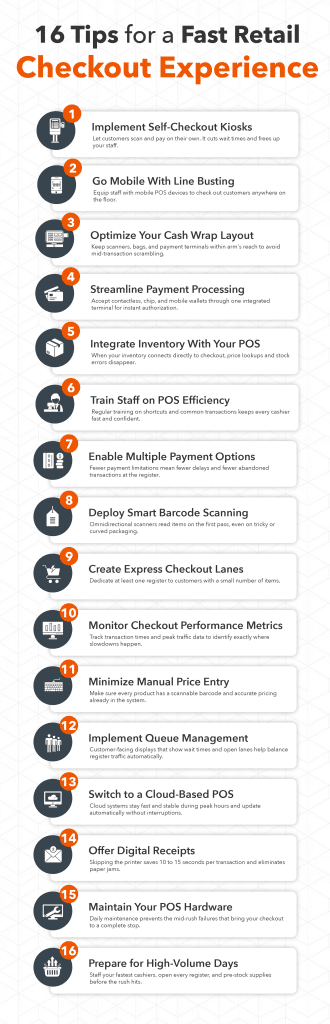
Long checkout lines frustrate customers and cost you sales. Here are proven strategies to speed up your retail checkout process and keep customers happy.
Implement Self-Checkout Kiosks
Self-service technology lets customers scan and pay for items independently. KORONA POS’s self-checkout system cuts wait times by allowing multiple transactions simultaneously. Customers appreciate the control and speed, especially for quick purchases. You’ll also need to know how much self-checkout machines cost.
Key benefits include:
- Fewer staff needed at registers during peak hours
- Faster processing for customers with a few items
- Lower labor costs while maintaining service quality
Selecting the best self-checkout POS systems makes all the difference. KORONA POS integrates seamlessly with your inventory, automatically updating stock levels as customers complete purchases. Many retailers see checkout times drop by 40% after adding self-service options.
Use Mobile POS for Line Busting
Equip your staff with mobile devices to process sales anywhere in the store. When lines form, employees can check out customers on the spot instead of directing them to fixed registers. The difference between traditional POS and mobile POS is significant for customer satisfaction.
Mobile checkout advantages:
- Process payments during peak traffic
- Complete sales on the sales floor
- Accept payments at pop-up locations or events
KORONA POS mobile solutions connect wirelessly to your main system, keeping inventory accurate across all sales channels. Staff can complete entire transactions in seconds without customers leaving the product display area.
Optimize Your Cash Wrap Layout
Your checkout counter design directly impacts transaction speed. A well-planned retail cash wrap creates efficient workflow and prevents bottlenecks. Position equipment within arm’s reach of staff and ensure adequate space for bagging.
Layout essentials:
- Place scanners and payment terminals at optimal heights
- Keep bags and receipt paper easily accessible
- Create clear paths for customer flow
Consider the customer’s journey from browsing to payment. Store layouts that improve the retail environment guide shoppers naturally toward checkout areas without confusion or crowding.
Streamline Payment Processing
Slow payment authorization kills checkout speed. Integrated payment processing eliminates the delay between scanning items and accepting payment. KORONA POS connects directly with payment processors for instant authorization.
Fast payment features:
- Accept contactless cards and mobile wallets
- Process chip cards in under three seconds
- Enable tap-to-pay for transactions under $100
Modern retail payment processing handles multiple payment types simultaneously. Customers can split payments between cards or combine gift cards with credit, all processed through one interface.
Find out how much you’re spending.
Integrate Inventory with Your POS
Manual price lookups waste precious seconds at checkout. KORONA POS’s all-in-one system links your entire inventory database directly to checkout terminals. Every product scan instantly retrieves accurate pricing and product details.
Integration benefits:
- Eliminate price checks and manager overrides
- Update sale prices across all registers instantly
- Eliminate errors from manual entry
When inventory and checkout systems work together, staff spend zero time searching for prices or verifying stock. The system knows what you have and what it costs, keeping lines moving smoothly.
Speak with a product specialist and learn how KORONA POS can power your business.
Train Staff on POS Efficiency
Even the best technology fails without proper training. Schedule regular sessions teaching staff keyboard shortcuts, common transaction types, and problem-solving techniques. Employee scheduling software helps ensure you always have trained cashiers available.
Training priorities:
- Master barcode scanning techniques
- Learn quick-key commands for frequent items
- Practice handling returns and exchanges efficiently
KORONA POS includes intuitive interfaces that new employees learn quickly. Most staff become proficient within their first shift, cutting training time and costs.
Enable Multiple Payment Options
Fumbling with different payment systems slows everything down. Payment gateways that accept all payment types through one terminal keep transactions moving.
GOOD TO KNOW
KORONA POS processes credit cards, debit cards, mobile payments, and gift cards seamlessly.
Payment variety speeds checkout by:
- Fewer declined transactions
- Accommodating customer preferences
- Eliminating the need to switch systems
Customers choose their preferred payment method without delays. The system automatically selects the right processor and completes authorization in seconds, regardless of payment type.
Deploy Smart Barcode Scanning
Fast, accurate scanning is fundamental to quick checkout. KORONA POS supports various scanning methods, from handheld devices to fixed scanners. Position scanners strategically so staff can swipe items without awkward reaching or repositioning.
Scanning best practices:
- Use omnidirectional scanners for any-angle reading
- Keep backup scanners charged and ready
- Maintain clean scanner windows for first-pass reads
Quality scanners read barcodes on the first attempt, even on curved or wrinkled packaging.
Create Express Checkout Lanes
Dedicate registers to customers with a few items. Express lanes prevent quick shoppers from waiting behind full carts. Different types of POS systems allow you to configure specific terminals for express service only.
Express lane setup:
- Limit to 10 items or fewer
- Staff with your fastest cashiers
- Place near store entrance for convenience
KORONA POS lets you customize register functions, so express lanes can restrict transaction types while maintaining full inventory integration. Customers appreciate dedicated fast service options.
Monitor Checkout Performance Metrics
Track transaction times to identify bottlenecks and improvement opportunities. KORONA POS analytics show average checkout duration, peak traffic times, and individual register performance. Data reveals which processes need optimization.
Key metrics to watch:
- Average transaction time by hour
- Items scanned per minute
- Payment processing duration
Using your POS in marketing strategies includes analyzing checkout data to improve operations. When you measure performance, you can set goals and track progress toward faster service.
Discover Advanced Analytics and Custom Reports
Speak with a product specialist and learn how KORONA POS can work for your business.
Minimize Manual Price Entry
Every keystroke adds seconds to checkout time. Ensure all products have scannable barcodes and accurate pricing in your system. KORONA POS bulk import tools let you upload entire catalogs quickly, eliminating manual product setup.
Automation strategies:
- Pre-program frequent custom items with quick keys
- Use weighted barcodes for produce
- Set up automatic discounts and promotions
When 95% of items scan automatically, checkout moves at maximum speed. Staff focus on customer service rather than hunting for prices or typing product codes.
Implement Queue Management Technology
Kiosk adoption in retail includes virtual queue systems that notify customers when registers open. KORONA POS integrates with customer-facing displays showing wait times and available lanes. Customers self-direct to open registers efficiently.
Queue management features:
- Display estimated wait times
- Alert customers to open registers
- Balance traffic across all checkout points
PRO TIP
Smart queue systems prevent overcrowding at popular registers while underutilized lanes sit empty. Even distribution keeps all checkout areas moving at optimal speed.
Upgrade to Cloud-Based POS
Legacy systems crash during peak hours when you need them most. Cloud-based solutions like KORONA POS maintain speed regardless of transaction volume. Software updates happen automatically without slowing operations.
Cloud advantages for speed:
- Process payments even during internet outages
- Access system from any device instantly
- Scale capacity during holiday rushes
Modern retail store performance depends on reliable technology. Cloud systems eliminate downtime and maintain consistent checkout speeds year-round.
Offer Digital Receipts
Printing receipts takes longer than you think. Offer email or text receipts to cut 10-15 seconds per transaction. KORONA POS automatically sends digital receipts as customers complete payment, eliminating printer delays.
Digital receipt benefits:
- Zero printer jams or paper shortages
- Faster transaction completion
- Environmental benefits customers appreciate
Customers prefer digital receipts they can’t lose. The system captures email addresses for marketing while speeding up checkout completion.
Maintain Your POS Hardware
Regular maintenance prevents mid-transaction failures. Clean scanner windows daily, replace receipt paper before it runs out, and keep card readers updated. KORONA POS monitors hardware health and alerts you to potential issues before they cause problems.
Maintenance checklist:
- Test all scanners at opening
- Stock extra receipt rolls and supplies
- Update software during off-peak hours
Improving the in-store experience starts with reliable equipment. Preventive maintenance costs less than lost sales from broken registers during busy periods.
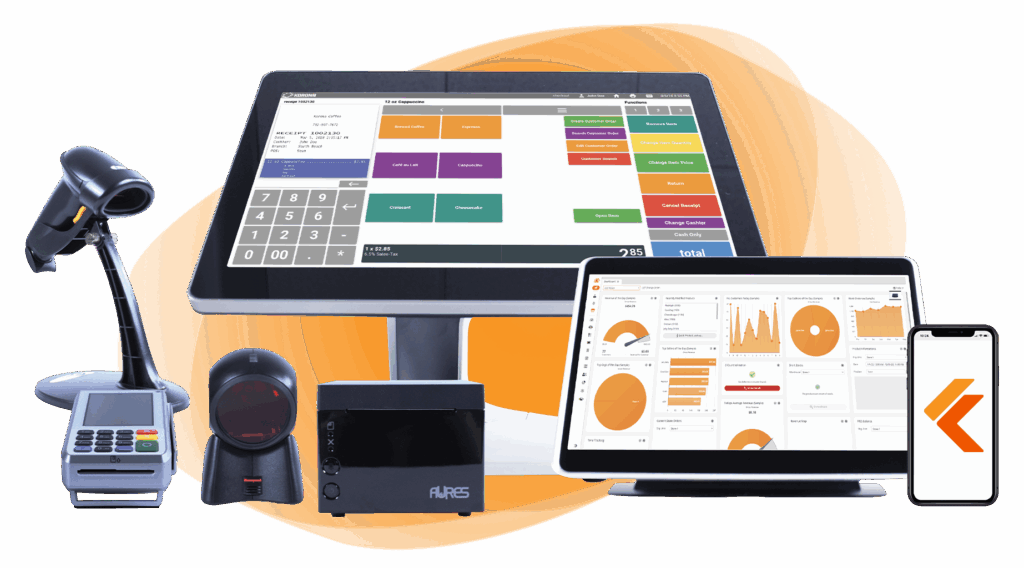
Build Your Own POS
Whether you run a retail store, café, or admissions booth, we have the point of sale hardware designed for your specific needs. Start building your ideal POS system now.
Optimize for High-Volume Days
Holiday shopping and sales events require extra preparation. Strategies to improve customer experience in retail stores include staffing adjustments and system optimization. Increasing retail conversion rates connects directly to checkout efficiency.
High-volume preparation:
- Schedule your fastest cashiers during peaks
- Open all available registers
- Pre-stock bagging supplies at every station
The system maintains speed even with hundreds of simultaneous transactions. Performance doesn’t degrade when you need it most, keeping checkout lines moving during crucial sales periods.
Why a Smooth Retail Checkout Matters?
You need a smooth retail checkout because slow checkout lines cost you money. Customers abandon purchases when wait times exceed five minutes, and frustrated shoppers tell others about bad experiences.
BE AWARE
Every lost sale hurts your bottom line. Fast, efficient checkout keeps customers happy and coming back. When transactions flow smoothly, staff can focus on customer service rather than fighting outdated technology.
Your POS system should speed up operations, not slow them down. Growing a retail business requires satisfied customers who complete their purchases quickly and return often.
How to Build the Future of Retail Checkout?
The checkout experience you offer today reflects the direction your business is heading. Here are the key steps to modernize it and stay ahead.
Step 1: Invest in Modern POS Hardware
Outdated hardware is often the root cause of slow checkout. Current retail trends show that modern retailers prioritize speed and reliability. Upgrading to reliable POS hardware built for retail workloads means fewer crashes, faster scans, and a smoother experience at every register.
Pro Tip
KORONA POS is compatible with a wide range of modern hardware, so you won’t need to overhaul everything at once.
Step 2: Centralize Inventory and Checkout
When your inventory and checkout systems are disconnected, errors happen fast. Solid retail inventory management tied directly to your POS keeps stock counts accurate and prevents mid-transaction surprises like out-of-stock items. The best inventory management software for small businesses updates pricing even across all locations automatically.
Pro Tip
KORONA POS combines inventory and checkout in one platform, which removes the need to toggle between separate systems.
Step 3: Plan for Multi-Store Growth
If you run more than one location, inconsistent checkout processes create real problems. A multi-store POS system or multi-store inventory management keeps operations aligned across all your locations from a single dashboard.
Pro Tip
KORONA POS is built for multi-location retailers, with centralized reporting and inventory across every store. You can also check our guide on the best multi-store retail management software
Step 4: Look for Processing-Agnostic
Many retailers don’t realize their POS and payment processor are two different things. Choosing the best retail payment system that integrates cleanly with your POS cuts transaction time significantly.
Pro Tip
KORONA POS works with multiple payment processors, so you stay in control of rates and switching costs.
Payment processors giving you trouble?
We won’t. KORONA POS is not a payment processor. That means we’ll always find the best payment provider for your business’s needs.
Step 5: Automate Checkout Processes
Manual processes at checkout, like hand-keying prices or looking up SKUs, kill your speed. Small business automation tools built into a modern POS handle the repetitive work so your staff can focus on the customer. You can even market with your POS system through automated customer data collection.
Pro Tip
KORONA POS automates discount application, inventory updates, and end-of-day reporting right out of the box.
Examples of Retailers Optimizing Checkout Experience
KORONA POS has transformed checkout operations across diverse retail environments, from liquor stores to bookstores and entertainment venues. These case studies showcase how real business owners leveraged the platform to streamline transactions, manage inventory, and accelerate growth.
Pine & Peoria Liquor Store in Tulsa, OK
The first video features Kristen Lee, owner of two Tulsa liquor stores at Pine & Peoria and Pine & Harvard. After acquiring these businesses, she transitioned to KORONA POS to enhance inventory tracking, gain thorough sales analytics, and improve backend operations.
KORONA POS transformed Kristen’s checkout operations by facilitating seamless inventory synchronization during transactions, robust product reporting to track sales patterns, and backend management to simplify daily operations.
Truro Vineyards in Cape Cod, MA
Troy and Stacey Fountain launched Downtown Books in Dothan, Alabama, with KORONA POS managing their extensive inventory, customer loyalty programs, and transaction processing from opening day.
The platform streamlined operations, delivered precise inventory tracking and sales analytics, while award-winning support facilitated system mastery, enabling consistent monthly revenue growth and simplified workflows.
Flathead Lake Alpine Coaster
This video showcases Jessica Wedel, owner of Flathead Lake Alpine Coaster, located near Glacier National Park in western Montana. She discusses her decision to launch the attraction and her experience implementing KORONA POS from opening day.
KORONA POS provided Flathead Lake Alpine Coaster with specialized ticketing capabilities, automated turnstile management for seamless guest flow, integrated digital waiver processing, and precise inventory tracking across merchandise.
Speed Up Your Checkout with an All-in-One Retail POS
KORONA POS speeds up your checkout with self-service kiosks that let customers scan and pay independently.
Our hardware solutions include everything from scanners to payment terminals, with flexible leasing options that fit your budget. As a processor-agnostic system, KORONA works with your preferred payment provider and offers dual pricing to offset credit card fees.
Whether you run a liquor store, vape shop, convenience store, bakery, coffee shop, admission-based business, or specialty retail location, KORONA handles your unique needs. Stop fighting with slow technology.
Book a demo today or call us at 833-200-0213 to see how KORONA POS transforms your checkout experience.


