Running multiple retail locations demands more than just opening doors at each site. You need clear systems, reliable staff, consistent procedures, and the right technology to keep everything aligned.
Managing multiple stores means juggling inventory, communication, security, and performance across every location simultaneously.
In this blog post, you’ll find out the practical strategies that transform multi-store operations from chaotic to controlled. You’lll learn more about how to build a cohesive business that grows sustainably.
Key Takeaways:
- Hire and develop the right people first. Reliable employees and strong managers are your foundation.
- Create consistency through documented systems. Write down your procedures, brand standards, and communication expectations so every location operates the same way.
- Invest in connected technology. POS systems, inventory management, and communication platforms eliminate manual work and give you visibility across all locations.
- Measure what matters and act on the data. Track sales, profitability, labor costs, and customer retention by location.
- Communicate constantly in multiple ways. Different information needs different channels: weekly manager calls, daily updates, monthly emails, and quarterly in person meetings.
How to Manage Multiple Stores Successfully (Step-by-Step Framework)
Managing multiple stores requires systems, clear procedures, and strong communication. Build a foundation with the right people, technology, and processes. Execute consistently and measure performance. Success comes from getting these fundamentals right across every location.
Multi-Store Management Strategy Overview
Area | Key Actions | Expected Outcome |
Inventory Management | Centralize visibility, automate stock transfers, set reorder rules, implement cycle counting | Accurate stock levels prevent stockouts and overstock across all locations |
Standard Operating Procedures | Document cash handling, customer service, merchandising, safety protocols | All stores operate consistently, reducing errors and improving compliance |
Employee Hiring | Define job descriptions, establish consistent standards, develop manager capability, conduct behavioral interviews | Reliable staff who perform well across all locations |
Staff Training & Onboarding | Create standardized training, assign mentors, use checklists, document procedures | New employees productive quickly with consistent knowledge across locations |
Consistent Branding | Develop style guides, standardize layouts, create brand voice, align pricing | Customers recognize unified brand regardless of location |
Communication Channels | Schedule manager check-ins, daily updates via platform, quarterly meetings, shared knowledge base | All staff informed, engaged, and aligned on company direction |
Secret Shopping | Hire mystery shoppers, evaluate service and cleanliness, test policies, compare locations | Honest feedback reveals gaps and drives continuous improvement |
Technology & Software | Implement POS system, cloud inventory tools, eCommerce platform, marketing automation, HR software | Connected operations, reduced manual work, better decision-making |
Physical & Digital Security | Install CCTV, enable POS fraud detection, secure cash handling, control access, protect cybersecurity | Protected inventory, cash, and customer data across all stores |
KPI Tracking | Monitor sales, inventory turnover, labor costs, customer retention, profitability | Data-driven decisions identify top performers and problem areas |
Implementation Order
Start with hiring reliable employees and documenting SOPs. These create your foundation. Layer in consistent branding and communication channels so your team knows what success looks like. Implement technology to automate routine work. Add secret shopping and KPI tracking to measure and improve continuously. Security should be ongoing, not an afterthought.
PRO TIP 1
Success managing multiple stores isn’t about doing one thing perfectly. It’s about executing all fundamentals consistently. Your inventory system fails without good procedures. Your brand doesn’t land without staff trained properly. Your technology helps only if people use it correctly. Every piece supports the others.
PRO TIO 2
Start with your biggest pain point. Fix that problem systematically. Then move to the next challenge. Build momentum with wins. Over time, these practices compound into a well-run operation where every location performs well and your job becomes easier, not harder.
Optimize Multi-Store Inventory Management
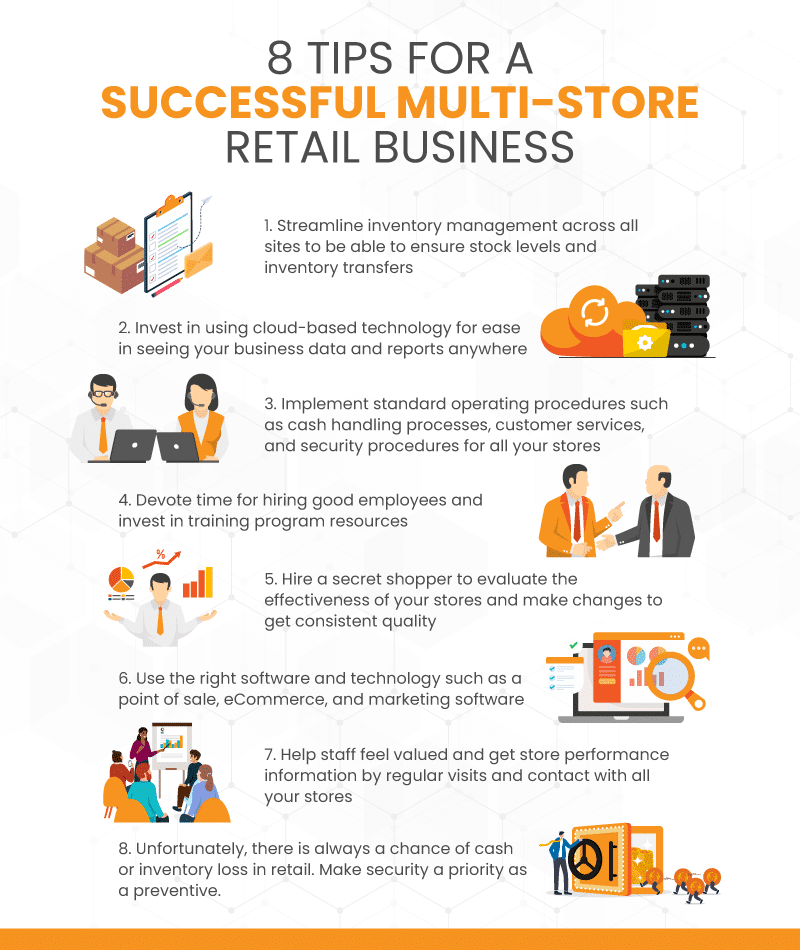
Running multiple locations creates a complex inventory puzzle. The good news? You can turn that complexity into a competitive advantage when you have the right system supporting your operations.
Centralized Automatic Stock Visibility
Stock levels change constantly. When customers shop, stock transfers happen, and new orders arrive, your numbers shift throughout the day. A connected POS system shows you accurate inventory across all locations instantly. No guessing, no phone calls between managers, no surprises during inventory counts.
Automatic Stock Transfers Between Stores
One location has 30 units, while another has zero. Instead of watching one store struggle while another wastes shelf space, automate transfer suggestions based on demand patterns. Your team receives alerts when one store should send stock to another, cutting down on stockouts and keeping customers happy.
Shared Reorder Rules
Each store shouldn’t decide independently when to reorder. Create reorder rules once, apply them everywhere. If a product typically sells 10 units weekly, the system suggests reordering before stock drops below that threshold. Consistency across locations prevents overbuying at some stores while others run short.
Cycle Counting Across Locations
Instead of one stressful inventory day where stores close, spread counting throughout the year. Assign small sections of inventory to different stores on different days. Your team counts manageable amounts regularly, catches discrepancies early, and maintains accurate records without operational disruption.
Performance Analytics by Location
Sales patterns differ between locations. What flies off shelves in one store might sit idle in another. Detailed reports show you which products perform best at each location, which items need repositioning, and where to focus marketing efforts. This intelligence guides better buying decisions for each store’s specific market.
Unified Supplier Management
Consolidating purchases across multiple stores gives you more leverage with suppliers. Track orders from all locations through one system, see spending patterns, and identify opportunities to negotiate volume discounts. Smaller orders become one larger order, often qualifying for better pricing.
Dead Stock Identification
Products that haven’t moved in months drain your cash and warehouse space. The system flags these items automatically, letting you decide whether to discount them, transfer them to a store where they might sell, or clear them out. Catch problems early rather than discovering them during year-end inventory.
Location-Specific Pricing and Promotions
Markets vary. One location might support premium pricing while another needs aggressive discounting to compete. Set different prices for the same product across stores. Run local promotions that make sense for each market without affecting locations where pricing works differently.
Customer Fulfillment from Any Location
A customer wants an item your store doesn’t have in stock. Check if another location has it. Offer to ship it to their home or transfer it to your store for pickup. Selling through physical storefronts and digital platforms requires a cohesive multichannel inventory management strategy.
Supplier Integration and Automated Ordering
Integrated systems can communicate with major supplier networks, sending orders automatically when stock hits reorder points. Fewer manual order entries mean fewer errors. Orders arrive faster because you’re not waiting for someone to submit a purchase order manually.
Accountability Tracking by Manager
When stock transfers, discrepancies occur, or adjustments happen, track them back to specific users at specific stores. This accountability encourages careful handling and helps you identify training needs. You’ll spot patterns like one manager consistently over-ordering or another missing obvious low-stock situations.
Seasonal Inventory Planning
Retail seasons aren’t uniform across locations. Northern stores might see winter peaks while southern locations peak differently. Plan seasonal inventory based on each store’s historical patterns. Build stock appropriately for peak seasons while avoiding excess during slow periods.
Return Management Across Locations
Returns happen everywhere. When items come back, they need to be restocked, inspected, or redistributed. A unified system ensures returns are handled the same way across all locations. Damaged items are identified, resaleable inventory gets back on shelves faster, and you avoid double-crediting customers.
Warehouse Allocation and Distribution
If you have a central warehouse, it must supply multiple stores with different demands. Automated distribution suggests which items should ship to which locations based on their sales velocity and stock levels. Reduce shipping costs by consolidating shipments and avoid emergency rush orders.
Inventory Database Best Practices
Your inventory system is only as good as the data inside it. Understand inventory management database essentials to ensure proper organization, categorization, and tracking. Regular audits, consistent naming conventions, and accurate categorization prevent confusion and errors that multiply across multiple locations.
Theft and Loss Prevention
Discrepancies between counted and recorded inventory happen at every location. A system that tracks every adjustment, transfer, and sale helps you identify where losses occur. You’ll see which locations need better procedures, additional training, or more attention to security.
Forecasting for Growth
Growing from 5 to 20 locations requires different inventory approaches. Historical data from existing stores helps you forecast needs for new ones. The system learns your patterns and can suggest opening inventory levels for new locations based on similar-performing stores, reducing guesswork and startup errors.
Getting Started with Better Inventory Management
The fundamentals don’t change whether you’re running 2 stores or 200. You need visibility, consistency, and the right tools to connect everything. Explore retail inventory management solutions tailored to multi-location operations.
The right POS and inventory system removes friction between your stores. Managers spend less time coordinating manually and more time focusing on sales. Stock moves where customers need it. Orders happen when inventory dips. You see exactly where your business stands, every single day.
Standardize Operations With Clear SOPs For All Your Stores
Standard operating procedures create consistency across your locations. When every store follows the same processes, management becomes easier, and customers get a consistent experience no matter which location they visit.
Cash Handling Processes
Standard operating procedures at this level should address the types of payments you accept, your refund and return procedures, and how often you close the cash register. Procedures should also cover all aspects of cash handling in your store to ensure the security of your finances.
Customer Service Standards
Customer service procedures define instructions and policies on how your staff should behave and dress. They also define what employees can and cannot say and what to do when dealing with difficult customers.
Merchandising & Store Presentation Guidelines
Product displays, shelf layouts, and seasonal setups should follow the same playbook everywhere. Your SOPs for merchandising and layout include what your displays look like, how often you need to change displays, how your products are displayed, etc.
PRO TIP
Document how displays should be arranged, how often to refresh them, and which products go where. Consistent presentation makes stores feel familiar to customers, helps staff find things faster, and ensures premium products get premium placement at every location.
Safety & Security Protocols
Ensure you have the proper procedures in place to protect your staff and customers’ safety and security. These procedures should cover basic issues, such as who opens and closes the store.
It should also cover complex situations, such as how to deal with shoplifters and what to do in the event of a natural disaster or other emergencies.
Invest In Cloud-Based Technology
Investing in cloud technology is one of the most effective technologies for making your multi-store business more successful.
Whether in one of your stores, at home, or even on the road, you can simply log into the system to check on your other branches or your entire operation. More cloud-based solutions are available today than ever, including CRM solutions, accounting, and point of sale software.
Plus, many of these programs interoperate, meaning you only have to enter your information once, and all cloud-based solutions are updated. If you have multiple cloud-based tools, it’s best to choose solutions that can integrate with each other. Check with your vendors before purchasing to ensure seamless data transfer. KORONA POS software can integrate with many software such as BottleCapps, Timeforge, Bloyal, Quickbooks Online, LineupApp, and many more.
Hire Reliable Store Employees
Good employees are the difference between stores that thrive and those that barely function. When you operate multiple locations, hiring becomes even more critical because one bad employee can damage your brand and finances. Strong hiring practices ensure consistency across all stores and build a team that supports your growth.
Define Clear Job Descriptions
Vague job postings attract the wrong applicants. Detail what responsibilities come with each position, what skills are required, and what success looks like.
Include specifics about cash handling, customer interaction, opening or closing duties, and physical demands. Candidates who understand expectations from day one are more likely to stay and perform well.
Establish Consistent Hiring Standards
Each store shouldn’t have different hiring thresholds. Create a standardized evaluation rubric that measures applicants against the same qualities—reliability, communication skills, customer service mindset, and ability to follow procedures.
Consistent standards ensure you get comparable talent everywhere and prevent one manager from lowering bar while another stays rigid.
Develop Manager Hiring Capability
Your managers make hiring decisions that impact their daily operations. Train them on interviewing techniques, red flags to watch for, and how to assess cultural fit.
Managers who understand what strong candidates look like will build better teams. Include them in hiring discussions and give them frameworks for evaluating candidates beyond gut feelings.
Screen for Reliability Early
Reliable people have consistent work histories without unexplained gaps. Ask about previous absences and reasons for leaving jobs.
Check references thoroughly and ask specifically about attendance and punctuality. Red flags include frequent job changes, vague reasons for leaving, and defensive answers about reliability. One unreliable employee creates chaos across your team and forces reliable people to cover shifts.
Use Skills Tests and Assessments
If cash handling is critical, give candidates a basic math or cash drawer test. If customer service matters, have them role-play handling a customer complaint.
Assessments reveal whether candidates have the skills they claim and how they perform under mild pressure. Someone who talks a good game might struggle when actually doing the work.
Conduct Multi-Round Interviews
One interview doesn’t reveal everything. A first conversation might show someone’s communication skills; a second might assess their problem-solving or reveal inconsistencies in their story.
If possible, have different people interview the same candidate. Managers see different things, and consistency across their feedback matters.
Background Checks and Legal Compliance
Background checks protect your business and customers. Depending on your state and industry, you may need to check criminal history, driving records, or previous employment verification.
Use reputable screening services and follow all legal requirements for how you use results. Never make decisions based on incomplete information or illegal criteria.
Create an Onboarding Checklist
New hires need structure. Create a standardized checklist covering paperwork, system access, safety training, and procedural walks. Assign a buddy or mentor to help during the first week.
Set clear expectations about dress code, break times, and reporting. Proper onboarding reduces early mistakes, speeds up time to productivity, and shows employees you take their start seriously.
Document Everything
Keep detailed notes from interviews, test results, reference checks, and selection decisions. Documentation protects you if hiring decisions are questioned and helps you improve your process over time. Written records also ensure consistency. Future hiring decisions can reference what worked before.
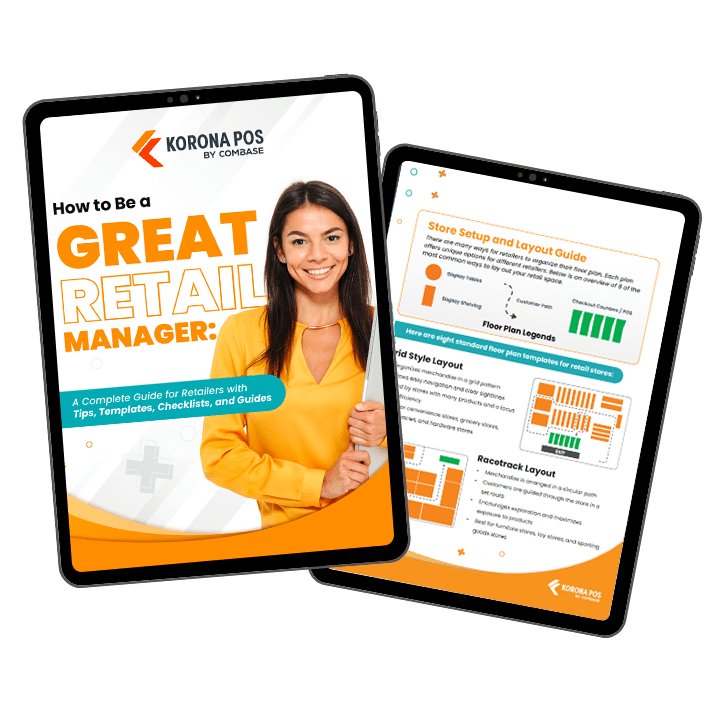
Free printable templates and checklists to help you manage retail operations with ease
Create Consistent Branding and Customer Experience Across Locations
Uniformity across locations transforms a scattered group of shops into a powerful, recognizable brand. Consistent experiences foster customer loyalty and simplify the oversight process for owners.
Develop a Brand Style Guide
Your logo, colors, fonts, and imagery should look the same everywhere. Create a detailed style guide that shows how to use your logo, which colors are acceptable, what fonts to use, and how materials should look.
Include examples of what not to do. When staff across all locations follow the same visual standards, customers instantly recognize your brand.
Standardize Store Layout and Design
Store layout affects customer behavior and experience. Where you place checkout counters, displays, and fitting rooms should follow the same logic everywhere. Product sections should be in the same relative positions.
Customers comfortable in one store should feel at home in another. Consistent layouts also make staff transitions between locations easier since they already know where things are.
Create a Brand Voice and Messaging
Your brand has a voice: formal or casual, friendly or professional, humorous or serious. Define how you communicate in emails, social media, signage, and customer service.
Include examples of on-brand language and phrases to avoid. Consistent messaging across locations reinforces your brand personality and helps customers feel connected to your company, not just individual stores.
Implement Unified Customer Service Policies
Create service standards that apply everywhere—return policies, refund procedures, customer complaint resolution, and warranty handling.
When one location honors returns differently than another, customers lose trust. Document these policies in writing and ensure every location follows them identically. Consistency in service policies builds confidence that your brand treats customers fairly.
Standardize Loyalty and Rewards Programs
If you have a loyalty program, it should work identically across all locations. Points earned in one store should be redeemable in another.
Reward tiers, benefits, and redemption options should be the same. A unified loyalty program encourages customers to shop across your locations and reinforces that they’re part of one brand, not multiple unrelated stores.
Monitor Brand Consistency Through Store Audits
Schedule visits to check cleanliness, display presentation, signage quality, and staff adherence to service standards.
Use a consistent audit checklist so you measure every location against the same criteria. Document findings and follow up on gaps. Audits show staff that brand standards matter and help identify locations needing support or retraining.
Develop Location-Specific Brand Adaptations
Consistency doesn’t mean ignoring local differences. Adapt your brand to respect regional preferences in product selection, holidays, and community values while maintaining core identity.
You might feature different seasonal products in different climates but use the same brand presentation. Smart localization respects communities while maintaining the brand consistency that makes you recognizable.
Use the Right Software and Technology to Manage Multiple Retail Locations
Technology is critical for multi-store success. The right software connects your operations, automates routine tasks, and gives you visibility across all locations so you can make smarter decisions faster.
POS & Multi-Store Management Software
A point of sale system is your operational backbone. It tracks sales, inventory, and customer data across every location in real time. Beyond transactions, modern POS platforms handle employee management, promotions, and compliance requirements. Learn more about the best retail management software to understand what features matter most for your operation.
Key capabilities:
- Real-time sales and inventory visibility across all locations
- Flexibility to use any payment processor without hidden fees
- Automated reporting that eliminates manual consolidation work
- Support for multiple payment methods and locations
Cloud-Based Inventory & Ordering Tools
Manual inventory tracking doesn’t scale beyond a few stores. Cloud systems automatically track stock levels across locations and alert you when items need reordering. The system can generate purchase orders automatically based on preset thresholds. You get accurate inventory reports anytime, anywhere, without spreadsheets or guesswork.
What you gain:
- Automatic alerts when stock falls below reorder points
- Elimination of manual counting errors and duplicated effort
- Purchase orders generated automatically to speed restocking
- Accurate inventory visibility for better buying decisions
Ecommerce & Omnichannel Systems
Understanding multi-channel retailing helps you serve customers how they want to shop. Customers expect to shop online and pick up in-store, or buy in-store and return online. Omnichannel systems sync your inventory, pricing, and customer data across all sales channels. A unified platform means one inventory feed powers both your website and physical stores. Customers get a consistent experience whether they shop online or in-store.
Benefits include:
- Single inventory system feeding all sales channels
- Consistent pricing and promotions everywhere
- Buy online, pickup in-store capabilities
- Unified customer data across channels
Marketing Automation Tools
Building customer relationships drives repeat business. Marketing automation software sends targeted campaigns to customers across all locations simultaneously. You can segment audiences by location, purchase history, or loyalty tier. Automation handles email, SMS, and loyalty programs while you focus on strategy instead of manual execution.
Automate:
- Email and SMS campaigns to customer segments
- Loyalty program enrollment and reward fulfillment
- Product recommendations based on purchase history
- Location-specific promotions to relevant customers
HR & Scheduling Tools
Managing schedules and payroll across multiple locations manually creates errors and frustration. Centralized HR software handles scheduling, time tracking, and payroll for all locations. Employees can pick up shifts, submit time off requests, and view schedules through mobile apps. Payroll processes automatically instead of requiring manual compilation from each store.
Improves:
- Schedule coordination across multiple locations
- Reduced payroll processing time and errors
- Employee self-service reduces administrative burden
- Compliance tracking for labor laws
CRM and Customer Data Platforms
Every customer interaction across all locations feeds into a single customer profile. CRM systems track purchase history, preferences, and communication history. You understand your best customers, their buying patterns, and what products they prefer. Marketing becomes targeted instead of blasted to everyone.
Enables:
- Complete customer purchase history across all stores
- Personalized recommendations based on actual behavior
- Identification of your highest-value customers
- Targeted retention programs for at-risk customers
Reporting and Analytics Tools
Multiple locations generate overwhelming data. Analytics tools consolidate that data into dashboards showing performance by location, product category, employee, or customer segment. You spot trends, identify top performers, and catch problems quickly. Reports answer critical questions without requiring hours of manual data work.
Reveals:
- Sales trends and seasonal patterns by location
- Top and bottom performing products
- Staff productivity and sales performance
- Customer acquisition and retention rates
Discover Advanced Analytics and Custom Reports
Speak with a product specialist and learn how KORONA POS can work for your business.
Payment Processing and Security
Your payment system needs to be secure, flexible, and cost-effective. Modern payment solutions comply with security standards and handle multiple card types. Avoid POS systems that force you into single payment processors with inflated fees. Choose systems allowing processor flexibility so you can negotiate rates based on volume.
Priorities:
- PCI compliance and security certifications
- Support for credit, debit, mobile, and alternative payments
- Transparent fee structures without hidden charges
- Ability to switch processors without system changes
Payment processors giving you trouble?
We won’t. KORONA POS is not a payment processor. That means we’ll always find the best payment provider for your business’s needs.
Data Integration and Synchronization
Siloed systems create manual work and errors. API integrations connect your POS, accounting, inventory, and marketing tools so data flows automatically. One transaction updates across systems instantly. Integration eliminates duplicate entry and reduces reconciliation nightmares.
Integration benefits:
- Automatic data flow between POS and accounting software
- Inventory updates reflected in ecommerce instantly
- Customer data unified across all systems
- Reduction of manual consolidation work
Mobile and Remote Access
You shouldn’t need to be physically present to manage your business. Cloud-based systems with mobile apps let you check sales, approve decisions, and monitor operations from anywhere. Managers can use tablets for inventory counts or price checks. Remote capability becomes essential when managing stores across different locations.
Access includes:
- Mobile apps for sales, inventory, and reporting
- Remote approval of transactions and adjustments
- Real-time notifications of important events
- Works offline and syncs when reconnected
Scalability for Growing Networks
Whether you operate five stores now or plan to open fifty, your software should grow with you. Scalable systems don’t require rebuilding when you add locations. New stores access the same platform immediately. Technology shouldn’t limit your expansion—it should enable it.
Scalable advantages:
- Add locations without system overhauls
- Consistent training across new stores
- Unified data regardless of store count
- Growth-ready infrastructure from the start
Implementation and Training
New software only works if staff actually uses it correctly. Quality vendors provide thorough training and ongoing support. Implementation shouldn’t shut down operations. Phased rollouts across locations let you work out issues before full deployment. Good support includes dedicated assistance during and after launch.
Ensure smooth adoption:
- Comprehensive training before launch
- Phased implementation across locations
- Dedicated support during transition
- Ongoing education as feature update
Have trouble getting your POS customer service on the phone?
KORONA POS offers 24/7 phone, chat, and email support. Call us at 833.200.0213 to see how reliable we are.
Create Strong Communication Channels Across Store Locations
Managing multiple stores requires constant, clear communication. Without it, stores operate in isolation, mistakes happen, and staff feel disconnected from leadership.
Weekly Manager Check-Ins
Weekly calls with store managers prevent small problems from becoming big ones. Cover sales performance, staffing challenges, inventory issues, and customer feedback.
These conversations should be two-way—ask managers what they need, not just report directives. Consistent weekly timing ensures nothing falls through cracks and managers know when to expect communication.
Daily Operations Updates Via Communication Platform
Daily updates cover scheduling changes, promotions launching, product arrivals, and important announcements.
Use a communication platform that reaches staff on their phones, where they check messages. Keep updates brief and actionable. Urgent information gets shared immediately; routine information can wait for weekly updates. Consistency builds a habit of checking for updates.
Quarterly In-Person Meetings
Quarterly meetings give you face time with multiple stores simultaneously. Share company performance, recognize achievements, discuss upcoming initiatives, and gather feedback. In-person meetings build relationships and culture better than digital communication.
Managers see peer managers, staff from different stores connect, and everyone hears the same message directly from leadership. These meetings also reveal the dynamics that digital communication misses.
Shared Knowledge Base
Create a central hub where staff can find answers, procedures, policies, FAQ, training videos, and troubleshooting guides. When questions arise, employees check the knowledge base first instead of asking managers.
Consistency improves when everyone references the same documented procedures. Regular updates keep information current and relevant. A searchable knowledge base saves managers time answering repetitive questions.
Monthly Written Updates for All Staff
Monthly updates share company news, celebrate store achievements, and highlight policy changes. Written communication gives people time to digest information. Include highlights from each location so staff see what other stores are doing.
Written records let employees refer back to information later. Consistent monthly timing creates expectation and habit around company communication.
Two-Way Feedback Channels
Give staff ways to share concerns, suggestions, and feedback anonymously or directly. Anonymous surveys reveal honest feedback people won’t share in meetings.
Suggestion boxes or digital forms let frontline staff propose improvements. When you act on feedback, it shows employees their voices matter. Two-way communication builds trust and surfaces problems leadership never hears about.
Establish Communication Standards
Define response time expectations for different types of messages. Urgent alerts expect immediate response. Regular emails might expect a response within 24 hours.
Documentation is always available. Managers should know whether their boss prefers calls or emails for issues.
PRO TIP
Clear standards prevent frustration and missed communication. Document expectations so everyone knows how and when to communicate.
Strengthen Physical and Digital Security Across Your Multi-Store Business
Protecting your stores from theft, fraud, and unauthorized access is critical when managing multiple locations.
Smart security systems work together. Cameras catch incidents, access controls prevent unauthorized entry, and POS controls flag unusual transactions. Integrated security lets you monitor all locations from one place and respond quickly to threats.
CCTV & Remote Monitoring
Video surveillance deters shoplifters and employees from stealing. High-quality cameras placed strategically cover checkout areas, storage, and entrances. Remote monitoring lets you watch live feeds from your office or home.
Recording systems preserve evidence if incidents occur. Cameras also document customer behavior and traffic patterns. View detailed guidance on how to manage a retail store to understand comprehensive security approaches.
POS Fraud Prevention
POS systems with fraud detection flag suspicious patterns—unusual voids, excessive discounts, or transactions outside normal ranges.
Alerts notify you immediately when something looks wrong. Track who performed each transaction and when.
PRO TIP
Compare sales data against inventory counts to identify discrepancies. Loss prevention features catch problems before they become major losses. Learn about retail loss prevention capabilities that stop theft at the source.
Secure Cash-Handling SOPs
Document exactly how cash should be handled at every stage. Define who counts, when counts occur, and how discrepancies are handled. Require two people present during cash counts for accountability. Limit access to safes and cash handling areas.
Daily reconciliation catches errors or theft quickly. Variance limits trigger investigation before small problems grow. Clear procedures protect both the business and honest employees.
Cybersecurity for Connected Devices
Cloud-based POS and security systems depend on strong passwords and network security. Require complex passwords and change them regularly.
Install security updates promptly when vendors release them. Train staff never to share passwords or use public Wi-Fi for store operations.
Backup data regularly in case of system failure or attack. Firewalls and antivirus software protect systems against malware. Regular security audits identify vulnerabilities before attackers exploit them.
Access Control & Staff Permissions
Give employees only the permissions they need to do their jobs. Cashiers shouldn’t access management reports. Stock employees shouldn’t void transactions. Managers shouldn’t approve their own time-off requests. Audit access levels regularly. Remove permissions when employees change roles.
PRO TIP
Track who accessed what information and when. Proper permissions prevent mistakes and limit opportunities for fraud. Regular access reviews catch overpermissioned employees before problems occur.
Hire a Secret Shopper To Evaluate The Effectiveness Of Your Stores
Hiring an outside perspective reveals blind spots that daily involvement often obscures. Their feedback reveals the gap between what you think is happening and what’s really happening.
Benefits of secret shopping:
- Unbiased evaluation from a real customer perspective
- Identify service inconsistencies before customers notice them
- Spot operational issues like cleanliness, product organization, and checkout procedures
- Compare performance across all locations objectively
- Test whether staff follow your policies and procedures
- Get detailed reports with specific examples, not just opinions
- Reveal gaps in staff training and product knowledge
- Benchmark your stores against your own standards and competitors
- Discover customer experience problems that damage loyalty
Use shopper feedback to make the necessary changes and ensure your business provides consistent, high-quality service across all locations.
Track Multi-Store KPIs to Improve Performance
You can’t manage what you don’t measure. Multi-store businesses need clear metrics to understand which locations perform well and which need support. KPIs show you sales trends, inventory health, labor efficiency, and customer behavior across all locations. Regular tracking reveals patterns, celebrates wins, and highlights problems before they spread.
Sales Performance by Location
Track total sales, sales per square foot, and growth rates for each location. Compare performance against targets and previous periods. Identify which stores exceed expectations and which lag behind. Sales data alone doesn’t tell the full story; a high-volume store might still be unprofitable.
Combine sales metrics with other KPIs to understand true performance. Learning how to grow a retail business helps you understand which growth strategies work best for your locations.
Inventory Turnover and Stock Health
Inventory turnover shows how many times you sell and replace inventory during a period. High turnover means products move quickly; low turnover indicates slow-moving items tying up cash. Track stock-out rates—how often customers find empty shelves.
Monitor inventory shrinkage by location to catch theft or counting errors. Compare which products perform differently across locations. Understanding inventory management challenges helps you address issues systematically across your network.
Labor Productivity and Costs
Calculate labor cost as a percentage of sales for each location. Track sales per labor hour, revenue generated per employee working hour.
Monitor scheduling efficiency; are you staffed appropriately for traffic patterns? Compare store productivity to identify best practices.
High labor costs don’t always indicate overstaffing; they can also signal inefficient processes. Labor metrics help you balance customer service with cost control across locations.
Customer Metrics and Retention
Track customer counts, average transaction value, and repeat customer rates by location. Measure customer satisfaction through surveys or reviews.
Monitor loyalty program enrollment and engagement. Identify which locations attract new customers and which depend on repeat customers.
Customer metrics reveal whether stores are growing their audience or losing traffic. Loyalty metrics show if customers feel valued enough to return.
Profitability and Margin Analysis
Calculate gross margin and net profit for each location. Compare margin percentages across stores to identify efficiency differences.
PRO TIP
Track COGS as a percentage of sales to spot inventory or pricing issues. Some stores might have high sales but thin margins.
Profitability metrics show which locations truly perform well and which appear strong but waste money. Focus on profit improvement, not just sales growth.
Manage Every Store From One Dashboard With KORONA POS
KORONA POS is built for multi-location retail. You can track inventory, sales, and staff across all stores from a single dashboard. It offers payment processor flexibility, so you can choose your rates. Automated reporting eliminates manual consolidation.
ANOTHER BENEFIT OF KORONA POS
KORONA POS has also automated royalty payments. For franchise operations, royalty payments can be automatically set up at your point of sale so they are deducted and transferred over set periods.
Whether you run liquor stores, coffee shops, specialty retailers, or quick-service operations, KORONA adapts to your business needs. Employee management tools, compliance tracking, and dual pricing support complex operations.
Ready to simplify multi-store management? Book a personalized live demo or call 833-200-0213 to see how KORONA POS works for your business.
Speak with a product specialist and learn how KORONA POS can power your business.
FAQs
1. How do I manage multiple outlets?
There are many ways to manage multiple outlets in different locations. Standardize your operating procedures. Make sure you hire professional and reliable staff. Establish strong communication between teams and invest in the right point of sale software. It will allow you to automate inventory tracking.
2. How do you call a company that owns several stores?
A store with multiple businesses consists of a number of branch stores owned by a single trading company. It is an attempt by manufacturers or wholesalers to establish a direct link with consumers by avoiding intermediaries. A company with multiple stores usually operates as a franchise or chain store.
3. What is a multi-store POS system?
A multi-store POS system is software designed for businesses with multiple locations. It can easily expand and grow with a business. Manage your inventory for all stores from one place. Track employee performance across all stores in your chain.
4. How to manage inventory management across multiple locations?
Managing inventory across multiple locations requires accurate tracking at each location and the use of inventory analysis. Also, ensure your inventory management software can integrate with suppliers, and don’t forget to back up your inventory data.